

iOS 26: Send Photos Faster With This Hidden Toggle - MacRumorsOpen MenuShow RoundupsShow Forums menuVisit ForumsOpen Sidebar
Skip to Content

iOS 26: Send Photos Faster With This Hidden Toggle

by

In iOS 26, Apple quietly added a neat new option that lets you send smaller-sized previews of images over Messages so that recipients get them right away, before the full-resolution images arrive.

iOS 26 Messages Feature 2 1
Thanks to the new setting, your recipient will receive a lower-quality preview almost instantly, followed by the full-resolution image. And if you're traveling with limited cellular data or using a metered data connection, they only get the compressed preview version – ensuring the original high resolution image doesn't hoover up your data.

How to Enable Send Photo Previews

Apple has made this feature easy to toggle on or off depending on your needs. Here's how to enable it:

  1. Open Settings on your iPhone.
  2. Scroll down and tap Apps.
  3. Select Messages from the app list.
  4. Toggle on the switch next to Send Low-Quality Photo Previews.
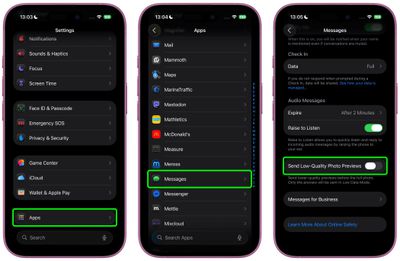
ios send photo previews messages

Once enabled, the feature works automatically, so you don't have to do anything else.

A Note on Low Data Mode

You can make sure that only smaller-sized previews of images are sent to recipients by keeping your iPhone in Low Data Mode. You can enable this manually by going to Settings ➝ Cellular Service. Choose your primary service, then tap Data Mode and toggle on Low Data Mode. The same setting appears under individual Wi-Fi network settings in Settings ➝ Wi-Fi (tap the encircled "i" button next to the Wi-Fi network name).
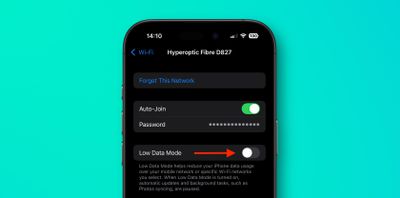
wi-fi
When Low Data Mode is active and Send Low-Quality Photo Previews is enabled, you may see photos in your Messages conversations appear slightly pixelated. Just bear in mind that they will only be delivered in higher quality versions if you send them when Low Data Mode is turned off.
Related Roundups: iOS 26, iPadOS 26
Related Forum: iOS 26

Top Rated Comments

EugW Avatar
10 months ago

Wrong, iMessage compresses all photos before being sent.

Always a good idea to understand the topic you are engaging in before engaging.
That is incorrect. My wife and I iMessage each other photos all the time and they retain the original size. To confirm this I just compared my wife's original photo vs. the one I received. The one I received was not actually the exact same size, but it was ever so slightly bigger (by 2 KB). The differences I noticed were that the original was IMG_5827.HEIC and my received copy was IMG_5827.heic (lower case suffix) but had additional metadata indicating that the photo was from her. See below. (I've edited out her phone number that was included in the metadata in the version I received.)


Attachment Image
Score: 11 Votes (Like | Disagree)
Starfia Avatar
10 months ago

We want the opposite. Allow us to share the full image and not some compressed crap
Not possible. The toggle switch is the universal symbol for the absence of an option.
Score: 6 Votes (Like | Disagree)
iMaffo Avatar
10 months ago
Neat! Does anybody knows what happens if the recipient is not on iOS 26?
Score: 6 Votes (Like | Disagree)
Loud_Texan Avatar
10 months ago
I hate when people share a picture in low-res since I like to save them.
Score: 4 Votes (Like | Disagree)
EugW Avatar
10 months ago
If the recipient saves the image to Photos, does it save the small preview version or the full version?
Score: 4 Votes (Like | Disagree)
zach-coleman Avatar
10 months ago
Is there any intelligence to the situation where someone downloads the low quality one? Does it upgrade it later when the high quality arrives?
Score: 3 Votes (Like | Disagree)

Popular Stories

apple intelligence photos tools

Apple to Bring AI Reframing and Editing Tools to Photos App

Monday June 8, 2026 11:16 am PDT by
Apple today announced new AI-powered photo editing tools coming to the Photos app as part of Apple Intelligence, including an upgraded Clean Up tool, a new Extend tool, and a new Spatial Reframing feature. Spatial Reframing allows users to reposition the virtual camera angle of a photo after it has already been taken. By touching and dragging, users can adjust the framing and perspective of...
iOS 26 Glass Photos Feature

Apple Photos Finally Gets a Slideshow Maker

Monday June 8, 2026 5:04 pm PDT by
Apple today announced new slideshow features coming to the Photos app, allowing users to play any set of photos and videos as a slideshow. There are options to set the slide duration, transition style, and music. iOS 27 also lets users save any slideshow directly as a video to their Photos library for easy playback later. Additional new features include the ability to save individual...
ios 27 messages

Apple Intelligence Introduces Contextual Call and Messages Features

Monday June 8, 2026 12:49 pm PDT by
Apple today announced a set of new communication-focused Apple Intelligence features, including contextual suggestions in Messages and a Call Context tool that surfaces relevant information from Mail when a user phones a business. The new Messages features offer one-tap suggestions based on the content of a conversation. If a contact asks for photos, Messages can surface a suggestion to...















