iOS 26: Capture iPhone Screen Content in HDR - MacRumorsOpen MenuShow RoundupsShow Forums menuVisit ForumsOpen Sidebar
Skip to Content

iOS 26: Capture iPhone Screen Content in HDR

by

Apple's iOS 26 update, currently in beta, brings a nice optional upgrade to screen capture quality with HDR (High Dynamic Range) capture support. The new feature captures or video-records what's on your iPhone's screen while preserving rich colors and detail.
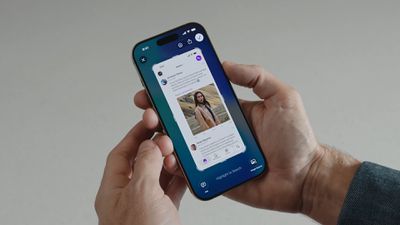
iOS 26 Screenshots
HDR screenshots are particularly valuable when capturing content with high contrast – like bright app interfaces against dark backgrounds, HDR videos, or detailed photos. The enhanced dynamic range preserves details that would typically be lost in standard screenshots, making them ideal for sharing visual content or documenting app interfaces with greater fidelity.

How to Enable HDR Screenshots

The following steps show you how to switch from standard to HDR screenshot capture:

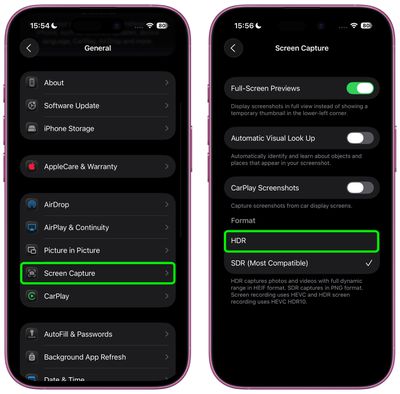
  1. Open Settings on your iPhone.
  2. Scroll down and tap General.
  3. Tap Screen Capture.
  4. Under "Format," tap HDR.

settings

That's all there is to it. Your iPhone will now capture all screenshots in HDR format, and video record in HEVC HDR10 format, providing superior image quality with enhanced dynamic range. Just be mindful that the trade-off is larger file sizes, as HDR captures store more image data than standard PNG screenshots and HEVC screen recording.

To return to standard screenshot capture, simply select SDR (Most Compatible) under the same "Format" section in the settings menu.

Additional Screen Capture Features

iOS 26 also includes other useful screen capture options in the same Settings menu. You can enable Full-Screen Previews to display screenshots in a larger view instead of showing a thumbnail, turn on Automatic Visual Look Up to identify objects in your screenshots, and enable or disable CarPlay Screenshots for capturing car display screens.


Top Rated Comments

thiscatisfat Avatar
14 months ago

I really wish Apple would let you screen shot a whole webpage, document or image, even what's off the screen
It does.
Score: 8 Votes (Like | Disagree)
Botts85 Avatar
14 months ago
Finally! I've been waiting for this for years.


And you thought standard PNG‘s were large :rolleyes:
Time for another image format standard.
Like HEIF? These upcoming HDR screenshots are in HEIF.

In practice I don’t think HDR10 HEVC video captures are much different from SDR HEVC in file size.
The HDR metadata for HDR10 or Dolby Vision is tiny, and 10-bit HEVC actually compresses more effectively than 8-bit HEVC. Even for 8-bit sources, using 10-bit HEVC is a best practice.
Score: 4 Votes (Like | Disagree)
klasma Avatar
14 months ago
The problem with HDR is that displays do map it (sometimes wildely) differently, so it’s not very portable. HDR is defined in terms of absolute luminance values, however displays rarely actually display those (because you adjust brightness to the environment), not to mention that displays differ in the dynamic range they are capable of displaying. Different algorithms are used to compensate for that, so it’s a bit of a mess.

My understanding is that with Liquid Glass, Apple is for the first time using HDR highlights in the actual UI (i.e. not just in media content), and that’s the motivation for supporting it in screenshots.
Score: 4 Votes (Like | Disagree)
14 months ago
Is this not the whole idea of screen recording?

Don't tell me it needed an A19 to do this?
Score: 4 Votes (Like | Disagree)
swm Avatar
14 months ago

Is this not the whole idea of screen recording?

Don't tell me it needed an A19 to do this?
nope, it even works with iphone 12. if your device supports ios26 - you can do hdr screenshots and screen recording.
the only requirement is HEIF and HEVC support
Score: 3 Votes (Like | Disagree)
14 months ago

It does.
Only specific apps such as Safari.

If you want a screenshot e.g. of an intervals run from the Fitness app, you're out of luck - and have to stitch together a collage in a 3rd party app if you want the whole thing.
Score: 3 Votes (Like | Disagree)

Popular Stories

iOS 27 Next to iPhone

Here's When iOS 27 Rolls Out Today in Every Time Zone [Update: It's Out]

Sunday September 13, 2026 3:00 am PDT by
Update 10:04 a.m.: iOS 27 is rolling out now, though it may take a bit for all users to see it, so keep checking! Apple is about to release iOS 27, which will finally deliver more advanced Siri AI capabilities as well as a variety of other refinements, improvements, and new features to iPhones. It's Apple's biggest software update of the year, and Apple announced at Wednesday's iPhone event...
iOS 27 Icon iPhone

iOS 27 Available Now With These 8 New Features

Monday September 14, 2026 9:00 am PDT by
Update — 10 a.m. Pacific Time: Apple has released iOS 27. During its iPhone 18 Pro and iPhone Duo event last week, Apple announced that iOS 27 will be released widely on Monday, September 14. iOS 27 should be available around 10 a.m. Pacific Time / 1 p.m. Eastern Time today via the Settings app, under General → Software Update. Below, we have highlighted eight new features and...
Apple iCloud Plus expansion hero

iCloud+ Now Includes Apple TV, Apple Arcade, and Curated Apple Music Stations in Over 100 Countries

Tuesday September 15, 2026 1:43 am PDT by
Apple today announced a new subscription initiative that turns paid iCloud+ subscriptions into a broader services bundle in more than 100 countries. In select countries, Apple says every paid iCloud+ plan, including the cheapest 50GB tier, now includes Apple TV and Apple Arcade "at no additional cost," while family sharing extends the storage, TV and Arcade access to up to five people....