

iPhone 15: How to Locate Friends With Precision Finding - MacRumorsOpen MenuShow RoundupsShow Forums menuVisit ForumsOpen Sidebar
Skip to Content

iPhone 15: How to Locate Friends With Precision Finding

by

If you and a friend have an iPhone 15, you can use Apple's Precision Finding feature to locate your friend and meet up. Keep reading to learn how it works.
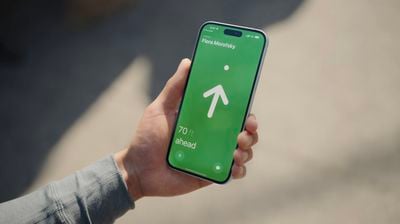
find my friends precision finding
On iPhone 15 models, Apple introduced Precision Finding for People. If you and the friend you're lookng for has an iPhone 15 or iPhone 15 Pro model, Precision Finding can guide you right to them with the help of on-screen directions and distance information.

To find your friend using Precision Finding, follow these steps:

  1. Open the Find My app on your iPhone.
  2. Tap People at the bottom of the screen, then tap the name of the friend you want to meet. (If you aren't following each other, you may have to share your location or ask for their location.)
  3. If you aren't nearby, tap Directions to get closer to their location. If you're near one another already, tap Find to notify your friend that you're trying to locate them., then follow the onscreen instructions to get directions.

When you get close enough to each other, an arrow will point in their direction with an estimate of how far away they are. When you’re walking in the right direction, the screen will turn green.

If you need to message the person you're looking for, tap the Message icon in the bottom-right corner of the screen. When you find your friend, tap the X button in the bottom-left corner to finish.


Related Forum: iPhone

Popular Stories

nomad orange charger

Nomad's New Stellar Orange Charger and Find My Card Match the iPhone 17 Pro

Tuesday June 9, 2026 9:00 am PDT by
Nomad today introduced two new products in its Stellar Orange colorway, expanding the number of accessories it offers in the unique shade. Stellar Orange matches the Cosmic Orange color that Apple used for the iPhone 17 Pro and iPhone 17 Pro Max. The Stellar Orange Stand One is a 2-in–1 charging stand that's priced at $135. It was previously available in silver and carbide, but it now...
FindMy Feature

watchOS 27 Gains a Consolidated and Redesigned Find My App

Tuesday June 9, 2026 3:15 am PDT by
Apple yesterday announced a redesigned Find My app in watchOS 27 that brings all tracking functionality into a single, map-centric interface. Previously split across separate Find Devices, Find People, and Find Items apps, the new app now consolidates everything into one unified view. Apple says the update makes it easier to locate the people, devices, and items you care about, with a...
FindMy Feature

iOS 27: Find My App Lets You Hide Location From Others Temporarily

Tuesday June 9, 2026 4:14 am PDT by
Apple's first iOS 27 developer beta, released on Monday, includes a new feature in the Find My app that lets you temporarily hide your location from select people. A new "Hide Location" option appears in the user's Find My card in the People section, under "My Location." Tapping it hides your location temporarily for 12 hours before reverting to your previous shared location state. When...















