Isolate, Copy, and Share Photo Subjects on iPhone and iPad - MacRumorsOpen MenuShow RoundupsShow Forums menuVisit ForumsOpen Sidebar
Skip to Content

Isolate, Copy, and Share Photo Subjects on iPhone and iPad

by

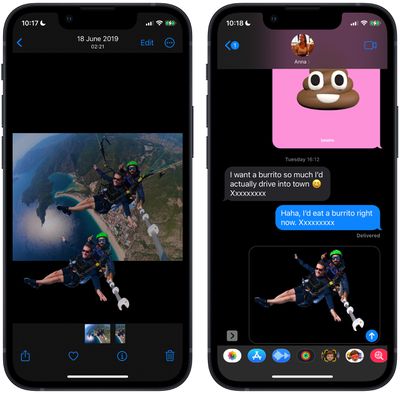
On iPhone and iPad, Apple's Visual Look Up feature for photos makes it possible to isolate the subject of a picture from its background so that you can copy it to the clipboard for use elsewhere or share it in another app.


Apple says the feature relies on advanced machine learning, and its ability to recognize and isolate subjects from a variety of photos is pretty impressive.

In fact it's so easy to use that performing painstaking subject isolation actions in image editing apps could soon become a thing of the past. Here's how it works.

  1. Launch Photos and select an image from your library containing a well-defined subject.
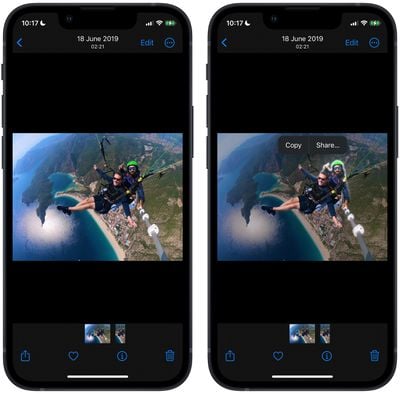
  2. Press and hold on the subject until it ripples and a white glow flows around its outline.
  3. In the popup menu that appears, tap Copy to send the isolated subject to the clipboard for pasting elsewhere, or tap Share... to access the standard sharing options in the Action menu and send it on its way.
    photos

  4. Alternatively, press and hold the subject to lift it from the background. Now, without taking your finger off the screen, use another finger to exit the ‌Photos‌ app and launch Messages, Mail, Notes, or another app that accepts images.
  5. Now drag and let go of the subject to place it where you want in the input field.
    photos

That's all there is to it. You can even use it in paused frames in videos. The feature works not just in ‌Photos‌, but also in screenshots and the Quick Look feature in the Files app.

As mentioned, the feature uses advanced machine learning and image analysis, therefore it is only available on phones with the A12 Bionic or newer chip. The A12 Bionic processor debuted in 2018 in the iPhone XS, iPhone XS Max, and the iPhone XR, so you need to be using one of these iPhones or a later model for it to work.


Popular Stories

Aston Martin CarPlay Ultra Screen

Apple Says CarPlay Ultra is Coming to These Vehicle Brands

Thursday May 21, 2026 11:53 am PDT by
Last year, Apple launched CarPlay Ultra, the long-awaited next-generation version of its CarPlay software system for vehicles. Nearly a year later, CarPlay Ultra is still limited to Aston Martin's latest luxury vehicles, but that should change fairly soon. In May 2025, Apple said many other vehicle brands planned to offer CarPlay Ultra, including Hyundai, Kia, and Genesis. CarPlay Ultra...
iphone 18 pro blue%402x

iPhone 18 Pro: Dark Cherry, Light Blue, and Dark Gray Chassis Leaked [Update]

Thursday June 4, 2026 5:18 am PDT by
Update: Since publication, new information has come to light suggesting the images have been AI-manipulated and are not in fact iPhone 18 Pro chassis parts. The original article follows. The color options Apple is reportedly planning for the upcoming iPhone 18 Pro and ‌iPhone 18 Pro‌ Max have appeared online today in the form of images of chassis parts of unknown authenticity....
iOS 27 All the New App Features

iOS 27: All the Rumored App Features

Wednesday June 3, 2026 3:48 pm PDT by
Siri is getting a major overhaul in iOS 27, but Apple also has some big updates planned for apps like Camera, Photos, and Wallet. There are multiple new AI features in the works, plus some non-AI upgrades. Camera Apple is moving Visual Intelligence from the Camera Control button to the Camera app in iOS 27, according to Bloomberg. There will be a Siri mode that will be available alongside...