


How to Create File Templates on Your Mac With Finder's Stationery Pad Feature - MacRumorsOpen MenuShow RoundupsShow Forums menuVisit ForumsOpen Sidebar
Skip to Content

How to Create File Templates on Your Mac With Finder's Stationery Pad Feature

by

macos finder iconStationery Pad is a handy way to nix a step in your workflow if you regularly use document templates on your Mac. The long-standing Finder feature essentially tells a file's parent application to open a copy of it by default, ensuring that the original file remains unedited.

Stationery Pad doesn't get much attention these days, but it's a neat alternative to repeatedly editing templates and using the "Save As..." command, which can lead to overwriting the original file if you're not too careful.

Almost any file type can be defined as a template with Stationery Pad – it could be used to streamline common Photoshop jobs, create skeleton HTML/CSS files, or help with Word document invoicing. To make use of Stationery Pad, create the file you want to use as a template, then follow the steps below.

How to Define a File as a Template Using Stationery Pad

  1. Find the file in Finder that you want to use as a template.

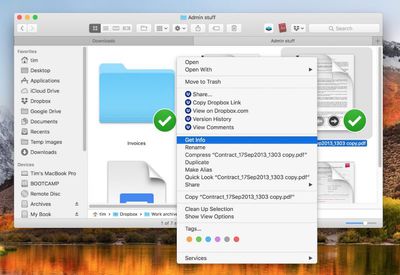
  2. Right-click (or Ctrl-click) the file and select Get Info in the contextual dropdown menu. Alternatively, click the file to select it and use the Command+I keyboard shortcut to launch Get Info.
    How to Use Stationery Pad

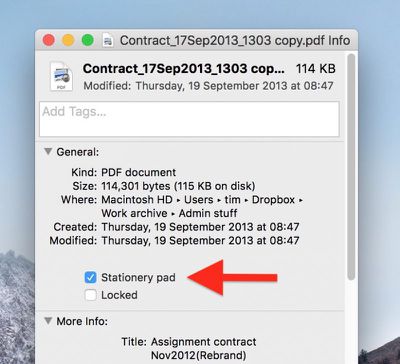
  3. Tick the Stationery Pad checkbox under the General section.
    How to Use Stationery Pad 1

  4. Click the red traffic light button to close the Get Info window.
Next time you double-click the template file, Finder will create and open a copy of it, leaving the original untouched. To reverse the behavior, simply untick the Stationery Pad checkbox in the template file's Get Info window.

Top Rated Comments

Starfia Avatar
105 months ago
Whoa!!

I've been a programming-enthusiast Mac user since well before the dawn of OS X and I never truly noticed that check box. That was one truly rare high-value meeting of article and reader.
Score: 10 Votes (Like | Disagree)
105 months ago
Definitely before OS X.

Possibly before System 7, but definitely added in some 7.x version. One of the interesting long-standing Mac features.
The original concept is actually a relic of the Lisa. The original idea behind the Lisa was that users would create files by tearing off the appropriate type of Stationery (Word processing, spreadsheet, drawing) and then start editing it. None of this "launching apps" business like today.

The ability to designate any file as a Stationery Pad, though, was a System 7 feature, I'm pretty sure.
Score: 6 Votes (Like | Disagree)
Pupi Avatar
105 months ago
Cool tip, thanks. Mac is such a beast. I can’t even imagine how it would be by now if they kept developing the power-user side of it, instead of making it more and more like an iPad.
Score: 5 Votes (Like | Disagree)
105 months ago

4. Click the red traffic light button to close the Get Info window.
Is "red traffic light button" really what we're calling the close window button now?
Score: 3 Votes (Like | Disagree)
chucker23n1 Avatar
105 months ago
It's a something that's been there for ages (even before OS X if I remember correctly) but I guess it's a feature most aren't aware of – I don't ever use it myself, even tough it might be a good idea sometimes. :)
Definitely before OS X.

Possibly before System 7, but definitely added in some 7.x version. One of the interesting long-standing Mac features.
Score: 3 Votes (Like | Disagree)
105 months ago
Never heard of this and already it's one of my favourite Mac things.
Score: 2 Votes (Like | Disagree)

Popular Stories

Apple Card iPhone 16 Pro Feature

Apple Card Promo to Offer Free AirPods Pro 3

Friday May 15, 2026 8:59 am PDT by
Starting as early as next week, customers who sign up for an Apple Card at Apple's retail stores in the U.S. will receive $249 cash back when they purchase AirPods Pro 3, according to Bloomberg's Mark Gurman. The promotion has yet to be officially announced by Apple, so exact terms and conditions are not available at this time. AirPods Pro 3 are priced at $249 in the U.S., so customers who...
Apple WWDC25 iOS 26 CarPlay Light mode 250609

Six Popular iPhone Apps Now Available on CarPlay

Thursday May 14, 2026 9:10 am PDT by
Apple's CarPlay system for accessing iPhone apps on a vehicle's dashboard screen has received six popular apps in recent weeks: ChatGPT, Perplexity, Grok, Google Meet, WhatsApp, and the indie artist streaming platform Audiomack. Make sure you have the latest version of each app and they will automatically appear on CarPlay. ChatGPT Starting with iOS 26.4, CarPlay supports voice-based...
ipad mini 7 blue

OLED iPad Mini: Release Date, Pricing, and What to Expect

Thursday May 14, 2026 5:08 am PDT by
According to the latest rumors, Apple is close to launching its next-generation iPad mini. So what should we expect from the successor to the iPad mini 7 that Apple released over a year ago? Read on to find out. Processor and Performance Apple is working on a next-generation version of the iPad mini (codename J510/J511) that features the A19 Pro chip, according to information found in code...

















