How to Use Siri in macOS - MacRumorsOpen MenuShow RoundupsShow Forums menuVisit ForumsOpen Sidebar
Skip to Content

How to Use Siri in macOS

by

Since macOS Sierra, Apple has included its well-known personal assistant, Siri, for the Mac. Siri for Mac differs from iOS' version of Siri in several ways, taking advantage of the larger real estate of a Mac's display and the Finder file system. Users can also easily transfer or pin Siri's search results to the Notification Center or documents they're working on. To help you get started with Siri for Mac, we've put together a guide outlining what it's capable of.

Activating Siri

macsiri1
There are four ways to activate Siri in macOS. Two of the methods are visually obvious while the third is not. The availability of the fourth handsfree method depends on the model of Mac.

  • The Dock icon sitting in between the Finder and Launchpad logos.
  • The Menu Bar toggle in between the Spotlight search and Notification Center icons.
  • The keyboard command. Hold the Command and Space buttons for approximately two seconds.
  • Saying simply "Hey Siri" handsfree to invoke the assistant.

Siri can be enabled two ways. While you're installing macOS, there'll be a prompt asking you whether you'd like to enable Siri. Additionally, Siri can be enabled and disabled in the Siri section of System Preferences. There are several other options for Siri in System Preferences, including language, voice, voice feedback, mic input and customized keyboard shortcuts.

What Siri for Mac Can Do

macsiri2
Siri for Mac can do most of the same things Siri for iOS can do. It can give you sports scores or tell you about the weather. Schedule an event on your calendar, remind you what you need to get done today or find movie times. Here's a full list of the things that carry over to the Mac.

  • Launching and searching for apps.
  • FaceTime and Messages
  • Sports scores, team schedules, league standings, and player and team information.
  • Photo search.
  • Maps and navigation.
  • Twitter and Facebook posting, plus Twitter search.
  • Movie information, showtimes, movie theater locations, movie reviews and award trivia.
  • Apple Music, radio and music identification.
  • iTunes, iBooks and Podcasts.
  • Reminders, calendar stocks, weather, contacts, clock, Find My Friends, email and notes.
  • Web search and Q&A, like unit measurements, facts and figures, and simple math.
  • Settings / System Preferences

Siri has two new abilities that are built specifically to take advantage of the Mac:

  • Finder
  • About this Mac

Siri's Mac-Specific Abilities

Unlike Siri for iOS, Siri for Mac's dialogue box only takes up a portion of the screen. This allowed Apple to build Siri to be better utilized for multitasking. For example, Siri can be used to send a message to a friend while you're writing an email or working on a document. It can also find restaurant reservations for you while you're in the middle of a conversation with a friend.

Because Siri is built for multitasking on a Mac, some of its results are more interactive, allowing you to combine them with other apps. These are some of the things you can do with Siri's results in macOS Sierra.
HowtoSiri

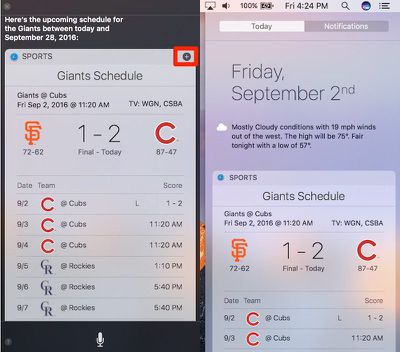
  • Pin photo results or sports team schedules to the Notification Center by clicking the + icon.
  • Drag files from Siri's Finder search to the desktop.
  • Drag and drop search results from photo searches into emails, messages, documents and the desktop.
  • Drag and drop map locations into emails, messages and documents.

Siri's Settings category is referred to as System Preferences to better match macOS' verbiage, but Siri can also do some things on a Mac that it can't do on an iPhone. These are new settings abilities Siri has gained:

  • Putting your computer to sleep.
  • Changing your desktop wallpaper.
  • Changing your display settings.

Finally, there are some specific hardware requests that Siri can fulfill. In addition to asking Siri to turn up your volume or turn off your Bluetooth, Siri can tell you about your Mac.

macsiri7

  • How fast your Mac is.
  • How much memory your Mac has.
  • What your Mac's serial number is.
  • How much free space your Mac's hard drive has.
  • How much iCloud storage you have.
  • What version of macOS you're running.

All of Siri's Mac abilities can be used at any time. Siri will pause any audio or video you might have been playing when you activated it. This includes audio and video in your web browser, like SoundCloud tracks or YouTube videos.

Siri's dialogue box will also stay on your screen no matter where you are, whether on the desktop or in a full-screen app. It'll also stay in place as you navigate to different spaces. Siri can be deactivated by clicking the small "x" in the top right corner of its dialogue box.
Related Forum: macOS Sierra

Top Rated Comments

S.B.G Avatar
132 months ago
I don't understand why we can't just speak to the Mac for Siri to be activated. We can do this with Windows 10 by saying "Hey Cortanta" and not pressing any buttons or clicking anything.

Score: 7 Votes (Like | Disagree)
132 months ago
I don't understand why we can't just speak to the Mac for Siri to be activated. We can do this with Windows 10 by saying "Hey Cortanta" and not pressing any buttons or clicking anything.
YOU CAN!

I posted instructions a long time ago: https://forums.macrumors.com/threads/how-to-enable-hey-siri-activation-on-a-mac-with-sierra.1983003/
Score: 3 Votes (Like | Disagree)
tardegrade Avatar
132 months ago
I'm impressed with the OS update but honestly Siri is just as hopeless on my Mac as it is on my iPhone. I gets roughly a third of requests right and then rarely interprets those requests correctly.

I've got a Moto G Android phone as well and comparing Siri to OK Google, which gets almost everything right first time and actually provides the desired results as well, is just a night and day difference.

It's shocking how far behind Apple are in this respect. Must try harder.
Score: 3 Votes (Like | Disagree)
132 months ago
Makes sense. Pressing a button to activate a voice activated assistant.
BTW what's the emoji for sarcasm?
Score: 2 Votes (Like | Disagree)
132 months ago
Needs keyboard input imo. You can't talk to Siri on a Mac always.
Score: 2 Votes (Like | Disagree)
The Templar Avatar
132 months ago
I played around with Siri last night. For some reason I cannot get her to launch applications. I have tried saying both "open" and "launch" with the name of the application, but every time she says "cannot find an application with that name, do you wish to search for it in the app store?" this is true for all apps, Apple's and third party apps. Has anyone else experienced this?

Article Link: How to Use Siri in macOS Sierra ('https://www.macrumors.com/how-to/macos-siri/')
I have the same problem, she tells me I don't have the app of that name and I should search the App Store! Other than set appointments and uselessly read out the Nikkei performance she seems incapable of anything useful. She won't search anything, can't find a file and is basically useless - she cannot interpret as well as the iPhone and won't place a FaceTime call, because I don't have the app according to her! Flawed is an understatement - useless is more like it.
Score: 1 Votes (Like | Disagree)

Popular Stories

Apple TV 4K 4th Generation Top View5

New Apple TV 4K Announced With A19 Chip, Updated Siri Remote, More

Tuesday October 13, 2026 6:08 am PDT by
Apple today announced the fourth-generation Apple TV 4K, with key features including an A19 chip, Siri AI support, an updated Siri Remote that has Find My support with Precision Finding, built in far-field microphones, support for surround sound with four HomePods in front and rear pairs, and more. The A19 chip in the new Apple TV 4K delivers up to 50% faster CPU performance and up to twice...
homepod mini 2 feature6

Apple Announces $149 HomePod Mini 2 With Siri AI, 'Sound Glow', and Four-Speaker Surround Sound

Tuesday October 13, 2026 6:11 am PDT by
Apple today announced a new HomePod mini equipped with Siri AI, new colors, and improved audio experiences. The new HomePod mini has an S10 chip that supports advanced computational audio, and Apple says it optimizes dynamic range, loudness, and acoustic performance in real-time. A Sound Glow feature turns the HomePod mini's top into a "visual canvas" that glows and animates in sync with...
New Apple TV 4K and Siri Remote Have These 14 New Features Feature

New Apple TV 4K and Siri Remote Have These 14 New Features

Tuesday October 13, 2026 10:26 am PDT by
The new Apple TV 4K and updated Siri Remote unveiled today have quite a few new features, as outlined in our all-in-one summary below. Here are 11 changes coming with the new Apple TV: A19 chip, for up to 50% faster CPU performance and up to twice as fast graphics performance compared to the previous model with the A15 chip. 8GB of RAM is very likely, up from 4GB of RAM in the previous ...
Latest Stories
Apple Store Subscription Sign-Up Controversy Exposed
5 hours ago
Siri AI Rumored to Become 'More Like an Agent' as Early as Next Year
16 hours ago
Apple Taking New Approach to Developing iOS 28 and macOS 28
17 hours ago
Early Apple Black Friday Deals on Apple Watch, MacBook Air, and More
2 days ago
'Backglow' Lets You Customize New MacBook Pro's Glowing Apple Logo
2 days ago
Top Stories: Apple Product Launches, iOS 27.3 Beta, and More
2 days ago
More Fun iPhone Duo Apps: 30 New Picks to Try
2 days ago
Hands-On With Apple's New OLED Touchscreen MacBook Pro
2 days ago
Apple Store With All-New Design Opening Soon in Southern California
2 days ago
Control the Glowing Apple Logo on Your New MacBook Pro
3 days ago
Apple Shares New 'Apple Card: Apply and Use in Minutes' Ad
3 days ago
Apple Says More Than 100,000 Apps Optimized for iPhone Duo, Here's What's Still Missing
3 days ago
Early Black Friday Deals Kickoff With Steep Discounts on Apple Watch Ultras and More
3 days ago
The MacRumors Show: iOS 27.3 Looks Like a Huge Update
3 days ago
Best Buy's Black Friday Event Begins With Sitewide Savings on Apple, TVs, More
3 days ago
Apple Releasing Yet Another Two New Products Next Week
3 days ago
MacBook Air Drops to Lowest Price in Months With Amazon's $250 Discount
3 days ago
Apple Rumored to Drop the iPhone's Action Button Next Year
3 days ago
Apple's Extended Return Policy Now in Effect for 2026 Holiday Season
3 days ago
Apple Music Classical Updated With New Icon and Refreshed Design
3 days ago
OLED iPad Mini, M6 iMac, and New MacBook Pros Available From Today
3 days ago
Apple Surveys iPhone Duo Buyers About Crease and Camera
3 days ago
Apple's First Touchscreen Mac is Now Arriving to Customers
3 days ago
Claude Gets Personal Finance Feature With Bank Account Linking
3 days ago
Apple Arcade Adds Crossy Road Rush and NBA 2K27
3 days ago
Apple's New HomeView Smart Home Hub: Here's How Much RAM It Has
3 days ago
iPad Mini vs. iPad Air Buyer's Guide: Now Just $50 Apart
4 days ago
First iOS 27.3 and macOS Golden Gate 27.3 Public Betas Now Available
4 days ago
Apple Announces a New Mac Sales Record
4 days ago
Paid $200 for Logic Pro? Apple Says You Won't Get This New Feature
4 days ago