iOS 17: How to Access and Manage Sticker Apps in Messages - MacRumorsOpen MenuShow RoundupsShow Forums menuVisit ForumsOpen Sidebar
Skip to Content

iOS 17: How to Access and Manage Sticker Apps in Messages

by

In iOS 17, Apple not only added several new Messages features, but also tweaked the interface design of the Messages app to give it a cleaner look. This means that the way you navigate and manage some aspects of the app – including iMessage sticker apps – has changed quite a bit. Keep reading to learn how it's done.
iOS 17 Messages Feature
iMessage stickers arrived way back in iOS 10, allowing users to resize stickers, put them on top of chat bubbles, add them in photos, and stick them on top of other stickers, with simple controls for dragging.

Stickers have come a long way since then. In iOS 17, for example, users are now able to create their own animated stickers from photo subjects, and even apply stickers across the operating system. Despite these advances, standard sticker packs still feature in iOS 17, but the way you access and manage them has changed.

The following steps show you how to access, rearrange, and delete installed sticker apps in Apple's refreshed Messages app for iPhone and iPad.

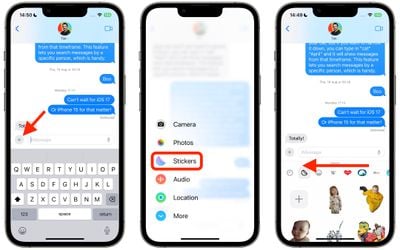
  1. In a conversation thread, tap the + button to the left of the text input field.
  2. Tap Stickers in the vertical menu.
  3. Below the text input field, swipe left across the installed sticker apps all the way to the end of the row, then tap the Edit button.
    messages

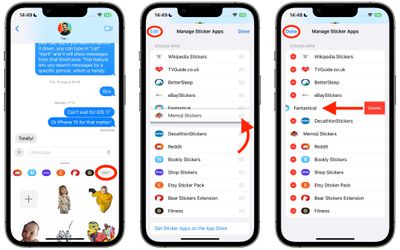
  4. To rearrange the sticker apps as you want them to appear in the previous row, press the three lines beside an app and drag it up or down to your preferred to location.
  5. To delete a sticker app, tap Edit in the top left, then tap the red delete button next to the app in question.
  6. To finish, tap Done in the top right.
    messages

That's all you need to do. The way you organize vanilla iMessage apps has also changed in iOS 17 – check out our dedicated how-to if you want to learn more.


Popular Stories

Apple Wallet

iOS 27 Will Add Two New Apple Wallet Features to Your iPhone

Monday June 1, 2026 12:15 pm PDT by
Apple is set to unveil iOS 27 during its WWDC 2026 keynote on Monday, June 8, and the update will reportedly include two new Apple Wallet features. First, iOS 27 will reportedly let users create their own digital passes by scanning items like movie tickets, concert passes, and gym membership cards. Many apps already offer Apple Wallet passes, but now users will be able to create a custom...
Dynamic Island iPhone 18 Pro Feature

iPhone 18 Pro Battery Capacities Allegedly Leaked

Tuesday June 2, 2026 1:54 am PDT by
Battery capacities for Apple's upcoming iPhone 18 Pro have allegedly surfaced, and the numbers suggest only a modest increase over the iPhone 17 Pro. According to prolific Weibo-based leaker Digital Chat Station, Apple is testing the iPhone 18 Pro with different battery capacities for the China and U.S. versions of the device, similar to last year's iPhone 17 Pro models. The Chinese model is ...
macOS 27 on MacBook Pro

Apple Says macOS 27 Won't Be Compatible With These Macs

Wednesday June 3, 2026 8:29 am PDT by
During WWDC 2025, Apple revealed that macOS 26 Tahoe would be the final major macOS version for Intel-based Macs. macOS 27 will be compatible with Apple silicon Macs only, meaning that you will need a Mac with an M-series chip or a MacBook Neo with an A18 Pro chip in order to install the software update. Apple will unveil macOS 27 during its WWDC 2026 keynote this Monday, June 8, and the...