Never Miss Your Doorbell While Wearing Headphones on iPhone - MacRumorsOpen MenuShow RoundupsShow Forums menuVisit ForumsOpen Sidebar
Skip to Content

Never Miss Your Doorbell While Wearing Headphones on iPhone

by

Noise-canceling headphones are great for blocking out distractions, but they can also block out sounds you actually need to hear, like a courier at the front door with your all-important package. Well, thanks to an Apple accessibility feature, your iPhone can do the listening for you and alert you when your doorbell rings.
Never Miss Your Doorbell While Wearing Headphones on iPhone Feature
Meet Sound Recognition, the feature in question that uses your iPhone's microphone to continuously monitor for specific sounds. When it detects one, you'll receive a notification that plays through your connected headphones, along with a vibration on your iPhone (or Apple Watch if you're wearing one).

The feature is primarily designed for people who are deaf or hard of hearing, but it's equally useful for anyone who works from home and regularly wears AirPods or noise-canceling headphones.

How to Enable Doorbell Alerts

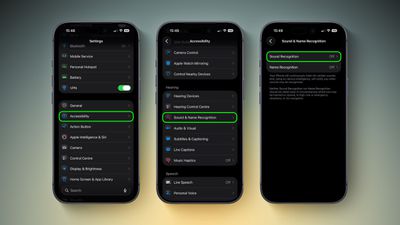
  1. Open Settings on your iPhone.
  2. Tap Accessibility.
  3. Under "Hearing," tap Sound & Name Recognition, then tap through to Sound Recognition.
    doorbell sound recognition2 1

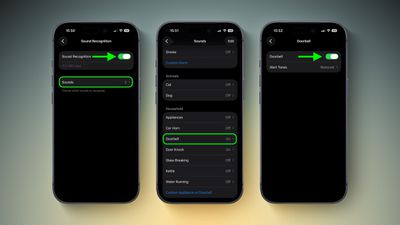
  4. Toggle on Sound Recognition, then tap Sounds.
  5. Under "Household," tap Door Bell and toggle it on in the next screen. You'll also see the option to choose a specific alert tone.
    settings

Note that your iPhone may need to download a small file (around 30MB) before the feature becomes active, so a Wi-Fi or data connection could be needed.

Training Your iPhone to Recognize Your Doorbell

If your iPhone doesn't reliably detect your specific doorbell, you can train it to recognize the sound by following these steps:

  1. Go to Settings ➝ Accessibility ➝ Sound & Name Recognition ➝ Sound Recognition ➝ Sounds.
  2. Tap Custom Appliance or Doorbell, then enter a name.
  3. Place your iPhone near the doorbell and tap Start Listening.
  4. Ring your doorbell. Repeat this five times to complete the training.

Quick Access via Control Center

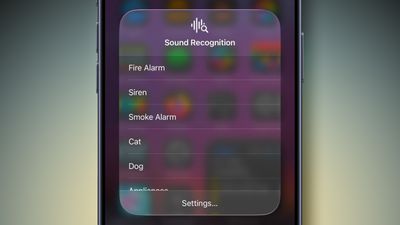
Once Sound Recognition is enabled, iOS automatically adds a toggle to Control Center. From here, you can press and hold the Sound Recognition icon to quickly enable or disable specific sounds without diving into Settings, which is handy if you only want doorbell detection when you're at home wearing headphones.

control center
Sound Recognition can also detect smoke alarms, dog barking, babies crying, water running, and more. Just keep in mind that Apple advises against relying on this feature in high-risk or emergency situations.

Top Rated Comments

Rychiar Avatar
10 months ago
can you make a HomePod listen for specific sounds like this? I'd like my kitchen HomePod to know when my fridge is beeping since the door always gets stuck
Score: 6 Votes (Like | Disagree)
10 months ago

Noise-canceling headphones are great for blocking out distractions, but they can also block out sounds you actually need to hear, like a courier at the front door with your all-important package. Well, thanks to an Apple accessibility feature, your iPhone can do the listening for you and alert you when your doorbell rings.

MacRumors content image

Meet Sound Recognition, the feature in question that uses your iPhone's microphone to continuously monitor for specific sounds. When it detects one, you'll receive a notification that plays through your connected headphones, along with a vibration on your iPhone (or Apple Watch if you're wearing one).

The feature is primarily designed for people who are deaf or hard of hearing, but it's equally useful for anyone who works from home and regularly wears AirPods or noise-canceling headphones.

How to Enable Doorbell Alerts

[LIST=1]
* Open Settings on your iPhone.

* Tap Accessibility.

* Under "Hearing," tap Sound & Name Recognition, then tap through to Sound Recognition.
MacRumors content image

Toggle on Sound Recognition, then tap Sounds.

* Under "Household," tap Door Bell and toggle it on in the next screen. You'll also see the option to choose a specific alert tone.
MacRumors content image

Note that your iPhone may need to download a small file (around 30MB) before the feature becomes active, so a Wi-Fi or data connection could be needed.

Training Your iPhone to Recognize Your Doorbell

If your iPhone doesn't reliably detect your specific doorbell, you can train it to recognize the sound by following these steps:
[LIST=1]
*
Go to Settings ➝ Accessibility ➝ Sound & Name Recognition ➝ Sound Recognition ➝ Sounds.

* Tap Custom Appliance or Doorbell, then enter a name.

* Place your iPhone near the doorbell and tap Start Listening.

* Ring your doorbell. Repeat this five times to complete the training.

Quick Access via Control Center

Once Sound Recognition is enabled, iOS automatically adds a toggle to Control Center. From here, you can press and hold the Sound Recognition icon to quickly enable or disable specific sounds without diving into Settings, which is handy if you only want doorbell detection when you're at home wearing headphones.
MacRumors content image

Sound Recognition can also detect smoke alarms, dog barking, babies crying, water running, and more. Just keep in mind that Apple advises against relying on this feature in high-risk or emergency situations.


Article Link: Never Miss Your Doorbell While Wearing Headphones on iPhone ('https://www.macrumors.com/how-to/never-miss-doorbell-wearing-iphone/')
I already have this feature in my home. It's called "having a Terrier".
Score: 4 Votes (Like | Disagree)
Windoes Avatar
10 months ago
Doesn’t work much with a door knocker
Score: 3 Votes (Like | Disagree)
WarmWinterHat Avatar
10 months ago

I think this is creepy as ****. They already started repurposing Ring as a surveillance network.

I've got an analogue video entry phone that makes enough noise that you can hear it listening to black metal with the airpods in and noise cancellation on.
Wife said the same thing when we saw the Ring Super Bowl commercial with the lost dogs.

No thank you.

Score: 3 Votes (Like | Disagree)
10 months ago
Imagine when the apple doorbell can tell you exactly who is at the door and you get notified via your airpods
Score: 3 Votes (Like | Disagree)
KeepCalmPeople Avatar
10 months ago
Amazing - Apple creates problems while trying to solve problems, and then solves the problems they create.

I'm sure the list of things that you would actually want to be able to hear is quite long, such as the sound of breaking glass, gunfire etc. Trying to 'whitelist' all of those is quite the challenge. AI to the rescue? It never ends...
Score: 2 Votes (Like | Disagree)

Popular Stories

iOS 28 AI

Apple Taking New Approach to Developing iOS 28 and macOS 28

Sunday November 8, 2026 7:42 am PST by
Apple has made a change to its development process for iOS 28, macOS 28, and corresponding software updates, according to Bloomberg's Mark Gurman. In his Power On newsletter today, he said Apple separates development of each year's new operating systems into three major stages. Typically, he said each stage consists of four weeks of coding followed by a four-week "convergence" period where...
duo aquarium

More Fun iPhone Duo Apps: 30 New Picks to Try

Friday November 6, 2026 3:27 pm PST by
When the iPhone Duo launched, we shared a list of some of the fun apps developers created for the new form factor. Two weeks out, developers are continuing to come up with fresh ideas, so we thought we'd share some of our favorites. Games Marbles Unhinged ($2.99) - Marbles Unhinged is a marble maze designed for the Duo. When you fold it, the floor turns into a ramp. If you stand the top...
apple pro tell logo

Apple Launching Five New Products Today

Thursday November 5, 2026 12:59 am PST by
Apple is launching five new products on Friday, November 6, following pre-orders that opened last week, including its first touchscreen MacBook Pro models. The following new products will be available from today: iPad mini with OLED display and A20 Pro chip iMac with M6 chip 14-inch MacBook Pro with M6 chip 14-inch MacBook Pro with OLED touchscreen 16-inch MacBook Pro with OLED...
Latest Stories
Apple to Give You More Control Over When Your Mac Passwords Lock
42 minutes ago
Siri Is Getting a Better Memory
1 hour ago
iPhone 18e Could Feature Bigger Display and Battery
2 hours ago
Apple's Siri Boss May Leave - Here's Who Could Take Over
2 hours ago
Apple Launching Two More New Products This Friday
2 hours ago
Apple Store Subscription Sign-Up Controversy Exposed
11 hours ago
Siri AI Rumored to Become 'More Like an Agent' as Early as Next Year
21 hours ago
Apple Taking New Approach to Developing iOS 28 and macOS 28
23 hours ago
Early Apple Black Friday Deals on Apple Watch, MacBook Air, and More
2 days ago
'Backglow' Lets You Customize New MacBook Pro's Glowing Apple Logo
2 days ago
Top Stories: Apple Product Launches, iOS 27.3 Beta, and More
2 days ago
More Fun iPhone Duo Apps: 30 New Picks to Try
3 days ago
Hands-On With Apple's New OLED Touchscreen MacBook Pro
3 days ago
Apple Store With All-New Design Opening Soon in Southern California
3 days ago
Control the Glowing Apple Logo on Your New MacBook Pro
3 days ago
Apple Shares New 'Apple Card: Apply and Use in Minutes' Ad
3 days ago
Apple Says More Than 100,000 Apps Optimized for iPhone Duo, Here's What's Still Missing
3 days ago
Early Black Friday Deals Kickoff With Steep Discounts on Apple Watch Ultras and More
3 days ago
The MacRumors Show: iOS 27.3 Looks Like a Huge Update
3 days ago
Best Buy's Black Friday Event Begins With Sitewide Savings on Apple, TVs, More
3 days ago
Apple Releasing Yet Another Two New Products Next Week
3 days ago
MacBook Air Drops to Lowest Price in Months With Amazon's $250 Discount
3 days ago
Apple Rumored to Drop the iPhone's Action Button Next Year
3 days ago
Apple's Extended Return Policy Now in Effect for 2026 Holiday Season
3 days ago
Apple Music Classical Updated With New Icon and Refreshed Design
3 days ago
OLED iPad Mini, M6 iMac, and New MacBook Pros Available From Today
3 days ago
Apple Surveys iPhone Duo Buyers About Crease and Camera
4 days ago
Apple's First Touchscreen Mac is Now Arriving to Customers
4 days ago
Claude Gets Personal Finance Feature With Bank Account Linking
4 days ago
Apple Arcade Adds Crossy Road Rush and NBA 2K27
4 days ago









































