How to Pair a PS5 DualSense and Xbox Series X Controller With iPhone, iPad, and Apple TV - MacRumorsOpen MenuShow RoundupsShow Forums menuVisit ForumsOpen Sidebar
Skip to Content

How to Pair a PS5 DualSense and Xbox Series X Controller With iPhone, iPad, and Apple TV

by

With the release of iOS 14.5 and tvOS 14.5, Apple users can now connect their PS5 DualSense and Xbox Series X controllers to an iPhone, iPad, and Apple TV. Keep reading to learn how it works.
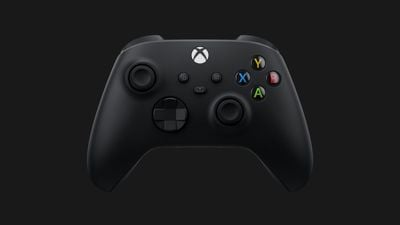
xbox series x controller microsoft
Since iOS 13 and tvOS 13, users have been able to connect popular console controllers to an iPhone or ‌Apple TV‌ to play Apple Arcade games and other iOS games, instead of having to spend extra money on MFi-compatible controllers.

The newest updates, iOS 14.5 and tvOS 14.5, introduce additional support for the latest gaming controllers from Sony and Microsoft, allowing the PS5 DualSense controller and the Xbox Series X controller to be used with iPhones and iPads.

The following steps walk you through the process of pairing your DualSense or Series X controller to your Apple device. If you haven't already, you'll need to update your iPhone/‌iPad‌ to iOS 14.5 (Settings > General > Software Update) or your ‌Apple TV‌ to tvOS 14.5 (Settings -> System -> Software Updates).

How to Connect the PS5 DualSense controller to iPhone or iPad

  1. Open your iOS device's Settings app and navigate to Bluetooth.
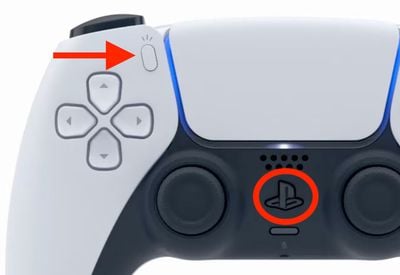
  2. On your DualSense controller, press and hold the Share button (next to the D-Pad, with three lines radiating out from the top) and the PS button (in between the thumbsticks) at the same time. Hold them for at least three seconds, until you see the light bar flashing blue.
    sony

  3. On your iPhone/‌iPad‌, under "Other Devices," tap on your PS5 DualSense controller.
  4. Tap Pair.

To save battery once you're done using the controller, return to the Bluetooth settings screen and tap the info ("i") icon next to the PS5 controller, then tap Disconnect or Forget this device to remove it from the list.

How to Connect the Xbox Series X controller to iPhone or iPad

  1. Open your iOS device's Settings app and navigate to Bluetooth.
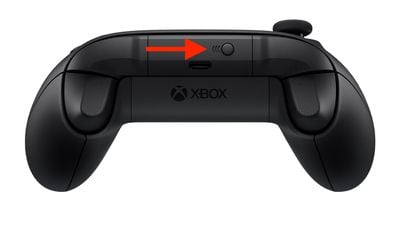
  2. On your Xbox Series X controller, hold down the pairing button located on the top of the controller for a few seconds.
    xbox series x

  3. On your iPhone/‌iPad‌, under "Other Devices," tap on your Xbox Series X controller.
  4. Tap Pair.

To save battery once you're done using the controller, return to the Bluetooth settings screen and tap the info ("i") icon next to the Xbox Series X controller, then tap Disconnect or Forget this device to remove it from the list.

How to Connect the PS5 DualSense Controller to Apple TV

  1. Open the Settings app on ‌Apple TV‌ and select Remotes and Devices -> Bluetooth.
  2. On your DualSense controller, press and hold the Share button (next to the D-Pad, with three lines radiating out from the top) and the PS button (in between the thumbsticks) at the same time. Hold them for at least three seconds, until you see the light bar flashing blue.
    sony

  3. On your ‌Apple TV‌, select the DualSense Controller to pair it, which will be confirmed with a notification on tvOS.

How to Connect the Xbox Wireless Controller to Apple TV

  1. Open the Settings app on ‌Apple TV‌ and select Remotes and Devices -> Bluetooth.
  2. On your Xbox Series X controller, hold down the pairing button located on the top of the controller for a few seconds.
    xbox series x

  3. On your ‌Apple TV‌, select the Xbox Series X controller to pair it, which will be confirmed with a notification on tvOS.

The above steps should work for most wireless console controllers, including the DualShock 4 Wireless controller and Xbox Wireless controller.


Top Rated Comments

blazerunner Avatar
67 months ago
Amazing; connect a non Apple controller to every Apple platform except the one that matters. LOL... Mac OS gaming is DEAD.
Score: 4 Votes (Like | Disagree)
bennyf Avatar
67 months ago

It's rather amazing that you can pair one of these controllers with an iPhone, but I have no idea what I would even want to play with one.
Screen real estate on phone is at such a premium it makes a lot of sense if you don't have an iPad. Minecraft is one example. Wonderbox from Apple Arcade is another that benefits a ton from not having fingers blocking part of the screen.
Score: 3 Votes (Like | Disagree)
67 months ago
Also worth knowing for the latest Xbox controller, which enables quick switching between the console and another paired device: https://www.theverge.com/22273528/how-to-xbox-series-x-controller-swap-connection-phone-pc
Score: 2 Votes (Like | Disagree)
67 months ago

Is the Mac version only available on the Mac app store? I didn't see it in steam.
Don't know about Steam, but I bought Borderlands 3 Super Deluxe through Epic in February 2020. It was released in September 2019, it was actually available on Mac before it was on Xbox.
Score: 1 Votes (Like | Disagree)
67 months ago

Have you tried Horizon Zero Dawn?
I bought it on Steam, have not played it yet.
Score: 1 Votes (Like | Disagree)
67 months ago

Amazing; connect a non Apple controller to every Apple platform except the one that matters. LOL... Mac OS gaming is DEAD.
I only connect the controller to my Mac so I can play my PS games remotely :p Before they nuked 32 bit apps I had quite a few games on Steam, butI used a mouse to play these.
Score: 1 Votes (Like | Disagree)

Popular Stories

iCloud iPhone 17 Pro

iPhone Users Who Pay for iCloud Storage Get Two New Perks on iOS 27

Thursday July 2, 2026 6:10 am PDT by
If you pay for certain iCloud+ storage plans beyond the 5GB that Apple offers for free, you will receive two more perks on iOS 27 at no additional cost. A summary of the two new iCloud+ perks on iOS 27:Increased daily usage limits for some new Apple Intelligence features, including image generation in the revamped Image Playground app. HomeKit Secure Video cameras receive generated video...
Apple Event Logo

Apple Just Released a New Product

Thursday July 2, 2026 8:04 am PDT by
Apple's first product release of summer 2026 occurred this week, but do not get too excited, as it is merely the Beats Solo Buds in a new color. Beats Solo Buds are now offered in orange through Best Buy in the U.S., with availability set to expand to 7-Eleven stores in Japan on July 4. Apple already offered orange Solo Buds in India for free with the purchase of an iPhone 15 or iPhone 15 ...
iPhone 4 on Black Feature

Apple Facing One of Its Worst Leaks Since the iPhone 4

Thursday July 2, 2026 9:53 am PDT by
Apple supplier Tata Electronics recently suffered a cyberattack that resulted in thousands of confidential files being published on the dark web, and this reportedly included some photos and documents related to the upcoming iPhone 18 Pro. We have elected not to share any of the leaked photos in this story due to the illegal nature in which they were obtained, but they can easily be found...