

iOS 16: How to Pin Tabs in Safari on iPhone and iPad - MacRumorsOpen MenuShow RoundupsShow Forums menuVisit ForumsOpen Sidebar
Skip to Content

iOS 16: How to Pin Tabs in Safari on iPhone and iPad

by

In iOS 16 and iPadOS 16, Apple's Safari browser has inherited a handy feature from Safari on Mac – the ability to pin tabs. Keep reading to learn how it works on iPhone and iPad.
iOS 16 Safari Guide Feature
Safari's pinned tabs feature lets you better organize your tabs, especially if find you have too many open at the same time. It's particularly useful if you have certain websites that you tend to visit frequently throughout the day.

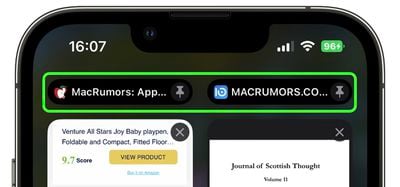
That's because when you pin a tab in iOS 16, you no longer need to go searching through all of your open tabs for it, because it gets moved right to the top of the open tabs screen, like so.
safari
The other neat thing about pinned tabs is that they stay in place, even when you open a new Safari window or quit and reopen Safari. And when you click a link to another website from a pinned tab, the other website opens in a new tab, ensuring your pinned tab always shows the website you pinned.

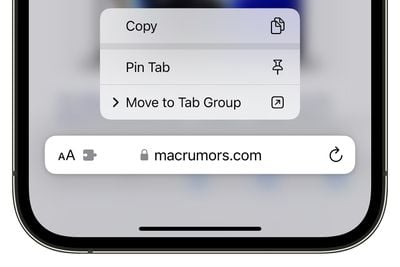
Pinning a tab that you want to come back to is easy. If you have the tab open and selected in Safari, simply long press the URL bar and select Pin Tab from the popover menu.
pin tab ios 16 tab groups
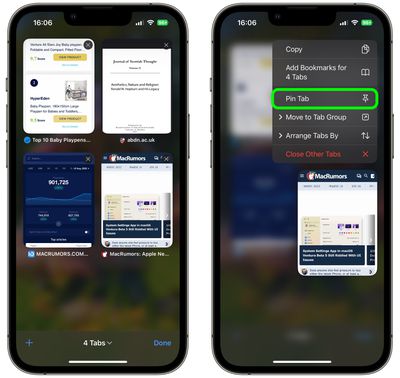
If you're viewing Safari's open tabs browser screen, find the open tab that you want to pin and long press on it, then select Pin Tab from the popover menu.
safari
Not only can you pin multiple tabs in Safari in iOS 16, you can also pin tabs that are part of Tab Groups so that they are open all the time. To pin a tab to a Tab Group in ‌iOS 16‌, open up the Tab Group, then long press on the URL bar and tap the Pin Tab option.

Tag: Safari

Popular Stories

MacBook Pro Low Angle Wide Lens

macOS 27: Two More Changes Leaked Ahead of WWDC Next Month

Sunday May 10, 2026 9:45 am PDT by
macOS 27 will have a "slight redesign" compared to macOS Tahoe, according to the latest word from Bloomberg's Mark Gurman. In his Power On newsletter today, Gurman said the design changes will help to improve the readability of macOS Tahoe's Liquid Glass interface:If you've used Tahoe, you're likely familiar with some of the quirks — particularly the transparency effects and shadows that...
iphone 18 pro blue%402x

iPhone 18 Pro: Dark Cherry, Light Blue, and Dark Gray Chassis Leaked [Update]

Thursday June 4, 2026 5:18 am PDT by
Update: Since publication, new information has come to light suggesting the images have been AI-manipulated and are not in fact iPhone 18 Pro chassis parts. The original article follows. The color options Apple is reportedly planning for the upcoming iPhone 18 Pro and ‌iPhone 18 Pro‌ Max have appeared online today in the form of images of chassis parts of unknown authenticity....
Aston Martin CarPlay Ultra Screen

Apple Says CarPlay Ultra is Coming to These Vehicle Brands

Thursday May 21, 2026 11:53 am PDT by
Last year, Apple launched CarPlay Ultra, the long-awaited next-generation version of its CarPlay software system for vehicles. Nearly a year later, CarPlay Ultra is still limited to Aston Martin's latest luxury vehicles, but that should change fairly soon. In May 2025, Apple said many other vehicle brands planned to offer CarPlay Ultra, including Hyundai, Kia, and Genesis. CarPlay Ultra...














