How to Disable Night Mode on Your iPhone's Camera - MacRumorsOpen MenuShow RoundupsShow Forums menuVisit ForumsOpen Sidebar
Skip to Content

How to Disable Night Mode on Your iPhone's Camera

by

When using the Camera app on iPhones, the ‌Night Mode‌ feature comes on automatically when the camera sensor registers an indoor or outdoor scene that is dark enough to warrant brightening, resulting in natural colors and reduced noise. That's the idea, anyway. The reality is that ‌Night Mode‌ won't always capture the kind of nighttime image that you want.
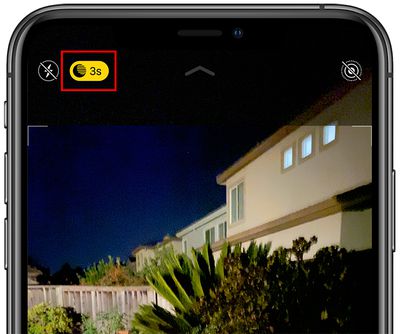
nightmodebutton
If you're aiming to shoot an authentic evening scene in which any sources of light remain subdued, for example, it's better to turn off ‌Night Mode‌ to prevent extreme light exposure and a blown out picture.

If you don't want ‌‌Night Mode‌‌ engaged when you're shooting in low light environments, you can turn it off by tapping the yellow ‌‌Night Mode‌‌ button when it appears at the top of the viewfinder. The problem is, when you open the Camera app again and the sensor detects low light, ‌Night Mode‌ will automatically enable itself again.

In iOS 14, there was no way to disable ‌Night Mode‌ for good – you had to manually switch ‌Night Mode‌ off every time you relaunch the Camera. But in iOS 15 and later, you can turn off ‌Night Mode‌ and ensure that it stays off whenever you subsequently open the Camera app. Here's how.

  1. Launch the Settings app on your iPhone.
  2. Tap Camera.
  3. Tap Preserve Settings.
  4. Toggle the Night Mode switch to the green ON position.
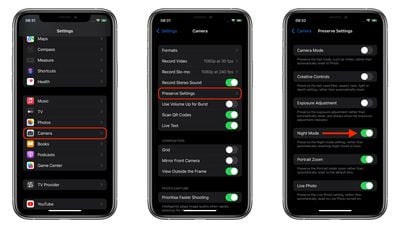
settings
Turning on this switch makes the Camera remember that you disabled ‌Night Mode‌ last time you were shooting. You can still manually enable ‌Night Mode‌ in the Camera app in the usual way, but now you're in control of when it's active.
Popular Stories

Apple Card iPhone 16 Pro Feature

Apple Card Promo to Offer Free AirPods Pro 3

Friday May 15, 2026 8:59 am PDT by
Starting as early as next week, customers who sign up for an Apple Card at Apple's retail stores in the U.S. will receive $249 cash back when they purchase AirPods Pro 3, according to Bloomberg's Mark Gurman. The promotion has yet to be officially announced by Apple, so exact terms and conditions are not available at this time. AirPods Pro 3 are priced at $249 in the U.S., so customers who...
Apple WWDC25 iOS 26 CarPlay Light mode 250609

Six Popular iPhone Apps Now Available on CarPlay

Thursday May 14, 2026 9:10 am PDT by
Apple's CarPlay system for accessing iPhone apps on a vehicle's dashboard screen has received six popular apps in recent weeks: ChatGPT, Perplexity, Grok, Google Meet, WhatsApp, and the indie artist streaming platform Audiomack. Make sure you have the latest version of each app and they will automatically appear on CarPlay. ChatGPT Starting with iOS 26.4, CarPlay supports voice-based...
ipad mini 7 blue

OLED iPad Mini: Release Date, Pricing, and What to Expect

Thursday May 14, 2026 5:08 am PDT by
According to the latest rumors, Apple is close to launching its next-generation iPad mini. So what should we expect from the successor to the iPad mini 7 that Apple released over a year ago? Read on to find out. Processor and Performance Apple is working on a next-generation version of the iPad mini (codename J510/J511) that features the A19 Pro chip, according to information found in code...