How to Remove Tracking Information From URLs in Safari - MacRumorsOpen MenuShow RoundupsShow Forums menuVisit ForumsOpen Sidebar
Skip to Content

How to Remove Tracking Information From URLs in Safari

by

Starting in iOS 17, iPadOS 17, and macOS Sonoma, Safari can remove tracking parameters from URLs in order to prevent cross-website tracking. Keep reading to learn how it works and how to control the setting for both Private and non-Private Browsing modes.

safari icon blue banner
Apple has updated Safari in its latest operating systems so that now it can remove tracking parameters in web addresses. When a tracking parameter is detected while browsing or copying a link, Safari strips the identifying components of the URL, while leaving the rest intact. The links still work as expected, but no longer have unique identifiers.
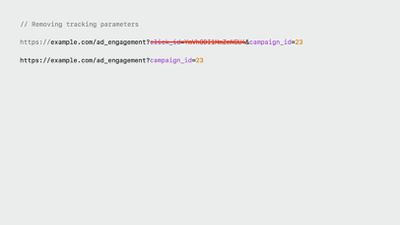
Safari Link Tracking Prevention

Example of a URL before and after the tracking parameters are removed

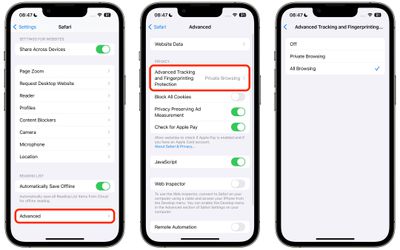
Apple calls this new feature Advanced Tracking and Fingerprinting Protection, and it also works for links shared in Apple's Messages and Mail apps. The following series of steps show you how to enable the feature for all browsing in Safari on iPhone, iPad, and macOS Sonoma. Turning it on will ensure that all URLs opened will strip the additional tracking information that's sometimes pasted on to the end of a URL.

How to Remove All URL Tracking in Safari on iPhone and iPad

  1. Launch the Settings app on your device.
  2. Scroll down and tap Safari.
  3. Scroll all the way down and tap Advanced.
  4. Under "Privacy," tap Advanced Tracking and Fingerprint Protection.
  5. Tap All Browsing.

settings

How to Remove All URL Tracking in Safari on Mac

  1. Launch Safari on your Mac.
  2. Select Safari -> Settings... in the menu bar.
  3. Click the Advanced tab.
  4. Make sure the box is checked next to Use advanced tracking and fingerprint protection, then choose in all browsing from the dropdown menu.
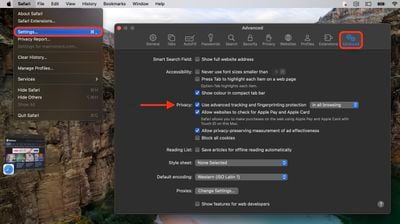
settings

In iOS 17, Apple also added a secondary authentication requirement to access Private Browsing tabs. Click the link to learn how it works.

Tag: Safari

Popular Stories

MacBook Pro Low Angle Wide Lens

macOS 27: Two More Changes Leaked Ahead of WWDC Next Month

Sunday May 10, 2026 9:45 am PDT by
macOS 27 will have a "slight redesign" compared to macOS Tahoe, according to the latest word from Bloomberg's Mark Gurman. In his Power On newsletter today, Gurman said the design changes will help to improve the readability of macOS Tahoe's Liquid Glass interface:If you've used Tahoe, you're likely familiar with some of the quirks — particularly the transparency effects and shadows that...
Apple Card iPhone 16 Pro Feature

Apple Card Promo to Offer Free AirPods Pro 3

Friday May 15, 2026 8:59 am PDT by
Starting as early as next week, customers who sign up for an Apple Card at Apple's retail stores in the U.S. will receive $249 cash back when they purchase AirPods Pro 3, according to Bloomberg's Mark Gurman. The promotion has yet to be officially announced by Apple, so exact terms and conditions are not available at this time. AirPods Pro 3 are priced at $249 in the U.S., so customers who...
Apple WWDC25 iOS 26 CarPlay Light mode 250609

Six Popular iPhone Apps Now Available on CarPlay

Thursday May 14, 2026 9:10 am PDT by
Apple's CarPlay system for accessing iPhone apps on a vehicle's dashboard screen has received six popular apps in recent weeks: ChatGPT, Perplexity, Grok, Google Meet, WhatsApp, and the indie artist streaming platform Audiomack. Make sure you have the latest version of each app and they will automatically appear on CarPlay. ChatGPT Starting with iOS 26.4, CarPlay supports voice-based...