

 Most popular websites these days come in both desktop and mobile versions, with the latter rendering content in a more responsive fashion for a consistent browsing experience across a variety of tablet and smartphone screens.
Mobile-friendly websites are often stripped down and streamlined for easier navigation, with the result that some full-page content isn't displayed at all. Even when it is, finding that content can sometimes be a chore, especially if you're used to the desktop version of a site.
Fortunately, Apple has had the foresight to let you bypass mobile versions of websites and view original desktop versions on its mobile devices instead. To request a desktop site in Safari on an iPhone or iPad running iOS 13, simply follow these steps.
- Navigate to a website that you'd like to view the desktop version of.

- Tap the "aA" icon in the top-left corner of the screen to reveal the Website View menu.
- Select Request Desktop Website from the dropdown menu.
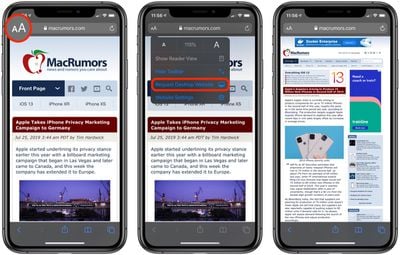
The great thing about Safari's Website View menu is that it will remember your preferences for that specific website and apply it automatically the next time content is loaded from the same parent URL.
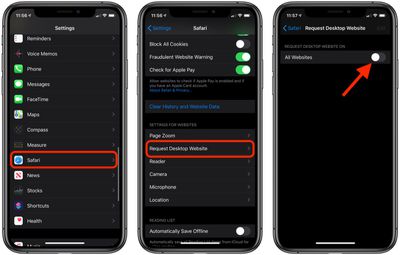
If you want, you can configure Safari to request the desktop website on all the websites you visit. The toggle switch to enable this option can be found in the Settings app, under Safari -> Request Desktop Website.















