

How to Review and Delete WhatsApp Media - MacRumorsOpen MenuShow RoundupsShow Forums menuVisit ForumsOpen Sidebar
Skip to Content

How to Review and Delete WhatsApp Media

by

If you're a heavy WhatsApp user and your iPhone is running low on storage, it may be that all the videos, voice messages and photos stored in the app are taking up a hefty amount of space on your device.

Whatsapp Feature
Fortunately, WhatsApp features a built-in media management tool that can help you identify, select, and bulk delete GIFs, photos, and videos that may be filling up your phone.

The tool groups together large files and media that has been forwarded many times, sorting files by size in descending order, and provides a way to preview files before deleting them. You can also see a preview of media before selecting one or multiple files to delete.

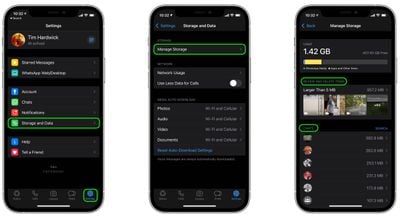
To access the storage management tool, launch the app and go to Settings -> Storage and Data -> Manage Storage.
whatsapp
The Review and Delete Items section shows you media that is larger than 5MB, while the Chats section below lists all the media shared in a particular chat thread. Tapping into either section allows you to view media and delete items individually in the viewing window.

You can also bulk-delete media by tapping Select in the top-right corner of the screen, choosing multiple items, then tapping the Trash icon in the bottom-right corner. There's also a nuke option in the form of the Select All button, which lets you delete all WhatsApp media over 5MB.


Popular Stories

Whatsapp Feature

These Older iPhones Will Need an Update to Keep Running WhatsApp

Thursday June 11, 2026 3:36 am PDT by
Some older iPhone models will need a software update to keep running WhatsApp from the end of November 2026, after Meta confirmed it is raising the app's minimum system requirements. From November 30, WhatsApp will require iOS 15.5 or later, up from the current requirement of iOS 15.1. The models affected are the iPhone 6s, iPhone 6s Plus, iPhone SE (1st generation), iPhone 7, and iPhone...
Whatsapp Feature

WhatsApp Working on View-Once Text Messages for iPhone

Wednesday June 17, 2026 1:48 am PDT by
WhatsApp is working on a way to let users send text messages that can only be viewed once, similar to the feature already available for photos, videos, and voice notes. According to WABetaInfo, after typing a message in the chat bar, users will be able to select a new "Send as view once" option by long-pressing the Send button. When the message is sent, the recipient will be able to open the ...
Whatsapp Feature

WhatsApp Now Lets You Reserve a Username

Monday June 29, 2026 4:01 pm PDT by
Popular messaging app WhatsApp is now allowing users to reserve usernames ahead of plans to launch username-based messaging. Right now, WhatsApp uses a person's phone number as an identifier, but usernames will allow people to interact without having to exchange personal information. Username reservations are rolling out starting this week, and not all users will have access to the...















