Save 7GB of iPhone Storage Just by Toggling This Switch - MacRumorsOpen MenuShow RoundupsShow Forums menuVisit ForumsOpen Sidebar
Skip to Content

Save 7GB of iPhone Storage Just by Toggling This Switch

by

Apple this week released iOS 18.3, iPadOS 18.3, and macOS Sequoia 15.3, software updates that enable Apple Intelligence on supported devices by default. Whether you own an iPhone, iPad, Mac – or indeed all three – regardless of what you think about Apple Intelligence, there's one reason why you may want to disable Apple's AI features at the earliest opportunity: To reclaim storage.

apple intelligence black
Apple's marketing machine has made much of Apple Intelligence since its announcement at WWDC in June 2024. Apple brought the first features to compatible iPhones, iPads and Macs in October with a point update to iOS 18/iPadOS 18 and macOS Sequoia, followed by a further update in December that brought a more fleshed-out set of AI-powered features, with the most recent update adding some much-needed refinements.

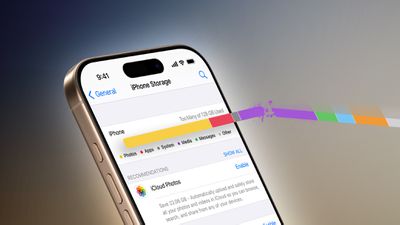
Despite the raft of updates, Apple Intelligence remains in beta, and in terms of the AI suite's current usefulness, opinions remain decidedly mixed. For some, however, when considering the relative worth of these features, the deciding factor will be their local storage overhead. According to Apple's support page, Apple Intelligence now requires 7GB of storage space. This number applies whether you're using an iPhone, iPad, or Mac.
iPhone Free Up Storage Feature Redux 1
That might sound like a lot, but it's one way that Apple is able to tout the privacy credentials of Apple Intelligence. Many of these features run locally, and in order to do so, they must download AI models to your device(s), which currently requires 7GB of storage. This means if you have an iPhone, iPad, and a Mac, it effectively equates to 21GB of storage across your devices that is being taken up by AI models that you may never even use.

But don't assume that 7GB is any sort of hard cap. In April, Apple is expected to release iOS 18.4 featuring some broad enhancements to Siri's AI capabilities, which will likely hike the storage requirement further. And that's not even taking into consideration the storage demands that iOS 19 will bring later this year...

AI or No AI? Time to Decide

Here's the deal. After updating to iOS 18.3, iPadOS 18.3, or macOS Sequoia 15.3, Apple Intelligence is an opt-out feature, not an opt-in feature. In other words, if you have updated – or plan to update – your devices to the new software, Apple Intelligence will be automatically enabled upon doing so.
iOS 18
Note that this still applies if you already disabled it in the previous point updates but then allowed the latest update welcome screens to steer you towards enabling Apple Intelligence again. If however you chose "Set Up Later" at the on-screen prompt, you have no action to take – these features will respect your prior decision and remain disabled. For everyone else, it's time to decide: Is Apple Intelligence really worth all those precious gigabytes?

Why Disabling Apple Intelligence Reclaims Storage

Apple Intelligence utilizes something called the MobileAsset framework to manage and deliver its machine learning models and related assets to your devices. This framework dynamically downloads and updates the necessary components, ensuring that your devices have access to the latest capabilities without requiring comprehensive system updates.

Thankfully, when you disable Apple Intelligence, the system identifies that the associated assets are no longer in use. The MobileAsset framework then purges these unused assets when additional space is required – optimizing and freeing up your local storage in the process. Here are the steps you need to take to ensure that happens.

macOS Sequoia Genmoji Feature

How to Disable Apple Intelligence

Disabling Apple Intelligence completely is simply a matter of flipping the associated switch on each supported device running the latest software. Compatible devices include any iPhone 16 model, iPhone 15 Pro and iPhone 15 Pro Max, any iPad with A17 Pro or M1 and later, and any Mac with M1 or later.

Disable Apple Intelligence on iPhone and iPad

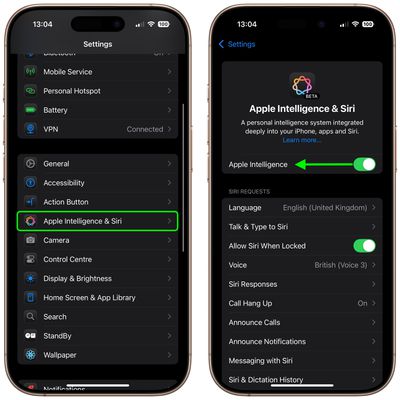
On iPhone and iPad, you can find it in Settings ➝ Apple Intelligence & Siri. Toggle off the switch next to Apple Intelligence.
settings

Disable Apple Intelligence on Mac

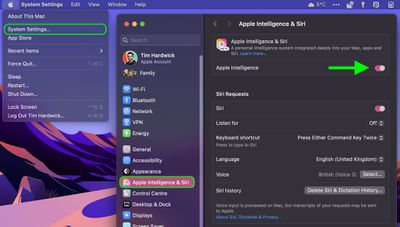
On Mac, open System Settings, select Apple Intelligence & Siri in the sidebar, then click the switch next to Apple Intelligence at the top of the menu window to toggle it off.
macos settings

What You Lose by Disabling Apple Intelligence

In iOS 18.2 or later, iPadOS 18.2 or later, and macOS Sequoia 15.2 or later, turning off Apple Intelligence will knock out the following features:

  • Genmoji
  • Image Playground
  • Image Wand in the Apple Pencil tool palette
  • Writing Tools
  • Clean Up in Photos
  • Create a Memory movie in Photos (not available in macOS)
  • Natural language search in Photos
  • Notification summaries
  • Reduce Interruptions Focus
  • Intelligent Breakthrough & Silencing in Focus
  • Priority messages in Mail
  • Smart Reply in Mail and Messages
  • Summaries in Mail and Messages
  • Siri enhancements, including product knowledge, more resilient request handling, new look and feel, more natural voice, the ability to type to Siri, and more
  • ChatGPT integration within Siri and Writing Tools

If you don't see any of the features listed above on your device, your specific model likely doesn't support Apple Intelligence, so you don't have anything to worry about.
Popular Stories

iOS 27

Apple Says iOS 27.3 Beta Coming Next Week

Friday October 30, 2026 2:45 pm PDT by
Apple today announced that the first iOS 27.3 developer beta will be released next week and enable some Apple Intelligence features in China. In a press release shared on the Apple Newsroom website in China, Apple said the beta will be released on Wednesday, November 4, but that likely means Tuesday, November 3 in the U.S. due to time zone differences. Apple said iOS 27.3 will then be...

apple tv siri ai

Older Apple TV 4K Models to Gain Apple Intelligence and Siri AI Support

Tuesday October 13, 2026 8:16 am PDT by
Apple today said that second- and third-generation Apple TV 4K models will gain Siri AI in beta with tvOS 27.2. Siri AI on the Apple TV adds conversational entertainment searches, follow-up questions, and personal context through a paired compatible device. Setup requires the Home app's home owner to have an Apple Intelligence-enabled iPhone or iPad running the latest software, with Siri AI...
Apple Greg Joswiak

Greg Joswiak Says Apple Isn't Focused on Making AI for 'Lunatic Fringe'

Thursday October 15, 2026 7:52 am PDT by
In an interview with TIME's Andrew R. Chow, Apple's marketing chief Greg Joswiak said Apple Intelligence is meant for "everyday people" as opposed to the "lunatic fringe." The full sentence: "In the midst of a populist AI backlash, they contend that they are building a modest but personalized and privacy-preserving form of AI that will actually help ordinary people as opposed to merely...
Latest Stories
Apple Releases macOS Golden Gate 27.2.1
10 minutes ago
Apple Releases iOS 27.2.1 With Bug Fixes
14 minutes ago
Apple Releases watchOS 27.2.1 and visionOS 27.2.1 With Security Fixes
16 minutes ago
Apple Watch Ultra 4 Gets $99 Amazon Discounts, Starting at $699.99
25 minutes ago
Apple Pay Ad Features Martial Arts Convenience Store Food Fight
32 minutes ago
Apple Continues to Say Some AI Features Will Have Fees for Extra Usage
39 minutes ago
Apple Announces Türkiye Expansion Plans as Tim Cook Visits
2 hours ago
Singapore Saved Apple $2.7 Billion in Taxes This Year
2 hours ago
Apple Music's 2026 Artist of the Year is Olivia Dean
2 hours ago
This Could Be Your Last Chance to Pre-Order the HomeView at a Discount
3 hours ago
Some HomePod Mini 2 Buyers Returning Units Over Mac Speaker Issues
3 hours ago
MacBook Pro With PROLED XDR Display: Details You Might Have Missed
3 hours ago
Satechi Offers MacRumors Readers 30% Off Select Accessories in Early Black Friday Sale
3 hours ago
Leaker Envisions a Shorter iPhone With a New iOS Layout
4 hours ago
Apple to Give You More Control Over When Your Mac Passwords Lock
5 hours ago
Siri Is Getting a Better Memory
5 hours ago
iPhone 18e Could Feature Bigger Display and Battery
6 hours ago
Apple's Siri Boss May Leave - Here's Who Could Take Over
6 hours ago
Apple Launching Two More New Products This Friday
6 hours ago
Apple Store Subscription Sign-Up Controversy Exposed
15 hours ago
Siri AI Rumored to Become 'More Like an Agent' as Early as Next Year
1 day ago
Apple Taking New Approach to Developing iOS 28 and macOS 28
1 day ago
Early Apple Black Friday Deals on Apple Watch, MacBook Air, and More
2 days ago
'Backglow' Lets You Customize New MacBook Pro's Glowing Apple Logo
2 days ago
Top Stories: Apple Product Launches, iOS 27.3 Beta, and More
2 days ago
More Fun iPhone Duo Apps: 30 New Picks to Try
3 days ago
Hands-On With Apple's New OLED Touchscreen MacBook Pro
3 days ago
Apple Store With All-New Design Opening Soon in Southern California
3 days ago
Control the Glowing Apple Logo on Your New MacBook Pro
3 days ago
Apple Shares New 'Apple Card: Apply and Use in Minutes' Ad
3 days ago