Apple TV: How to Scrub Through Video Using the New Siri Remote (2nd Gen) - MacRumorsOpen MenuShow RoundupsShow Forums menuVisit ForumsOpen Sidebar
Skip to Content

Apple TV: How to Scrub Through Video Using the New Siri Remote (2nd Gen)

by

With the new Apple TV 4K now in customers' hands, some users are reporting issues when trying to control video with the redesigned Siri Remote.
Siri Remote 2 how to scrub Feature copy
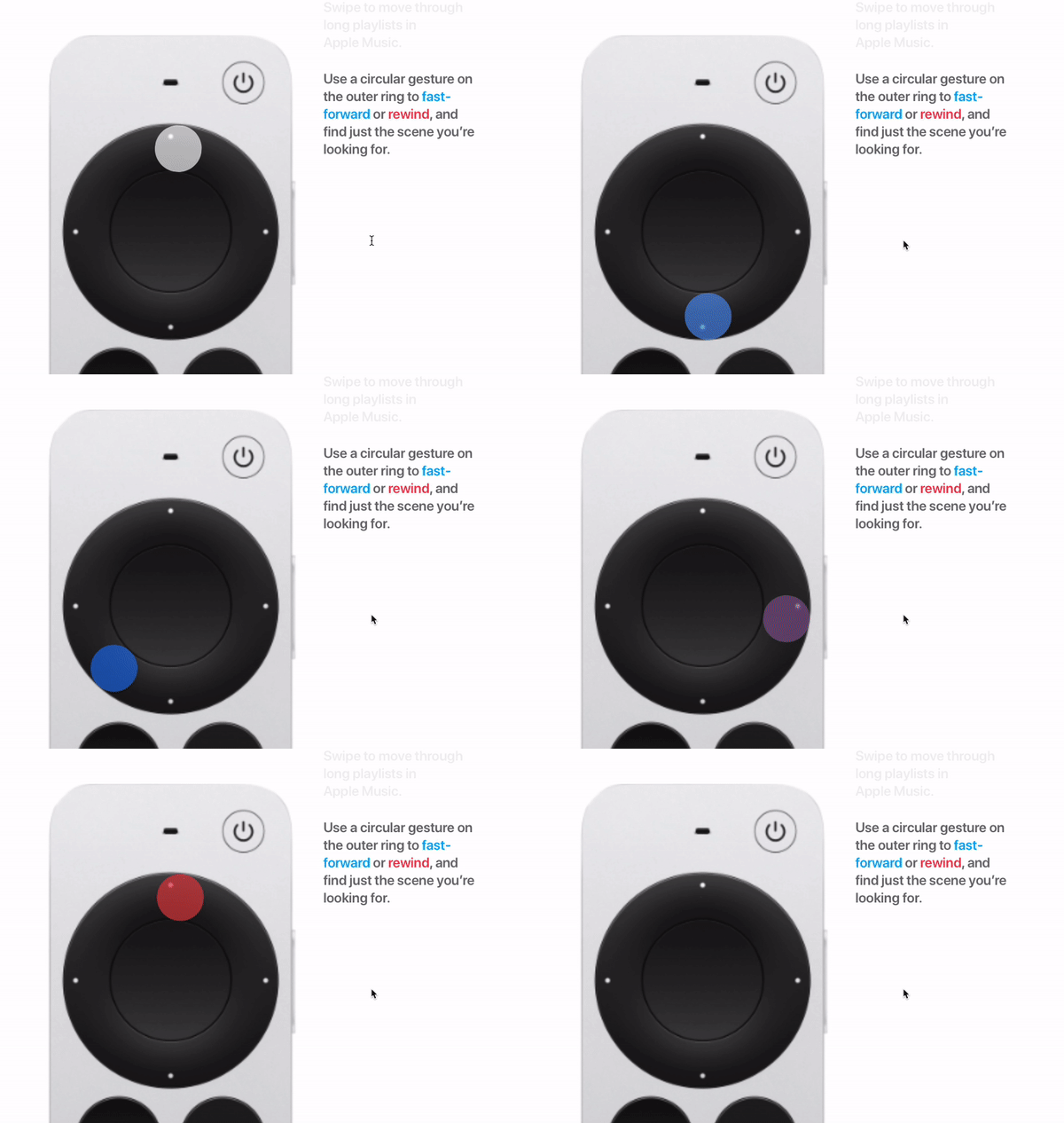
Specifically, some users are complaining that using the circular gesture on the new clickpad ring to fast-forward or rewind paused video isn't working as expected. Rather than scrubbing through video continually in the direction of the gesture, the video scrubs back and forth in opposite directions.

From what we've been able to work out, the problem seems to relate to a subtle additional gesture that users are missing out, either because it isn't very intuitive or Apple doesn't demonstrate it particularly well in the marketing material.
siri remote clickpad video scrubbing
Try following these steps to get it working. We've italicized the crucial gesture that users appear to be omitting.

  1. First, pause the video by pressing the Play/Pause button, or by pressing the center of the clickpad ring. (A small preview thumbnail will appear above the playback timeline at the bottom of the screen.)
  2. Swipe left or right across the clickpad to scrub backward or forward in time. For more granular control, rest your finger on the outer edge of the clickpad ring until a ring icon appears on-screen, then trace a circle with your finger around the clickpad ring in a clockwise or counterclockwise direction.
  3. To begin playback at the new position, press the center of the clickpad.

You should find this method works with Apple's own apps, but we've found inconsistencies in its functioning with third-party apps, especially those that don't use Apple's native playback UI. For instance, it worked for us in Netflix, but the Disney+ app had persistent issues responding to the circular gesture.


It could be that some third-party apps need updating before they recognize the new clickpad ring on the second-generation ‌Siri‌ Remote, so hopefully any niggles will be smoothed out soon.

Related Roundup: Apple TV
Buyer's Guide: Apple TV (Don't Buy)

Top Rated Comments

67 months ago
Is the Apple TV team so small that they didn't have time or care to test it out? They had 6 years to update this remote.
Score: 47 Votes (Like | Disagree)
omglolbbq Avatar
67 months ago
Apple need to enforce the use of standard UI components the same way they do in CarPlay so that features work consistently across the system and the user doesn’t have to learn ten different interfaces.
Score: 24 Votes (Like | Disagree)
Shasterball Avatar
67 months ago
The redesigned remote is 90% of the reason people are buying this thing. Apple appreciated this as they already sell the 2nd gen remote as a standalone. After all these years, and knowing the main desire to upgrade, why is the design still awkward?
Score: 19 Votes (Like | Disagree)
srbNYC Avatar
67 months ago

I miss being able to jump forward/back 10 seconds at a time by clicking on the right/left edge of the old remote. With the new remote, the video pauses and waits for me to scrub... scrubbing is less precise and requires more of my focus.
Use the left and right buttons for that; same functionality as the previous remote's touchscreen-edges.
Score: 16 Votes (Like | Disagree)
67 months ago

and everyone was so excited about this new remote ... hmmm ...
People will never be happy no matter what you do
Score: 11 Votes (Like | Disagree)
joediianni Avatar
67 months ago
Honestly… Third day into all new Apple TV’s in the house. I miss the old remote. The old gesture section was more like an extension of the iPhone and felt natural. This new one is large, clunky, button driven, I don’t know… Feels like it went back in time so far.
Score: 11 Votes (Like | Disagree)

Popular Stories

General visionOS watchOS and tvOS Betas Feature Redux

Apple Releases Second watchOS 26.6, tvOS 26.6 and visionOS 26.6 Betas

Monday June 15, 2026 10:06 am PDT by
Apple today provided developers with the second betas of upcoming watchOS 26.6, tvOS 26.6, and visionOS 26.6 betas for testing purposes. The software comes three weeks after Apple seeded the first betas. The software updates are available through the Settings app on each device, and because these are developer betas, a free developer account is required. There's no word on what's in the...
f 5d631a2d7714517b0b0137e38aadf744d175cb3e

Apple Releases First iOS 27, iPadOS 27, and macOS 27 Betas to Developers

Monday June 8, 2026 11:40 am PDT by
Following the WWDC 2026 keynote event, Apple has seeded the first betas of iOS 27, iPadOS 27, macOS 27, watchOS 27, tvOS 27, and visionOS 27 to developers for testing purposes. Registered developers can opt in to betas and download the software through the Settings app on each device. The software includes many of the new features that were shown off earlier today, though some of what...
Apple TV 2025 Thumb 2 Sans Text

Apple Announces tvOS 27 With These New Features

Monday June 8, 2026 2:00 pm PDT by
Apple barely touched on tvOS 27 during its WWDC 2026 keynote today, but the update exists, and it adds some new features to the Apple TV. In a slide that was shown very briefly during the keynote, Apple revealed some of tvOS 27's new features and enhancements: A redesigned Podcasts app Smoother app launches and animations Faster AirPlay connectivity with other Apple devices Smart ...