

iOS 15: How to See All the Photos People Have Shared With You in Messages - MacRumorsOpen MenuShow RoundupsShow Forums menuVisit ForumsOpen Sidebar
Skip to Content

iOS 15: How to See All the Photos People Have Shared With You in Messages

by

Most iPhone and iPad users enjoy sharing media with each other over Messages, and in iOS 15, Apple has acknowledged this popularity by adding a new section in the Photos app called Shared with You.
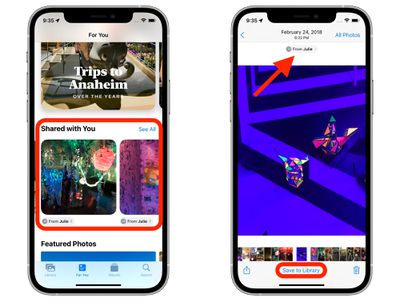
photos
If someone shares a photo or video with you in the Messages app, it will show up in Shared with You in ‌Photos‌. You can find this new section by selecting the For You tab.

If the photo shared with you was taken when you were present, it will appear in the All ‌‌Photos‌‌ view and in the Days, Months, and Years view, as well as in Featured ‌‌Photos‌‌ and Memories.

‌‌Photos‌‌ in the Shared With You section can easily be saved to the ‌‌Photos‌‌ Library. Simply select the photo and tap Save to Library at the bottom of the screen. You can also respond to a message from the ‌‌Photos‌‌ app, simply by tapping the contact name of the person who shared the photo with you.

In iOS 15, there are several new features and improvements in the ‌Photos‌ app that are worth checking out. You can find out more information in our dedicated Photos guide.


Related Forum: iOS 15

Popular Stories

apple intelligence photos tools

Apple to Bring AI Reframing and Editing Tools to Photos App

Monday June 8, 2026 11:16 am PDT by
Apple today announced new AI-powered photo editing tools coming to the Photos app as part of Apple Intelligence, including an upgraded Clean Up tool, a new Extend tool, and a new Spatial Reframing feature. Spatial Reframing allows users to reposition the virtual camera angle of a photo after it has already been taken. By touching and dragging, users can adjust the framing and perspective of...
iOS 26 Glass Photos Feature

Apple Photos Finally Gets a Slideshow Maker

Monday June 8, 2026 5:04 pm PDT by
Apple today announced new slideshow features coming to the Photos app, allowing users to play any set of photos and videos as a slideshow. There are options to set the slide duration, transition style, and music. iOS 27 also lets users save any slideshow directly as a video to their Photos library for easy playback later. Additional new features include the ability to save individual...
iCloud iPhone 17 Pro

iPhone Users Who Pay for iCloud Storage Get Two New Perks on iOS 27

Thursday July 2, 2026 6:10 am PDT by
If you pay for certain iCloud+ storage plans beyond the 5GB that Apple offers for free, you will receive two more perks on iOS 27 at no additional cost. A summary of the two new iCloud+ perks on iOS 27:Increased daily usage limits for some new Apple Intelligence features, including image generation in the revamped Image Playground app. HomeKit Secure Video cameras receive generated video...












