iOS 15 Photos Guide: Features, Text Recognition, Changes - MacRumorsOpen MenuShow RoundupsShow Forums menuVisit ForumsOpen Sidebar
Skip to Content

iOS 15 Photos Guide: Features, Text Recognition, Changes

Apple made some major improvements to the Photos app in iOS 15, adding some long-awaited and requested features along with unique capabilities that enable you to do more with your images than ever.

iOs 15 Photos Feature
There's a new Memories feature that lets you relive your favorite moments, metadata info can be viewed and edited, Visual Lookup lets you identify plants, landmarks, and more, and with Live Text, you can copy and paste the text from any image on your iPhone. This guide highlights all of the new features that are available in the ‌Photos‌ app.

Memories

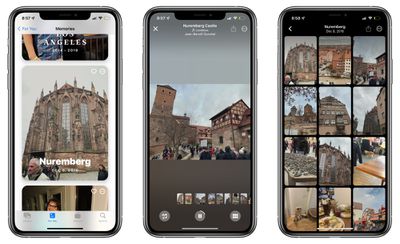
The Memories section of the ‌Photos‌ app has been overhauled in iOS 15, making it easier than ever to resurface your favorite memories.
photos memories app
The Memories feature has a new look that includes animated cards with adaptive titles, new animation and transition styles, and multiple image collages for a more cinematic feel. There are new memory looks that are added to Memories based on each photo and video, with Apple using machine learning to apply the right contrast and color adjustment for a consistent look. Apple says that this feature is designed to mimic what colorists at film studios do.

When playing a Memory, there's an interactive interface that lets you tap to pause, replay the last photo, skip to the next photo, or jump ahead, with the music designed to keep playing. Changing a song, removing or adding photos, or adjusting a Memory look is done in realtime with no need to recompile. To make it easier to make adjustments to Memories, there's a new Browse view so you can see all of the photos and videos in a bird's eye view.

Apple Music Integration

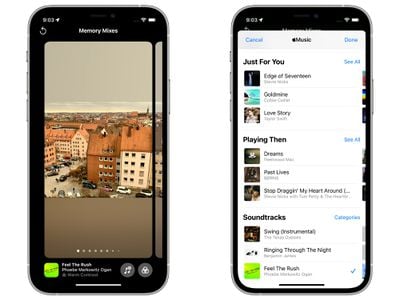
When creating and viewing Memories, the ‌Photos‌ app has always supported integrated music, but now Apple Music subscribers can choose to add any ‌Apple Music‌ song to a Memory.

memories apple music
The Memories feature makes personalized ‌Apple Music‌ song suggestions based on your music tastes and the content of your photos and videos. Song suggestions can include songs that were popular at the time and location of the memory, songs that you listened to while you were traveling, or a song from an artist if the memory includes a concert.

You can customize a Memory by swiping through various Memory mixes, which lets you experiment with different songs, pacing, and Memory looks.

New Memory Types

There are new kinds of Memories that are built from your ‌Photos‌ library, with Apple adding new international holidays, child-focused memories, and trends over time. Pet Memories have been improved and iOS devices can recognize individual dogs and cats.

Watch Next

After you've finished a Memory, Memories will suggest related content so that you can keep going through your photo content.
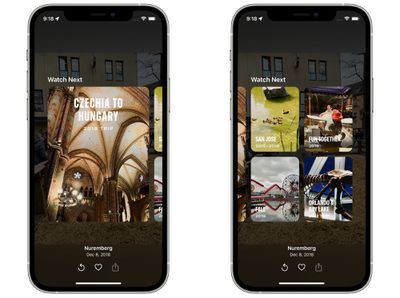
photo memory suggestions

Suggest Less Often

If there's someone popping up in your Memories or in Featured ‌Photos‌, you can use a new quick access "Feature Less" button to see less of that specific person.

feature less photos
This "Feature Less" option also works for dates, places, and holidays.

Live Text

Any text that's in a photograph or an image on your iPhone is now recognized by the iPhone through the new Live Text feature.
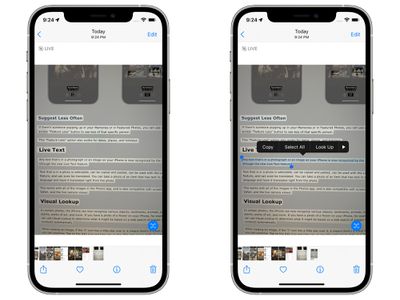
photos live text
Text that is in a photo is selectable, can be copied and pasted, can be used with the Lookup feature, and can even be translated. You can take a photo of an item that has text in a foreign language and have it translated right from the photo.

This works with all of the images in the ‌Photos‌ app, and is also compatible with screenshots, Safari, and the live camera viewer.

Visual Lookup

In certain photos, the iPhone can now recognize various objects, landmarks, animals, books, plants, works of art, and more. If you have a photo of a flower on your iPhone, for example, you can use Visual Lookup to determine what it might be based on a web search of images that Apple conducts automatically.
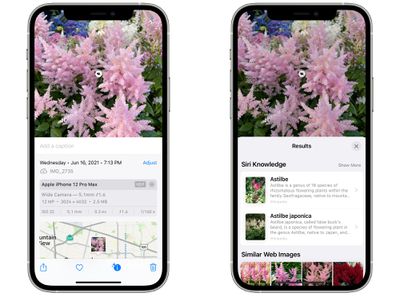
photos visual lookup
When viewing an image, if the "I" icon has a little star over it, it means there's a Visual Lookup you can examine. Tap on the Info icon and then tap on the little leaf icon to open up a search.

Metadata Viewing and Editing

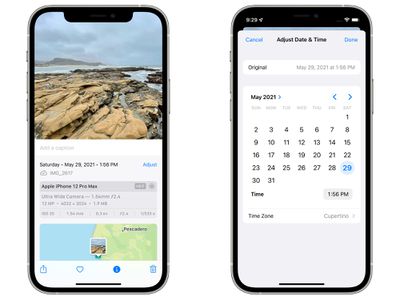
In iOS 15, if you tap on the new "Info" icon below a photo, you can view the camera that was used to take it, the lens, shutter speed, megapixels, size, aperture, and more, which is all of the EXIF info you can get from the desktop ‌Photos‌ app.

photos app metadata
In this interface, you can add captions and adjust the date and time of a photo through an added "Adjust" button. Prior to iOS 15, none of this information was available on iOS devices.

Faster iCloud Photos Library Syncing

Apple says that when you upgrade to a new device, iCloud Photos syncs more quickly than before, making it faster than ever for you to get access to your photo library.

People Identification and Naming Improvements

The "People" album on the iPhone has improved recognition for the various individuals that are in your pictures, and the iOS 15 ‌Photos‌ app is able to detect people in extreme poses, people wearing accessories, and people with occluded faces.

ios 15 improved people recognition
Apple has also added a full workflow for correcting naming mistakes. When selecting a person, if you tap on the "..." icon and then choose "Manage Tagged ‌Photos‌," you can untag any photos that might not be that person. This is also the interface used to tag additional photos if iOS finds untagged images.

Selection Order for Photos Picker

The ‌Photos‌ image picker that's available across iOS lets you select photos in a certain order for sharing purposes, so if you have a photo sequence, you can be sure they're shared in the order that you intend.

Shared With You

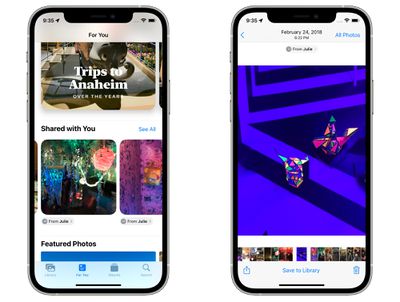
If someone shares a photo or video with you in the Messages app, it will show up in a new "Shared With You" section in the ‌Photos‌ app.

photos shared with you
If it's a photo that was taken when you were present, it will appear in the All ‌Photos‌ view and in the Days, Months, and Years view, as well as in Featured ‌Photos‌ and Memories.

‌Photos‌ in the Shared With You section can easily be saved to the ‌Photos‌ Library, and you can respond to a message with a tap right from the ‌Photos‌ app.

In iOS 15, you can search through your entire ‌Photos‌ library using Spotlight. You can search by locations, people, scenes, or things in the photos like plants or pets thanks to Visual Lookup.
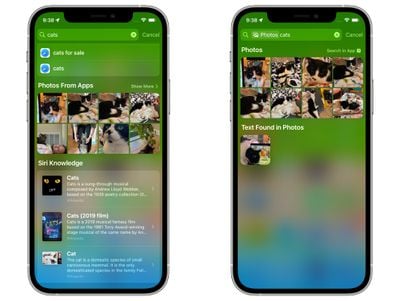
spotlight search photos app

Guide Feedback

Have questions about ‌Photos‌ in iOS 15, know of a feature we left out, or want to offer feedback on this guide? Send us an email here.


Popular Stories

apple pro tell logo

Apple Launching Five New Products Today

Thursday November 5, 2026 12:59 am PST by
Apple is launching five new products on Friday, November 6, following pre-orders that opened last week, including its first touchscreen MacBook Pro models. The following new products will be available from today: iPad mini with OLED display and A20 Pro chip iMac with M6 chip 14-inch MacBook Pro with M6 chip 14-inch MacBook Pro with OLED touchscreen 16-inch MacBook Pro with OLED...
duo aquarium

More Fun iPhone Duo Apps: 30 New Picks to Try

Friday November 6, 2026 3:27 pm PST by
When the iPhone Duo launched, we shared a list of some of the fun apps developers created for the new form factor. Two weeks out, developers are continuing to come up with fresh ideas, so we thought we'd share some of our favorites. Games Marbles Unhinged ($2.99) - Marbles Unhinged is a marble maze designed for the Duo. When you fold it, the floor turns into a ramp. If you stand the top...
silver iphone 18 pro

Apple Rumored to Drop the iPhone's Action Button Next Year

Friday November 6, 2026 6:07 am PST by
Apple plans to merge the iPhone's Action button with the Camera Control starting next year, according to the leaker known as "Instant Digital." In a new post on Weibo, the leaker claimed that a single press of the combined button would open the camera, while a long press would trigger the function assigned to the Action button. They explicitly clarified that the dedicated Action button would ...

Top Rated Comments

KittyKatta Avatar
70 months ago
Missing Feature: Family Sharing

Seriously, doesnt anyone at Apple have a family? If they offer $10/mo for 2TB of family shared data then it should include an OPTION for a family bucket of full-res photos so that parents can choose to combine all/some of their library.
Score: 29 Votes (Like | Disagree)
70 months ago
Can you finally add missing faces? It’s annoying when iOS does not recognise when a face is in a picture, as you can’t add one and then specify which person it is.
Score: 17 Votes (Like | Disagree)
70 months ago
Can they bring back the map view with pins? The map view with numbers really doesn't do anything for me. Does it matter if I took 23 or 19 photos in a particular location?

Score: 9 Votes (Like | Disagree)
leolabs Avatar
70 months ago

Spotlight should be able to search text in photos
It can, and it’s pretty speedy as well:

Attachment Image
Score: 7 Votes (Like | Disagree)
70 months ago

Someone care to explain why upgrading to a new decide will mean faster iCloud syncing? Why wouldn’t all existing devices also have this if they upgrade to iOS 15?
Existing devices would have the data already on them.

This just means that devices that have been erased or are being setup new will pull in initial data faster. Not that it has to be a literal brand new device.
Score: 6 Votes (Like | Disagree)
70 months ago

Can you finally add missing faces? It’s annoying when iOS does not recognise when a face is in a picture, as you can’t add one and then specify which person it is.
I second that and add: can you finally add geo location manually?
Score: 6 Votes (Like | Disagree)
Latest Stories
Siri AI Rumored to Become 'More Like an Agent' as Early as Next Year
11 minutes ago
Apple Taking New Approach to Developing iOS 28 and macOS 28
2 hours ago
Early Apple Black Friday Deals on Apple Watch, MacBook Air, and More
21 hours ago
'Backglow' Lets You Customize New MacBook Pro's Glowing Apple Logo
21 hours ago
Top Stories: Apple Product Launches, iOS 27.3 Beta, and More
1 day ago
More Fun iPhone Duo Apps: 30 New Picks to Try
2 days ago
Hands-On With Apple's New OLED Touchscreen MacBook Pro
2 days ago
Apple Store With All-New Design Opening Soon in Southern California
2 days ago
Control the Glowing Apple Logo on Your New MacBook Pro
2 days ago
Apple Shares New 'Apple Card: Apply and Use in Minutes' Ad
2 days ago
Apple Says More Than 100,000 Apps Optimized for iPhone Duo, Here's What's Still Missing
2 days ago
Early Black Friday Deals Kickoff With Steep Discounts on Apple Watch Ultras and More
2 days ago
The MacRumors Show: iOS 27.3 Looks Like a Huge Update
2 days ago
Best Buy's Black Friday Event Begins With Sitewide Savings on Apple, TVs, More
2 days ago
Apple Releasing Yet Another Two New Products Next Week
2 days ago
MacBook Air Drops to Lowest Price in Months With Amazon's $250 Discount
2 days ago
Apple Rumored to Drop the iPhone's Action Button Next Year
2 days ago
Apple's Extended Return Policy Now in Effect for 2026 Holiday Season
2 days ago
Apple Music Classical Updated With New Icon and Refreshed Design
2 days ago
OLED iPad Mini, M6 iMac, and New MacBook Pros Available From Today
2 days ago
Apple Surveys iPhone Duo Buyers About Crease and Camera
3 days ago
Apple's First Touchscreen Mac is Now Arriving to Customers
3 days ago
Claude Gets Personal Finance Feature With Bank Account Linking
3 days ago
Apple Arcade Adds Crossy Road Rush and NBA 2K27
3 days ago
Apple's New HomeView Smart Home Hub: Here's How Much RAM It Has
3 days ago
iPad Mini vs. iPad Air Buyer's Guide: Now Just $50 Apart
3 days ago
First iOS 27.3 and macOS Golden Gate 27.3 Public Betas Now Available
3 days ago
Apple Announces a New Mac Sales Record
3 days ago
Paid $200 for Logic Pro? Apple Says You Won't Get This New Feature
3 days ago
Instagram's Edits Video Editor is Now Available on Mac
3 days ago