How to Send High Resolution Photos and Videos in WhatsApp - MacRumorsOpen MenuShow RoundupsShow Forums menuVisit ForumsOpen Sidebar
Skip to Content

How to Send High Resolution Photos and Videos in WhatsApp

by

WhatsApp has rolled out a new option that lets users send photos and video over the messaging platform in high resolution. Keep reading to learn how it's done.

Whatsapp Feature
WhatsApp has released an update allowing iPhone and Android users to send photos and videos in high resolution, finally addressing the service's low quality media sharing limitation.

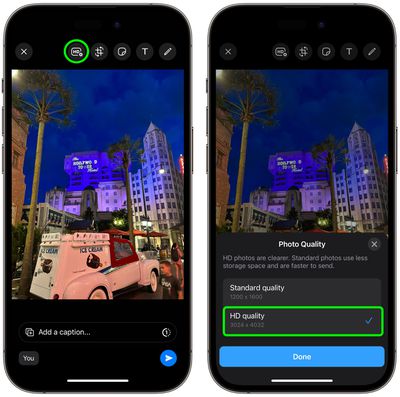
Called "HD quality," the option means users can send photos and videos that are clearer with minimal compression. Images captured on iPhone, for example, can now be sent in 3024 x 4032 resolution, rather than the previous maximum 920 x 1280 resolution, while video can be sent in 1280 × 718 resolution, rather than 848 × 476.

Recipients of HD photos/videos will see a HD label in the corner of the image, indicating that they have received a higher quality version, and all high resolution media is protected under WhatsApp's end-to-end encryption.

To get access to the feature, first update WhatsApp to the latest version, then follow these steps. (Note: If you don't see the HD option described below, the feature rollout has not yet gone live in your region.)

  1. In a chat thread, tap the Camera button.
  2. Select an image or video from your media library to send.
  3. Tap the HD button located at the top of the screen, left of the other image/video editing tools.
  4. Choose HD quality in the popup that appears, then tap Done.
  5. Tap the Send button.

whatsapp hd photos 1

According to Meta, if a user's internet connection is low bandwidth, they will receive photos and videos in Standard Quality, and will be able to choose to keep the standard version or upgrade it to HD where available.


Popular Stories

Whatsapp Feature

WhatsApp Now Lets You Reserve a Username

Monday June 29, 2026 4:01 pm PDT by
Popular messaging app WhatsApp is now allowing users to reserve usernames ahead of plans to launch username-based messaging. Right now, WhatsApp uses a person's phone number as an identifier, but usernames will allow people to interact without having to exchange personal information. Username reservations are rolling out starting this week, and not all users will have access to the...
Whatsapp Feature

WhatsApp Beta Adds Green Dot to Show Who's Online

Monday July 6, 2026 3:56 am PDT by
WhatsApp appears to be introducing a new visual indicator that shows when a contact is online, according to WaBetaInfo. The feature adds a small green circle to a contact's profile photo when they're active in the app, and which disappears the moment they leave, all updated in real time. The indicator is now being tested for the WhatsApp iPhone app in TestFlight after it debuted on Android...
Whatsapp Feature

WhatsApp Beta Reveals iCloud Backup Alternative for iPhone

Tuesday July 14, 2026 3:06 am PDT by
WhatsApp is developing a first-party cloud storage option for chat backups on iPhone, providing users with an alternative to iCloud for the first time, according to app tinkerer WABetaInfo. Code found in the WhatsApp beta for iOS (version 26.28.10.16), available through TestFlight, suggests that users will eventually be able to pick their preferred backup destination directly from the app's...