

How to Set and Manage HomePod Timers on iPhone and iPad - MacRumorsOpen MenuShow RoundupsShow Forums menuVisit ForumsOpen Sidebar
Skip to Content

How to Set and Manage HomePod Timers on iPhone and iPad

by

Did you know that you can manage multiple timers on your HomePod directly from the Home app on iPhone and iPad? Keep reading to learn how.
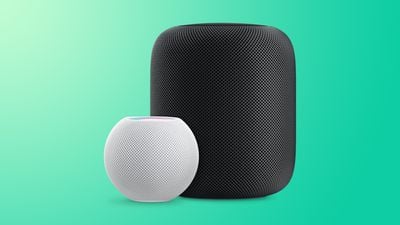
HomePodandMini feature green
Ever since iOS 12, ‌HomePod‌ users have been able to set timers, but previously this was only possible via Siri voice commands and there was no app interface for managing them. These days, however, you can set and manage times in the Home interface. Here's how.

  1. Launch the Home app on your iPhone or ‌iPad‌.
  2. Tap a ‌HomePod‌ card.
  3. To set a new timer, scroll down below "Alarms" and select New next to "Timers."
  4. Give your timer an identifying label, e.g. "Pizza." home app timer management
  5. Set the hours, minutes, and seconds for your timer, then tap Start.
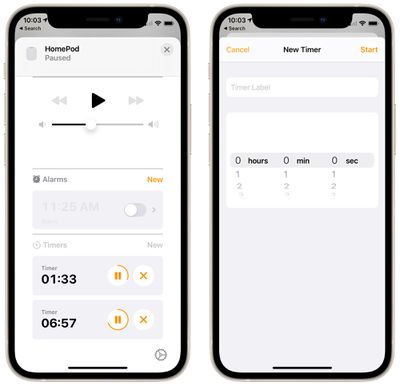
You can set a timer with a maximum timer limit of 24 hours. Any timers you have set on a particular ‌HomePod‌ will appear in this Timers section, and you can pause them or delete them individually using the respective buttons.

You can still set and manage timers via ‌Siri‌. All you need to say is "Hey Siri, set a timer for [x amount of time]." At any point while the timer is running, you can also ask ‌Siri‌ to turn it off with a command like "Hey Siri, turn off the timer" or "Hey Siri, pause the timer." You can also change the timer countdown with a command like "Hey Siri, change the timer to 10 minutes."

Just be aware that different HomePods aren't aware of timers set on other HomePods, even if they're on the same network.

Related Roundups: HomePod, HomePod mini

Popular Stories

HomePod 2 and Mini feature 1

Apple Releases HomePod Software 26.5

Monday May 11, 2026 9:59 am PDT by
Alongside iOS 26.5, iPadOS 26.5, and macOS Tahoe 26.5, Apple has released new HomePod 26.5 software for the HomePod and the HomePod mini. The update comes a little over a month after Apple released HomePod Software 26.4. According to Apple's release notes, HomePod Software 26.5 includes performance and stability improvements. ‌HomePod‌‌‌‌‌‌‌ software is installed...
Apple Card iPhone 16 Pro Feature

Apple Card Promo to Offer Free AirPods Pro 3

Friday May 15, 2026 8:59 am PDT by
Starting as early as next week, customers who sign up for an Apple Card at Apple's retail stores in the U.S. will receive $249 cash back when they purchase AirPods Pro 3, according to Bloomberg's Mark Gurman. The promotion has yet to be officially announced by Apple, so exact terms and conditions are not available at this time. AirPods Pro 3 are priced at $249 in the U.S., so customers who...
Apple WWDC25 iOS 26 CarPlay Light mode 250609

Six Popular iPhone Apps Now Available on CarPlay

Thursday May 14, 2026 9:10 am PDT by
Apple's CarPlay system for accessing iPhone apps on a vehicle's dashboard screen has received six popular apps in recent weeks: ChatGPT, Perplexity, Grok, Google Meet, WhatsApp, and the indie artist streaming platform Audiomack. Make sure you have the latest version of each app and they will automatically appear on CarPlay. ChatGPT Starting with iOS 26.4, CarPlay supports voice-based...















