How to Set Up an Apple Watch Using Family Setup - MacRumorsOpen MenuShow RoundupsShow Forums menuVisit ForumsOpen Sidebar
Skip to Content

How to Set Up an Apple Watch Using Family Setup

by

Family Setup is an Apple Watch feature in watchOS 7 that's designed to allow parents to set up Apple Watches for their children without them needing to own an iPhone as well.
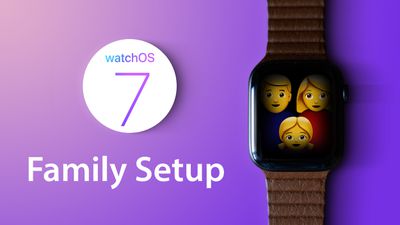
watchOS7 tips family setup
‌Family Setup‌ is mainly aimed at families with children, but it can also be used to set up an Apple Watch for an older adult or anyone else who doesn't have an iPhone but wants to take advantage of the health and fitness features of Apple Watch.

This article explains how to set up an Apple Watch to be used by someone else via ‌Family Setup‌. First though, there are some requirements to ‌Family Setup‌ that you should be aware of.

What You'll Need for Family Setup

‌Family Setup‌ is designed to work with a GPS and Cellular enabled Apple Watch Series 4 or later that's running ‌watchOS 7‌. It is not compatible with earlier Apple Watch models nor with those that do not have a cellular connection.

Cellular Apple Watch models require their own cellular plan, the price of which can vary between network operators, but you can get a plan for $10 month with most carriers in the United States. Note that while a cellular Apple Watch is required to set up a watch under ‌Family Setup‌, it can be activated without using a cellular plan.

The main person setting up ‌Family Setup‌ must have an ‌iPhone‌ 6s or later with iOS 14 installed, and all participants will need an Apple ID and will need to be part of a Family Sharing setup.

These last two requirements can be worked out during the setup process, but activating them beforehand will make the setup process a lot faster. Below are links to some how-tos that will help you with these pre-requisites, followed by a step-by-step walkthrough to set up an Apple Watch for ‌Family Setup‌.

How to Set Up an Apple Watch for Family Setup

  1. Turn on the Apple Watch.
  2. Launch the Watch app on your iPhone and go to the Apple Watch setup screen.
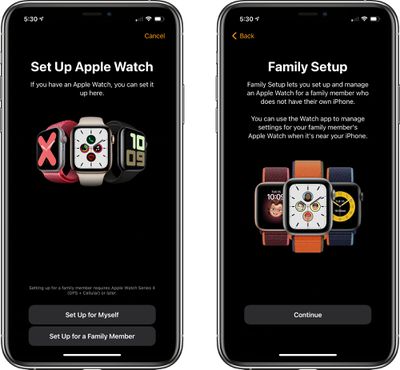
  3. Choose Set Up for a Family Member.
    familysetup1

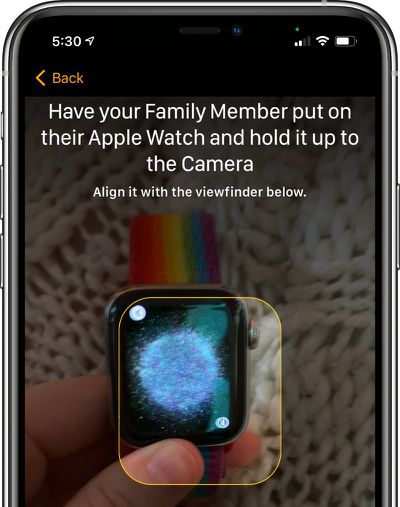
  4. Pair the Apple Watch with your ‌iPhone‌ by lining up the graphic on the watch's display with the ‌iPhone‌'s camera.
    applewatchfamilysetuppairing

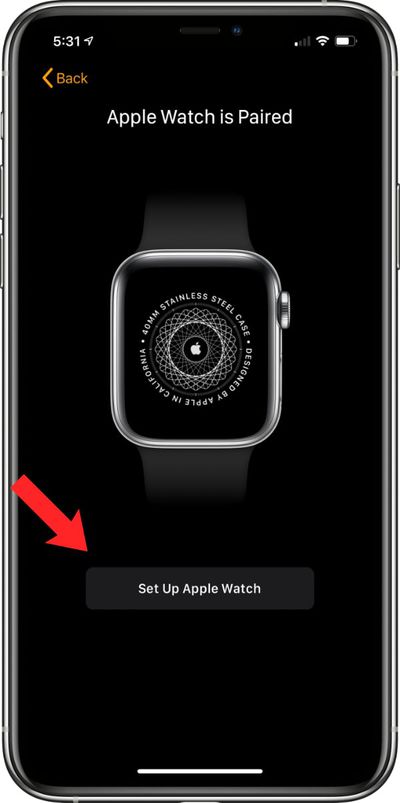
  5. Tap Set Up Apple Watch.
    setupapplewatchfamilysetup

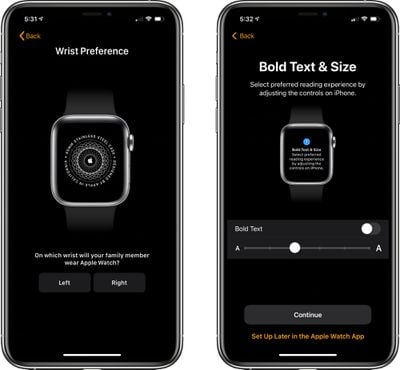
  6. Agree to the terms and conditions and select a wrist preference.
  7. Choose a text size for the Apple Watch, then select a passcode for unlocking it.
    familysetupapplewatchpreferences

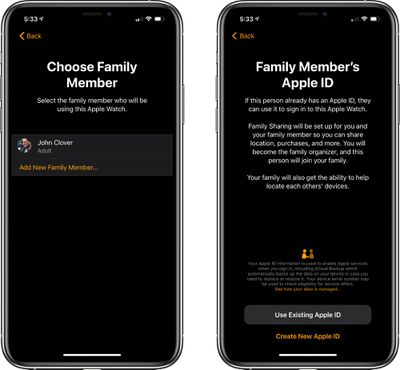
  8. Select the family member from your Family Sharing circle who will be using the Apple Watch. If the person is not a part of the Family Sharing group, you can choose to Add New Family Member and enter their ‌‌Apple ID‌‌.
    appleidfamilysetup

  9. If you chose the ‌‌Apple ID‌‌ route, you will need to go through some verification steps and enable two-factor authentication if it's not turned on. If you already had Family Sharing set up, enter the family member's ‌‌Apple ID‌‌ password to continue.
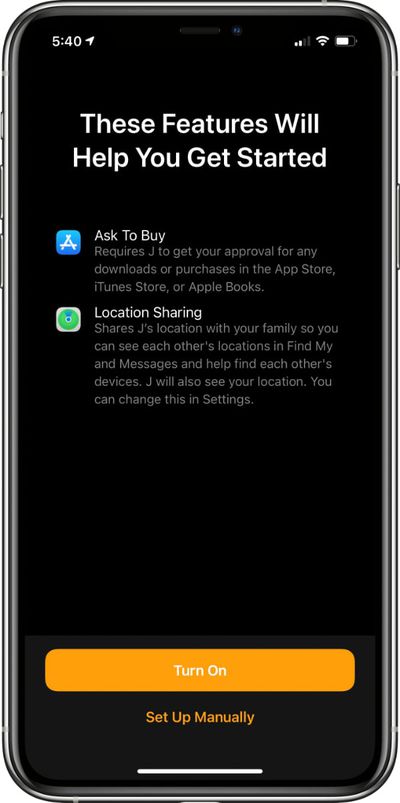
  10. Turn on Ask to Buy or Location Sharing if desired.
    familysetupgettingstarted

  11. Set up cellular and Wi-Fi access. Setting up cellular access will require going through your carrier/network operator, such as Verizon or Vodafone. This process can vary by carrier, but Apple and your carrier will walk you through the process on screen.
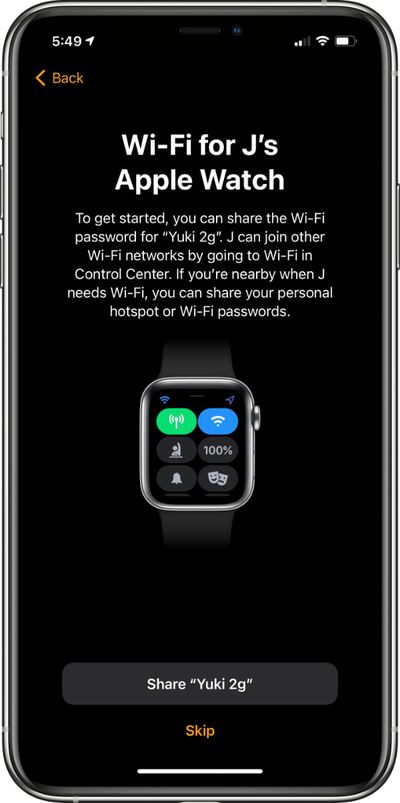
  12. You can also opt to set up cellular access at a later time and rely on Wi-Fi, but cellular is required for continual connectivity without an ‌iPhone‌. After setting up cellular or skipping it until later, tap the Share button to share your WiFi password with the Apple Watch.
    familysetupwifi

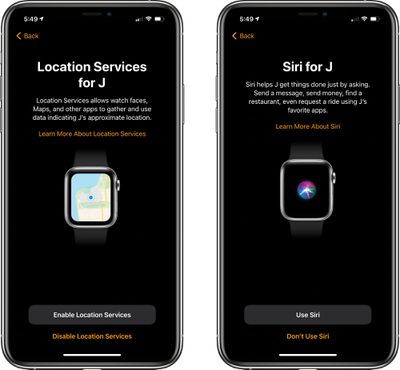
  13. Go through the additional setup screens for Location Sharing, Siri, analytics, and more.
    sirilocationservicesfamilysetup

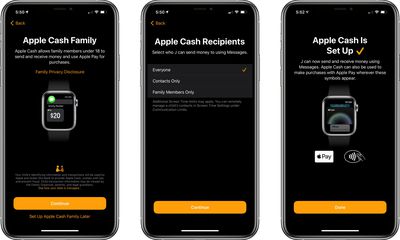
  14. Choose whether to set up Apple Cash Family, the feature that lets parents provide small amounts of cash to kids that can be used with Apple Pay for purchases. Parents can choose who their kids can send money to and receive money from. Agree to the Terms and Services, and confirm the legal name of your child.
    applecashfamilysetup

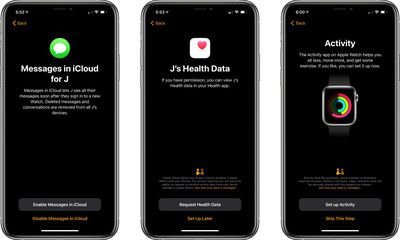
  15. Continue through the setup process, enabling or disabling additional services such as Messages in iCloud, Emergency SOS, Medical ID, Activity and route tracking options, Photos, trusted Contacts, Screen Time limits, Schooltime for limiting access during school hours, and a feature that lets parents view their children's health data, so daily activity can be monitored.
    evenmorefamilysetup

  16. After all of these settings are figured out, the Apple Watch will be ready to use and it will be listed under "Family Watches" in the Apple Watch app that belongs to the parent.
Apple offers parents quite a lot of control over what's enabled in ‌Family Setup‌ and how the Apple Watch functions. For an overview of what's available, be sure to check out our dedicated Family Setup guide.

Related Roundups: watchOS 26, watchOS 27
Related Forum: Apple Watch

Popular Stories

watchos 27

Apple Releases watchOS 27.2 With Siri AI Enhancements

Monday October 26, 2026 10:47 am PDT by
Apple today released watchOS 27.2, the first major update to the watchOS 27 operating system. watchOS 27.2 can be downloaded through the Settings app on the watch or the Apple Watch app on a connected iPhone. Software can only be installed when the Apple Watch is on the charger and has over 50 percent battery. According to Apple's release notes, watchOS 27.2 introduces new Siri AI...


watchos 27

Apple Seeds Updated watchOS 27.2 Release Candidate

Friday October 23, 2026 12:28 pm PDT by
Apple today seeded an updated version of the watchOS 27.2 release candidate, four days after the first RC became available. Registered developers and public beta testers can download software through the Apple Watch Settings app or using the Apple Watch app on iPhone. watchOS 27.2 adds new Siri AI features and extends Siri AI to more languages. This update provides enhancements to Siri...
siri recap live rewind

watchOS 27.3 Brings Live Rewind and Siri Recap to Apple Watch

Tuesday November 3, 2026 10:35 am PST by
With the first beta of watchOS 27.3, Apple is introducing new Audio Intelligence features it previewed for the Apple Watch Series 12 and Ultra 4 earlier this year. Powered by the S11 chip, Audio Intelligence includes Live Rewind, Siri Recap, Sound Recognition, and Shazam Music Recognition. Sound Recognition and Shazam are already on the watch, but Live Rewind and Siri Recap are now available ...
Latest Stories
Apple Releases macOS Golden Gate 27.2.1
1 hour ago
Apple Releases iOS 27.2.1 With Bug Fixes
1 hour ago
Apple Releases watchOS 27.2.1 and visionOS 27.2.1 With Security Fixes
1 hour ago
Apple Watch Ultra 4 Gets $99 Amazon Discounts, Starting at $699.99
1 hour ago
Apple Pay Ad Features Martial Arts Convenience Store Food Fight
2 hours ago
Apple Continues to Say Some AI Features Will Have Fees for Extra Usage
2 hours ago
Apple Announces Türkiye Expansion Plans as Tim Cook Visits
3 hours ago
Singapore Saved Apple $2.7 Billion in Taxes This Year
3 hours ago
Apple Music's 2026 Artist of the Year is Olivia Dean
3 hours ago
This Could Be Your Last Chance to Pre-Order the HomeView at a Discount
4 hours ago
Some HomePod Mini 2 Buyers Returning Units Over Mac Speaker Issues
4 hours ago
MacBook Pro With PROLED XDR Display: Details You Might Have Missed
4 hours ago
Satechi Offers MacRumors Readers 30% Off Select Accessories in Early Black Friday Sale
4 hours ago
Leaker Envisions a Shorter iPhone With a New iOS Layout
5 hours ago
Apple to Give You More Control Over When Your Mac Passwords Lock
6 hours ago
Siri Is Getting a Better Memory
6 hours ago
iPhone 18e Could Feature Bigger Display and Battery
7 hours ago
Apple's Siri Boss May Leave - Here's Who Could Take Over
7 hours ago
Apple Launching Two More New Products This Friday
7 hours ago
Apple Store Subscription Sign-Up Controversy Exposed
16 hours ago
Siri AI Rumored to Become 'More Like an Agent' as Early as Next Year
1 day ago
Apple Taking New Approach to Developing iOS 28 and macOS 28
1 day ago
Early Apple Black Friday Deals on Apple Watch, MacBook Air, and More
2 days ago
'Backglow' Lets You Customize New MacBook Pro's Glowing Apple Logo
2 days ago
Top Stories: Apple Product Launches, iOS 27.3 Beta, and More
2 days ago
More Fun iPhone Duo Apps: 30 New Picks to Try
3 days ago
Hands-On With Apple's New OLED Touchscreen MacBook Pro
3 days ago
Apple Store With All-New Design Opening Soon in Southern California
3 days ago
Control the Glowing Apple Logo on Your New MacBook Pro
3 days ago
Apple Shares New 'Apple Card: Apply and Use in Minutes' Ad
3 days ago