

How to Share Your Screen Using Messages on Mac - MacRumorsOpen MenuShow RoundupsShow Forums menuVisit ForumsOpen Sidebar
Skip to Content

How to Share Your Screen Using Messages on Mac

by

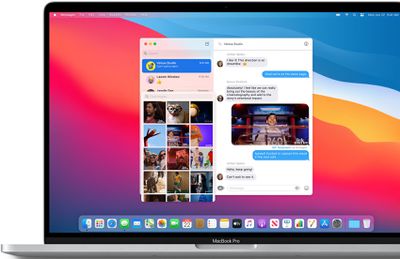
When you're chatting in Messages, you can share your Mac's screen with the person you're messaging, or they can share theirs with you. You can also let someone control your screen, and vice versa. It's a great way to give a friend or family member some remote tech support, or you can use it to work collaboratively on a project. Here's how it works.
messagesimages

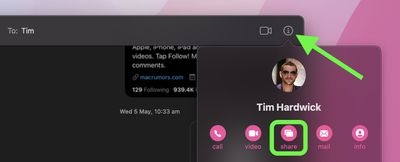
  1. In the Messages app on your Mac, select a conversation thread, then click the info (i) button.

  2. Click the Share button. (If the option is grayed out, make sure the other person is signed in to iCloud using the same Apple ID they used to sign into Messages.)
    messages

  3. Select Invite to Share My Screen or Ask to Share Screen. When the screen-sharing request is accepted, an audio call will be initiated so you can chat while you share screens.
  4. To stop screen sharing, click the screen-sharing icon in the menu bar, then choose End Screen Sharing. If you're viewing your friend's screen, choose Screen Sharing -> Quit Screen Sharing.
Let Someone Control Your Screen

When you're sharing your screen with someone, you can also let them control your screen, which gives them total access to your Mac.

If you trust the other person to do this, click the screen-sharing icon in the menu bar, then choose Allow [name] to control my screen. If you receive a message asking if you want to let the other person control your screen, select Control my screen, then click Accept.


Popular Stories

iOS 27 Next to iPhone

Here's When iOS 27 Rolls Out Today in Every Time Zone [Update: It's Out]

Sunday September 13, 2026 3:00 am PDT by
Update 10:04 a.m.: iOS 27 is rolling out now, though it may take a bit for all users to see it, so keep checking! Apple is about to release iOS 27, which will finally deliver more advanced Siri AI capabilities as well as a variety of other refinements, improvements, and new features to iPhones. It's Apple's biggest software update of the year, and Apple announced at Wednesday's iPhone event...
iOS 27 Icon iPhone

iOS 27 Available Now With These 8 New Features

Monday September 14, 2026 9:00 am PDT by
Update — 10 a.m. Pacific Time: Apple has released iOS 27. During its iPhone 18 Pro and iPhone Duo event last week, Apple announced that iOS 27 will be released widely on Monday, September 14. iOS 27 should be available around 10 a.m. Pacific Time / 1 p.m. Eastern Time today via the Settings app, under General → Software Update. Below, we have highlighted eight new features and...
Apple iCloud Plus expansion hero

iCloud+ Now Includes Apple TV, Apple Arcade, and Curated Apple Music Stations in Over 100 Countries

Tuesday September 15, 2026 1:43 am PDT by
Apple today announced a new subscription initiative that turns paid iCloud+ subscriptions into a broader services bundle in more than 100 countries. In select countries, Apple says every paid iCloud+ plan, including the cheapest 50GB tier, now includes Apple TV and Apple Arcade "at no additional cost," while family sharing extends the storage, TV and Arcade access to up to five people....















