

How to Sort Liked Songs in Spotify By Genre or Mood - MacRumorsOpen MenuShow RoundupsShow Forums menuVisit ForumsOpen Sidebar
Skip to Content

How to Sort Liked Songs in Spotify By Genre or Mood

by

If you're a big Spotify fan, you undoubtedly know that whenever you "Like" a song in the mobile app using the heart button, these songs are automatically added to your Liked Songs collection.
Spotify
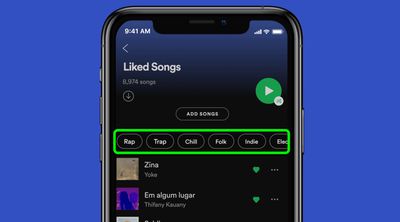
While it's always been possible to play the collection straight through like a playlist or tap individual songs to listen to them, Spotify recently added new filters that allow you to play only the songs that fit a certain mood or genre.

Using the new feature, as long as you have at least 30 tracks in your collection, you can filter your favorite songs using up to 15 personalized mood and genre categories. Follow the steps below to learn how to turn the new filters on and off.

  1. Launch the Spotify app on your iPhone or iPad.
  2. Tap Your Library in the bottom-right corner of the interface.
  3. Tap Liked Songs.
  4. Now tap one of the filters at the top of the playlist header to display all the tracks that fall under that mood or genre (you can swipe sideways on the horizontal list to reveal more).
  5. To move to another mood or genre at any time, simply tap the "X" next to the genre or mood to disable the filter and return to your full Liked Songs collection.

According to Spotify, if your tastes change or if you add and remove songs, your genre and mood filters will also update based on the content of your collection, so be sure to keep an eye out for new additions.

Tag: Spotify

Popular Stories

General Spotify Feature

Spotify Now Lets You Keep Kids' Music Out of Your Wrapped

Tuesday September 15, 2026 6:00 am PDT by
In a move that should be welcomed by parents and guardians of young children, Spotify has announced a new feature that lets you keep kids' and family music played on the service out of your taste profile. Starting today, Spotify is rolling out a new toggle in the app's settings that prevents kids' music from affecting your personalized recommendations. This includes, for example, songs you...
iOS 27 Next to iPhone

Here's When iOS 27 Rolls Out Today in Every Time Zone [Update: It's Out]

Sunday September 13, 2026 3:00 am PDT by
Update 10:04 a.m.: iOS 27 is rolling out now, though it may take a bit for all users to see it, so keep checking! Apple is about to release iOS 27, which will finally deliver more advanced Siri AI capabilities as well as a variety of other refinements, improvements, and new features to iPhones. It's Apple's biggest software update of the year, and Apple announced at Wednesday's iPhone event...
iOS 27 Icon iPhone

iOS 27 Available Now With These 8 New Features

Monday September 14, 2026 9:00 am PDT by
Update — 10 a.m. Pacific Time: Apple has released iOS 27. During its iPhone 18 Pro and iPhone Duo event last week, Apple announced that iOS 27 will be released widely on Monday, September 14. iOS 27 should be available around 10 a.m. Pacific Time / 1 p.m. Eastern Time today via the Settings app, under General → Software Update. Below, we have highlighted eight new features and...















