

 In iOS 13 and iPadOS, the Find My app replaces the Find My Friends and the Find My iPhone apps of old, and brings their features together in a unified interface that allows you to find whatever you need.
The Find My app works much like the two apps it replaces. For example, you can use it to share your location with friends, get notifications on friends' movements, stop sharing your location with particular friends, or turn off location sharing entirely.
Click the links above to learn how to access the respective sharing options in Find My. To learn how to stop sharing your location with a particular friend, simply follow the steps below.
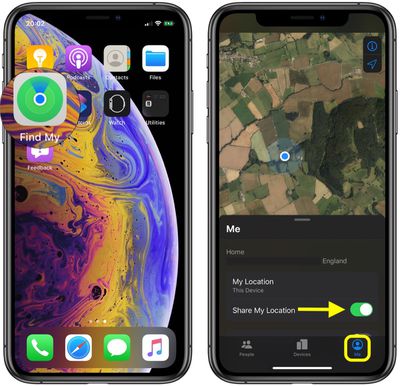
- Launch the Find My app on your iPhone or iPad. (The Find My app is available by default on all new iOS devices, but if you've deleted it, you need to download the free app from the App Store.)
- Tap the Me tab at the bottom of the screen.

- Make sure the toggle switch next to Share My Location is in the green ON position – simply tap the toggle to change its status if needed.
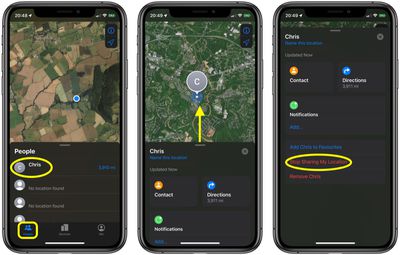
- Now, tap the People tab, and select the person you want to stop sharing your location with.
- Drag up the person's card onto the screen with a swipe of your finger to reveal all the sharing options.
- Tap Stop Sharing My Location.
When you turn off location sharing with a friend, this status is reflected in your iCloud settings, where you can also control sharing options. Launch the Settings app on your device, tap your Apple ID banner at the top, then tap Find My, and you'll see your list of friends who share locations with you. You can also find the list in Settings -> Privacy -> Location Services -> Share My Location.



















