If you're an Apple Music subscriber, you can add and download songs, albums, playlists, and video content from the Apple Music catalog to your personal music library, and access all of them on any other Apple devices you own that have the Music app.

With Apple's Sync Library feature enabled, the Apple Music content in your library will be synced across your devices as long as they are all signed in to the same Apple ID that you use with your Apple Music subscription.
The following steps show you how to enable Sync Library on iPhone, iPad, Mac and PC.
Turn on Sync Library on iPhone and iPad
- Launch the Settings app on your iPhone or iPad.
- Scroll down and tap Music in the apps list.
- Tap the Sync Library toggle to enable the feature.

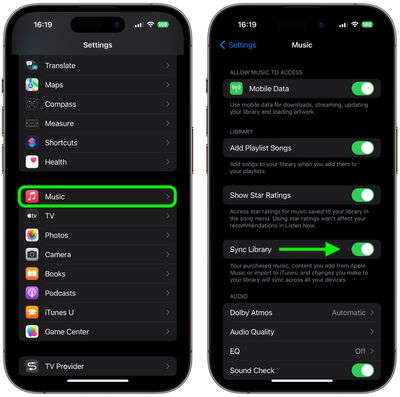
Turn on Sync Library on Mac
- Launch the Music app on your Mac.
- On Mac, select Account from the menu bar and make sure you're signed in with the same Apple ID that you use with your Apple Music subscription.
- From the menu bar, choose File -> Library -> Organize Library.
- Click the checkbox next to Consolidate files, then click OK.
- From the menu bar, choose Music -> Settings....
- In the "General" tab, select Sync Library, then click OK.
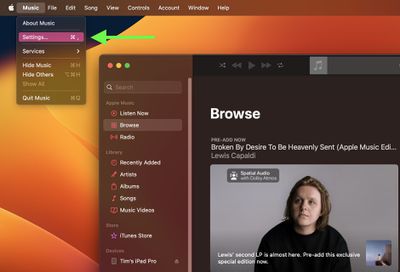
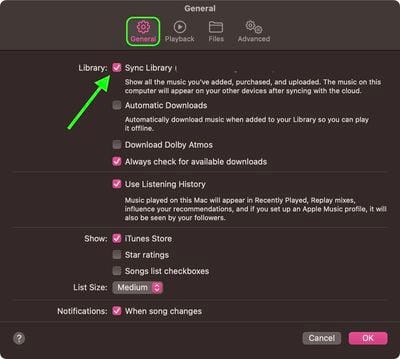
Wait for your music library to sync. You can check its status by going to the bottom of the sidebar and clicking Updating Cloud Music Library.
Turn on iCloud Music Library on PC
In iTunes for Windows, Sync Library is called iCloud Music Library.
- In the iTunes app, sign in to the iTunes Store using the same Apple ID that you used to set up iCloud Music Library on the first computer.
- Choose Edit -> Preferences, then click General.
- Select the iCloud Music Library checkbox.
That's all there is to it. All you need to do now is wait for your music library to sync.