Best Way to Transfer Data From Your Old iPhone to a New iPhone 13 - MacRumorsOpen MenuShow RoundupsShow Forums menuVisit ForumsOpen Sidebar
Skip to Content

Best Way to Transfer Data From Your Old iPhone to a New iPhone 13

by

If you've got a new iPhone 13 to replace your current iPhone, there are a few ways you can migrate your data across to the new device. You can restore your apps, data, and settings from your most recent iCloud backup, restore from a backup on your computer, or you can use device-to-device migration to transfer your data directly from your previous iPhone to your new one. There are currently known issues with restoring your data from a backup, so this article focuses on how to perform a wireless device-to-device migration.
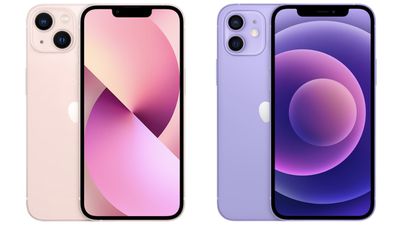
iphone 13 vs iphone 12
Without doubt, device-to-device migration will be the most convenient option for most owners of a new iPhone 13. It transfers over information like photos, app data, login credentials, device preferences and settings, and more. As with an ‌‌iCloud‌‌ backup, apps themselves are downloaded directly from the App Store rather than from your existing ‌iPhone‌. It may take a little longer than restoring from a backup, but the time saved from not having to log into all your apps again makes it worth the wait, which is why this process trumps the other transfer methods.

The following steps outline the Quick Start process that you can use to perform a wireless device-to-device migration. As always when transferring data between devices, make sure you have made a backup of your current iPhone, just in case anything untoward happens during the migration process.

It's also worth noting that if your current iPhone has an eSim plan, you'll be asked to "Transfer Cellular Plan" while setting up your iPhone 13: You can either select the numbers you want to transfer or opt to Decide Later to complete the plan transfer after you've set up your iPhone.

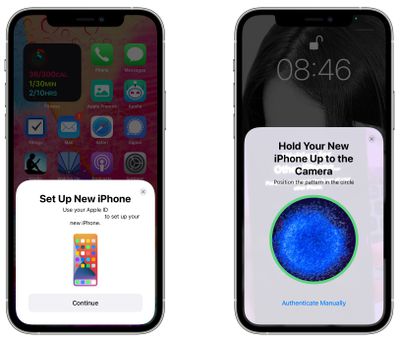
  1. Plug both iPhones into a power outlet, turn on your new iPhone 13 and place it near your current iPhone, which needs to be running iOS 12.4 or later for the transfer to work. The Quick Start screen will appear on your current iPhone and offer the option of using your Apple ID to set up your new device. Make sure that it's the ‌Apple ID‌ that you want to use, then tap Continue.
  2. Hold up your current iPhone and center the camera's viewfinder over the animation that appears on your iPhone 13. Wait for a message that says "Finish on New iPhone."
    set up iphone 13

  3. When prompted, enter your current passcode on your new iPhone 13.
  4. Follow the instructions to set up Face ID on your iPhone 13.
  5. Tap Transfer from iPhone to start transferring your data to your iPhone 13. You should be given the choice of whether to transfer some additional settings, such as Apple Pay and Siri, to your new iPhone.
  6. If you have an Apple Watch paired to your current iPhone, you'll be asked if you want to transfer your Apple Watch data and settings.
  7. Keep the two iPhones near each other and plugged into power until the data migration process is finished.
The amount of time that it takes to transfer data from one ‌iPhone‌ to another will vary based on what's on the existing ‌iPhone‌, but Apple provides a data transfer estimate on the main data transfer screen.

If the wireless network you're relying on is too slow, you can perform the data migration using a wired connection, but for that you'll need a Lightning to USB 3 Camera Adaptor and a Lightning to USB Cable. Connect the Camera Adaptor into your current iPhone, then plug the Lightning to USB Cable into your iPhone 13 and the other end into the adaptor. You'll then be able to follow the steps outlined above.

If you plan to sell or trade in your old iPhone to get a bit of extra cash, make sure to adequately erase everything on it to get it ready for its next owner.


Related Forum: iPhone

Top Rated Comments

bmodi Avatar
67 months ago
Also a restore is a "clean install". I think most misunderstand a "data transfer".
What it does is not to directly send everything from the old to the new. Just the settings get overtaken, which apps you had and so on. However all apps everything gets downloaded from the App Store like you would do it in case you do a manual setup. No difference. But overtaking it from the old Iphone will save you a lot of time!
Score: 8 Votes (Like | Disagree)
67 months ago
So at what stage do you swap the sim over?
Score: 5 Votes (Like | Disagree)
67 months ago
First time I experienced the 'device to device' migration by just holding the 2 phones next 2 each other 2 years ago with the iPhone 11Pro. By far the easiest most straightforward data transfer I've ever had. So much better than all the faff we used to have to endure backing everything up, plugging everything in etc.
Score: 4 Votes (Like | Disagree)
67 months ago
One great outcome for me was that the side-by-side transfer method allowed all of my music to be transferred - even the albums/songs I had ripped from CDs. Previously I had to use a third party app (e.g. iMazing) to transfer the music from a backup on my MacBook. The whole process took 45 minutes and was seamless. Well done Apple.
Score: 3 Votes (Like | Disagree)
67 months ago

I’m just going with a clean install. It’s slower overall but at least I get to control the order so the things I need are there first.
The only problem with clean installs is things like stickers or apps that aren't available anymore won't be available, even if you still use them on your current device. If you transfer, it keeps them. That might not be an issue for you, but I was bummed when I found some of the stuff that I was using didn't show up on my fresh install.
Score: 2 Votes (Like | Disagree)
67 months ago

what about the microsoft authenticator app? will it work either way you transfer?
Sadly no, both Microsoft and google authenticator did not transfer over my accounts using direct transfer.

Score: 2 Votes (Like | Disagree)

Popular Stories

apple pro tell logo

Apple Launching Five New Products Today

Thursday November 5, 2026 12:59 am PST by
Apple is launching five new products on Friday, November 6, following pre-orders that opened last week, including its first touchscreen MacBook Pro models. The following new products will be available from today: iPad mini with OLED display and A20 Pro chip iMac with M6 chip 14-inch MacBook Pro with M6 chip 14-inch MacBook Pro with OLED touchscreen 16-inch MacBook Pro with OLED...
duo aquarium

More Fun iPhone Duo Apps: 30 New Picks to Try

Friday November 6, 2026 3:27 pm PST by
When the iPhone Duo launched, we shared a list of some of the fun apps developers created for the new form factor. Two weeks out, developers are continuing to come up with fresh ideas, so we thought we'd share some of our favorites. Games Marbles Unhinged ($2.99) - Marbles Unhinged is a marble maze designed for the Duo. When you fold it, the floor turns into a ramp. If you stand the top...


silver iphone 18 pro

Apple Rumored to Drop the iPhone's Action Button Next Year

Friday November 6, 2026 6:07 am PST by
Apple plans to merge the iPhone's Action button with the Camera Control starting next year, according to the leaker known as "Instant Digital." In a new post on Weibo, the leaker claimed that a single press of the combined button would open the camera, while a long press would trigger the function assigned to the Action button. They explicitly clarified that the dedicated Action button would ...
Latest Stories
Siri AI Rumored to Become 'More Like an Agent' as Early as Next Year
6 hours ago
Apple Taking New Approach to Developing iOS 28 and macOS 28
8 hours ago
Early Apple Black Friday Deals on Apple Watch, MacBook Air, and More
1 day ago
'Backglow' Lets You Customize New MacBook Pro's Glowing Apple Logo
1 day ago
Top Stories: Apple Product Launches, iOS 27.3 Beta, and More
1 day ago
More Fun iPhone Duo Apps: 30 New Picks to Try
2 days ago
Hands-On With Apple's New OLED Touchscreen MacBook Pro
2 days ago
Apple Store With All-New Design Opening Soon in Southern California
2 days ago
Control the Glowing Apple Logo on Your New MacBook Pro
2 days ago
Apple Shares New 'Apple Card: Apply and Use in Minutes' Ad
2 days ago
Apple Says More Than 100,000 Apps Optimized for iPhone Duo, Here's What's Still Missing
2 days ago
Early Black Friday Deals Kickoff With Steep Discounts on Apple Watch Ultras and More
2 days ago
The MacRumors Show: iOS 27.3 Looks Like a Huge Update
2 days ago
Best Buy's Black Friday Event Begins With Sitewide Savings on Apple, TVs, More
2 days ago
Apple Releasing Yet Another Two New Products Next Week
2 days ago
MacBook Air Drops to Lowest Price in Months With Amazon's $250 Discount
2 days ago
Apple Rumored to Drop the iPhone's Action Button Next Year
2 days ago
Apple's Extended Return Policy Now in Effect for 2026 Holiday Season
2 days ago
Apple Music Classical Updated With New Icon and Refreshed Design
2 days ago
OLED iPad Mini, M6 iMac, and New MacBook Pros Available From Today
3 days ago
Apple Surveys iPhone Duo Buyers About Crease and Camera
3 days ago
Apple's First Touchscreen Mac is Now Arriving to Customers
3 days ago
Claude Gets Personal Finance Feature With Bank Account Linking
3 days ago
Apple Arcade Adds Crossy Road Rush and NBA 2K27
3 days ago
Apple's New HomeView Smart Home Hub: Here's How Much RAM It Has
3 days ago
iPad Mini vs. iPad Air Buyer's Guide: Now Just $50 Apart
3 days ago
First iOS 27.3 and macOS Golden Gate 27.3 Public Betas Now Available
3 days ago
Apple Announces a New Mac Sales Record
3 days ago
Paid $200 for Logic Pro? Apple Says You Won't Get This New Feature
3 days ago
Instagram's Edits Video Editor is Now Available on Mac
3 days ago







































