Turn a Long Webpage into a PDF with a Single iPhone Screenshot - MacRumorsOpen MenuShow RoundupsShow Forums menuVisit ForumsOpen Sidebar
Skip to Content

Turn a Long Webpage into a PDF with a Single iPhone Screenshot

by

In iOS and iPadOS, Apple includes a built-in screenshot feature that also provides you with the ability to capture an entire webpage on your iPhone or iPad that you can then save or share with someone as a PDF document.

safari macos icon banner
By converting full‑page screenshots into PDFs directly within Safari, you can preserve the exact layout and content of lengthy articles, receipts, or social media threads in a single, shareable file. Using the feature also eliminates the need to stitch together multiple images or rely on third‑party apps, plus the text remains searchable and any images stay crisp.

Here's how the feature works.

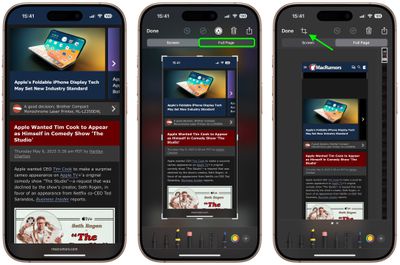
  1. Launch Safari and navigate to the webpage that you wish to capture.
  2. If your device lacks a Home button, press the power button located at the top of the device and the volume up button located on the right of the device at the same time to take a screenshot. Otherwise, press the Home button and the Sleep/Wake button simultaneously to capture a screenshot.
  3. A preview of the screenshot will pop up in the lower left of the display. Tap it to open up the Instant Markup interface. You'll have about five seconds before it disappears.
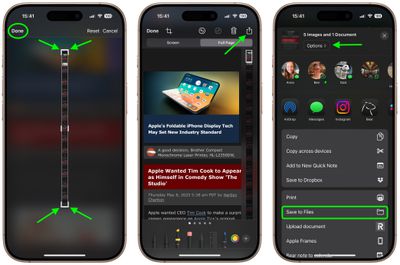
  4. Tap the Full Page tab in the upper right corner of the Markup interface, then tap the Crop icon at the top.
    safari

  5. Use the frame around the webpage to select what to capture by dragging the corners with your finger, then tap Done.
  6. Tap the Share sheet icon (the square with an arrow pointing out) to bring up a panel of share options and actions.
  7. From here, you can either share the captured webpage as a PDF document using the top two rows of icons, or save it somewhere (Save to Files, for example) using the Action menu options below. You can also use the Options button to name the file.
    safari

Note that you can always use the Markup tools to edit your PDF before saving or sharing it.

Tag: Safari

Top Rated Comments

13 months ago

... press the power button located at the top of the device and the volume up button located on the right...
Actually they moved the power button from the top to the right side...just the other day. And the volume buttons have always been on the left side.
Score: 11 Votes (Like | Disagree)
13 months ago
Love this feature. As insane as the thumbnail looks, the resulting document is very easy to read on mobile. I do wish News supported the same thing.
Score: 6 Votes (Like | Disagree)
It’s always something Avatar
13 months ago

Now, if we can only get a save as photo option. If you’re sending someone a screenshot in a text, you don’t want to send them a PDF. It’s not a job application.
You can do this two ways with the full page: the Done menu gives you the choice to save the full page screenshot to Photos (from where you can then share it). Or, in the Share menu, tap Options and choose Single Image before sending it in a text.
Score: 4 Votes (Like | Disagree)
cateye Avatar
13 months ago
This is one of those weird little features that I was like, "but why, tho?" when it debuted, and then I ended up using it all the time. It's super handy.
Score: 4 Votes (Like | Disagree)
russell_314 Avatar
13 months ago
Now, if we can only get a save as photo option. If you’re sending someone a screenshot in a text, you don’t want to send them a PDF. It’s not a job application.
Score: 4 Votes (Like | Disagree)
russell_314 Avatar
13 months ago

I'm just here to say that I love those small iOS and macOS tip posts!
Absolutely! I learned something from this thread
Score: 3 Votes (Like | Disagree)

Popular Stories

MacBook Pro Low Angle Wide Lens

macOS 27: Two More Changes Leaked Ahead of WWDC Next Month

Sunday May 10, 2026 9:45 am PDT by
macOS 27 will have a "slight redesign" compared to macOS Tahoe, according to the latest word from Bloomberg's Mark Gurman. In his Power On newsletter today, Gurman said the design changes will help to improve the readability of macOS Tahoe's Liquid Glass interface:If you've used Tahoe, you're likely familiar with some of the quirks — particularly the transparency effects and shadows that...
Apple Card iPhone 16 Pro Feature

Apple Card Promo to Offer Free AirPods Pro 3

Friday May 15, 2026 8:59 am PDT by
Starting as early as next week, customers who sign up for an Apple Card at Apple's retail stores in the U.S. will receive $249 cash back when they purchase AirPods Pro 3, according to Bloomberg's Mark Gurman. The promotion has yet to be officially announced by Apple, so exact terms and conditions are not available at this time. AirPods Pro 3 are priced at $249 in the U.S., so customers who...
Apple WWDC25 iOS 26 CarPlay Light mode 250609

Six Popular iPhone Apps Now Available on CarPlay

Thursday May 14, 2026 9:10 am PDT by
Apple's CarPlay system for accessing iPhone apps on a vehicle's dashboard screen has received six popular apps in recent weeks: ChatGPT, Perplexity, Grok, Google Meet, WhatsApp, and the indie artist streaming platform Audiomack. Make sure you have the latest version of each app and they will automatically appear on CarPlay. ChatGPT Starting with iOS 26.4, CarPlay supports voice-based...