

How to Bring Color Back to Infograph Apple Watch Faces After Updating to watchOS 6 - MacRumorsOpen MenuShow RoundupsShow Forums menuVisit ForumsOpen Sidebar
Skip to Content

How to Bring Color Back to Infograph Apple Watch Faces After Updating to watchOS 6

by

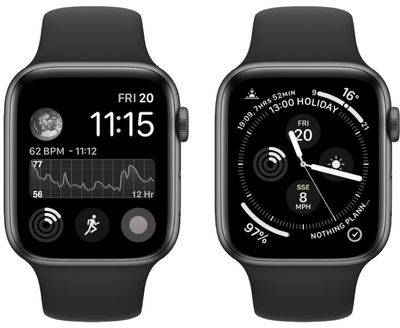
If you use one of the Infograph watch faces on your Apple Watch, you may be surprised to find that the colors have drained from your chosen complications since you updated to watchOS 6.
monochrome infograph watchos6 2
Despite how it may first seem, the sudden grayscale look is not a bug, but an intentional watch face change that Apple describes as "new monochrome complications in Infograph and Infograph Modular" in the watchOS 6 release notes.

The way Apple has implemented the feature is a bit confusing initially, because the monochrome style appears by default if you've selected one of the various accent colors for your watch face. The chosen accent remains, but the complications display in monochrome.

If you don't like it, you can reinstate color complications by following these simple steps.

  1. On your Apple Watch, hard press on the monochrome Infograph watch face.
  2. Tap Customize.
    monochrome infograph watchos6 1

  3. On Infograph watch faces, use the Digital Crown to scroll up and select either the Black or White color option. On Infograph Modular faces, scroll up and select Multicolor.
  4. Press the Digital Crown twice to confirm your selection and exit the customize screen.
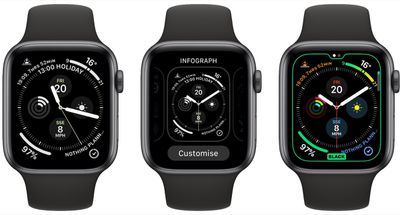
You can do the same thing in the Watch app on iPhone. Select the My Watch tab and tap the offending watch face under My Faces, then select Black, White, or Multicolor from the color options.


Related Roundup: Apple Watch 11
Buyer's Guide: Apple Watch (Caution)

Top Rated Comments

iSRS Avatar
88 months ago
To those who say their Series 4 did not do this, were you previously using the black or white face? If you were using any of the colors, volt, red, anything other than black or white, your watch likely did do this.
This article isn’t a “fix” it’s telling you to change your color on that face from literally any color except black or white.
Score: 6 Votes (Like | Disagree)
xplora Avatar
88 months ago
This article fails at explaining what Apple has done. Simply, Apple has changed all the colour accents to have monochrome complications, leaving only the black, and white accents with colourful complications. So, no, you cannot go back to your chosen accent colour if you want colourful complications.
Score: 4 Votes (Like | Disagree)
cmChimera Avatar
88 months ago
Wait but I can’t set an accent color for the dial anymore?
Score: 4 Votes (Like | Disagree)
Koshkaboo Avatar
88 months ago

This article fails at explaining what Apple has done. Simply, Apple has changed all the colour accents to have monochrome complications, leaving only the black, and white accents with colourful complications. So, no, you cannot go back to your chosen accent colour if you want colourful complications.
This! The article is poor in explaining the problem and making it clear that the solution doesn't actually solve the problem. I had chosen the purple accent color before this and had my complications have color. Now, if I want a purple accent color I have to have monochrome complications. So, yeah, I went and selected black and it "solved" the complications problem...but now I don't have purple accent color any more.
Score: 3 Votes (Like | Disagree)
ScottNWDW Avatar
88 months ago
I loved the info graph watch face, but now not so much because I can't change the accent color to match my band like I used to do,
Score: 3 Votes (Like | Disagree)
88 months ago

Wait but I can’t set an accent color for the dial anymore?
This was my first thought as well after reverting my watch back to colours. Sucks a bit
Score: 3 Votes (Like | Disagree)

Popular Stories

Apple Watch SE 3 1

Apple Adds Apple Watch to Education Store in Australia, China, Japan, and More

Thursday May 7, 2026 8:14 am PDT by
Apple today added the Apple Watch to its Education Store in select countries, allowing students and teachers to purchase the device at a discount. The Apple Watch Series 11, Apple Watch SE, and Apple Watch Ultra 3 are available with education pricing in Australia, China, Hong Kong, Japan, Malaysia, Singapore, South Korea, Taiwan, Thailand, and Vietnam. Apple is offering up to a 10%...
apple watch ultra 3 1

Apple Now Requires UNiDAYS Verification for Education Discounts in U.S. and Canada, Adds Apple Watch

Friday May 8, 2026 3:00 am PDT by
Starting today, Apple will require customers in the U.S., Canada, and Chile to verify their status as a student or educator to get educational discounts. Apple is adopting the UNiDAYS verification system that it uses in other countries, with a new process to accommodate homeschool families. Apple is also adding the Apple Watch Series 11, Apple Watch SE, and Apple Watch Ultra 3 to its...
Apple Watch Series 10 Jet Black Touch ID

Apple Watch Series 12 and watchOS 27: What to Expect Later This Year

Friday May 8, 2026 2:07 pm PDT by
While not too much has been reported about the next Apple Watch models, there are a few rumors about potential design changes and watchOS 27 features. Apple Watch Series 12 and Apple Watch Ultra 4 models are expected to be released in September, and we have outlined some of the key rumored hardware and software changes below. A new Apple Watch SE is not expected this year, as that model was...













