How to Turn Off 'Hey Siri' on HomePod - MacRumorsOpen MenuShow RoundupsShow Forums menuVisit ForumsOpen Sidebar
Skip to Content

How to Turn Off 'Hey Siri' on HomePod

by

One of the main features of Apple's HomePod is its "Hey Siri" function, which allows you to invoke Apple's voice-activated assistant handsfree and get it to answer queries and control functions related to other devices and services.
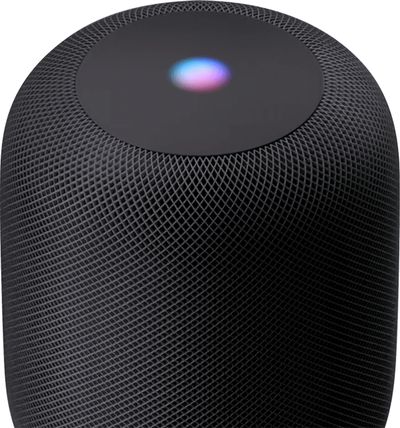
homepod siri
If you don't find ‌Siri‌ particularly useful on ‌HomePod‌ or you just don't like the idea of your speaker constantly listening for the words "Hey ‌Siri‌," you can always turn the feature off. The following steps show you how.

  1. Launch the Home app on your iPhone or iPad.
  2. Tap the Home tab if it isn't already selected.
  3. Press and hold the HomePod icon.
    how to turn off hey siri on homepod

  4. Tap Settings at the bottom right corner of the screen.
  5. Scroll down to the ‌Siri‌ section of options and tap the switch next to Listen for "Hey Siri" to toggle it to the white OFF position.
  6. Tap Done in the upper right corner of the screen.
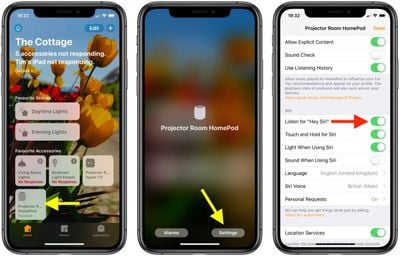
The "Hey ‌Siri‌" handsfree function is now disabled on your ‌HomePod‌. If you change your mind at any time and want to re-enable ‌Siri‌, simply toggle the switch back on again in the Home app.

Related Roundup: HomePod
Buyer's Guide: HomePod (Caution)

Popular Stories

macOS iOS 27 Siri App Feature

Apple's Siri AI Can Be Swapped Out for Claude, ChatGPT, Code Shows

Monday September 14, 2026 4:37 am PDT by
Code sleuth "pdfu" has uncovered iOS 27 and macOS Golden Gate private frameworks that show Apple has designed its new Siri architecture to work with third-party AI models at what appears to be a surprisingly deep level. One mechanism called Model Delegation allows Claude to appear as a Siri extension in the same way as the existing built-in ChatGPT extension. In pdfu's video, shared on X,...
macOS iOS 27 Siri App Feature

Reminder: iOS 27's All-New Siri AI Has a Waitlist, Here's How to Sign Up

Tuesday September 15, 2026 8:54 am PDT by
Apple this week released iOS 27 following around three months of beta testing. If you just installed the software update on your iPhone, you might be wondering where the new-and-improved Siri AI and dedicated Siri app are. In case you missed it, you must join Apple's waitlist in order to gain access to these new features. Keep in mind that while iOS 27 is compatible with the iPhone 11 and...
iOS 27 Out Now Thumb

Apple Releases iOS 27 and iPadOS 27 With Siri AI and Liquid Glass Update

Monday September 14, 2026 10:04 am PDT by
Apple today released iOS 27 and iPadOS 27, the newest operating system updates for the iPhone and iPad. The software is available for free on all compatible devices, and can be downloaded over the air by going to Settings > General > Software Update. Subscribe to the MacRumors YouTube channel for more videos. It can take several minutes for the updates to propagate to all users due to high...