

Turn Off the User Profiles Screen on Apple TV 4K - MacRumorsOpen MenuShow RoundupsShow Forums menuVisit ForumsOpen Sidebar
Skip to Content

Turn Off the User Profiles Screen on Apple TV 4K

by

Starting with tvOS 26.2, Apple TVs began displaying a user profile selection screen every time you wake the device from sleep. The feature helps households with multiple users maintain separate viewing histories and recommendations, but it can feel like an unnecessary step if you're the sole user.
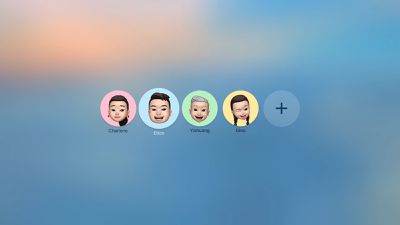
tvOS 26 Profiles
Fortunately, Apple lets you disable this prompt entirely. Here's how to turn off the user profiles screen and go straight to your Home screen.

Disable the User Profile Selection Screen

  1. Open Settings on your Apple TV.
  2. Select Profiles and Accounts.
  3. Toggle off Choose Profile on Wake.

With this setting disabled, your Apple TV will skip the profile selection screen and take you directly to the Home Screen when you wake it.

What Happens When You Disable Profile Switching

Turning off the profile switcher doesn't delete your user profiles or their associated watch history and recommendations. It simply removes the prompt that appears each time you turn on your TV or Apple TV.

If you share your Apple TV with others and want to switch profiles manually, you can still access profile options by going to Settings ➝ Users and Accounts and selecting a different user profile from there.

To learn more about how user profiles can be genuinely useful, check out our dedicated hands-on article.


Top Rated Comments

Mr Todhunter Avatar
22 weeks ago
I needed that. Thank you.
Score: 9 Votes (Like | Disagree)
22 weeks ago

This is the most redundant article ever. What kind of self loathing, split-personality narcissist would create multiple AppleID/iCloud accounts, then manually add and configure all those accounts on their AppleTV, even though they are the "sole user" of that AppleTV.
Am I a self loathing, split-personality narcissist because my family has four user accounts, but the Apple TV in my office is only used by me?

The one in the living room is used by the whole family, so the account selector is there, but not every room has multiple users.
Score: 7 Votes (Like | Disagree)
22 weeks ago
Of all my Apple devices the Apple TV is by far the least user-friendly. The remote control is still an issue after all these years.

And the user profiles are so annoying because they don’t sync with the third party streaming apps.
Score: 6 Votes (Like | Disagree)
aespana Avatar
22 weeks ago
The first thing I did when the Apple TV auto updated it self was disabling this. My mother asked why there was a new screen of choosing profiles or faces and because that, she couldn't go to YouTube and use the app.
Score: 6 Votes (Like | Disagree)
22 weeks ago
Also a useful tip for families that don’t bother with an ATV profile because all of the apps have their own profile selections (except ATV itself, of course)
Score: 6 Votes (Like | Disagree)
22 weeks ago

This is the most redundant article ever. What kind of self loathing, split-personality narcissist would create multiple AppleID/iCloud accounts, then manually add and configure all those accounts on their AppleTV, even though they are the "sole user" of that AppleTV.
Somehow I'm not surprised you live alone!
Score: 4 Votes (Like | Disagree)

Popular Stories

airpods pro 3 pink

New Apple Card Holders Can Get Free AirPods Pro 3, But There's a Catch

Monday May 18, 2026 8:11 am PDT by
Apple today launched a new promotion offering new Apple Card holders the chance to earn back the cost of AirPods Pro 3 through monthly cash rebates, but there is a recurring spend requirement attached. Customers who open a new Apple Card account and purchase AirPods Pro 3 directly from Apple by June 15 will qualify. Starting July 1 and running through April 30, 2027, cardholders can earn $25 ...
Foldable iPhone 2023 Feature 1

Foldable iPhone Production Stalls Amid Hinge Issues

Monday May 18, 2026 7:29 am PDT by
Trial production of Apple's long-anticipated foldable iPhone, likely called the "iPhone Ultra," has run into a significant engineering hurdle centered on hinge reliability, according to a known leaker. The leaker known as "Instant Digital" posted on Weibo that the foldable device's hinge is consistently failing to meet Apple's quality control standards under conditions of prolonged,...
wwdc apple park in person

Apple Announces WWDC 2026 Schedule, Sends Media Invites

Monday May 18, 2026 10:23 am PDT by
Apple today provided a schedule for its 2026 Worldwide Developers Conference, which starts on June 8 and ends on June 12. Apple also sent out invites to members of the media who have been invited to attend an in-person keynote viewing at Apple Park. Both the invites and schedule confirm that the keynote will begin at the standard time, 10:00 a.m. Pacific Time or 1:00 p.m Eastern Time....













