How to Easily Unlock Your iPhone with a Mask - MacRumorsOpen MenuShow RoundupsShow Forums menuVisit ForumsOpen Sidebar
Skip to Content

How to Easily Unlock Your iPhone with a Mask

by

In the current health climate, many people are wearing masks that cover their faces when going outside, visiting stores, and other tasks, and Apple's iPhones that use Face ID do not unlock when the user's face is obscured by a mask.
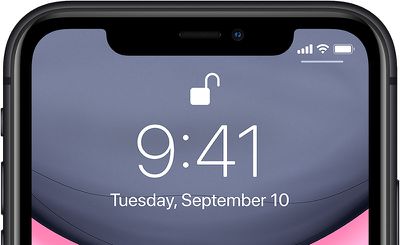
iphone11faceid
With this in mind, in iOS 13.5, Apple has streamlined the speed with which the passcode pops up when a mask on the face is detected, making it easier to get into an iPhone with a passcode when ‌Face ID‌ fails.

So when you swipe upwards on the Lock screen to unlock the ‌iPhone‌, this action immediately brings up the passcode interface if your face is covered by a mask.

If you haven't updated to iOS 13.5 yet (and you really should) here's the quickest way to get into your iPhone or iPad Pro when wearing a face mask.

Quickly Get to Passcode Screen

If you're using a version of iOS that's earlier than iOS 13.5, you can actually get to the passcode screen faster when you swipe up to unlock your iPhone.
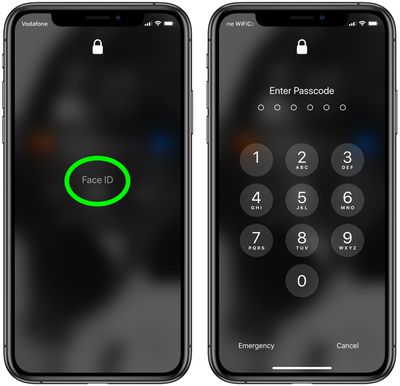
passcode lock
Tap the ‌Face ID‌ text in the center of the screen and you won't have to wait for it to scan your face and fail – you'll immediately be prompted for the passcode instead.

Other than updating your device's software, the only other way to use an iPhone with a mask is simply to turn off ‌Face ID‌ altogether and use a passcode instead. The following steps show you how to disable ‌Face ID‌ for just unlocking your iPhone.

How to Turn Off Face ID for Unlocking Only

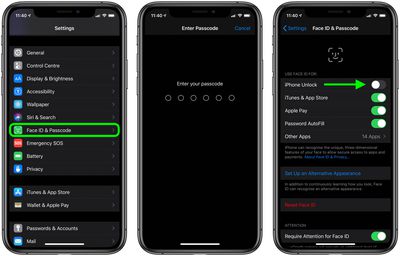
  1. Launch the Settings app on your iPhone.
  2. Tap Face ID & Passcode.
  3. Enter your passcode when prompted.
  4. Under Use Face ID For, switch off the toggle next to iPhone Unlock, and any of the other use cases listed that you don't want to use ‌Face ID‌ with.
    face id off

After carrying out the steps above, you'll be able to unlock your iPhone immediately using your passcode.

Top Rated Comments

manhattanboy Avatar
80 months ago
My secret is to just grab the face mask and pull it down. Works every time.
Score: 13 Votes (Like | Disagree)
80 months ago
This isn’t just a “current health climate” for many Apple customers. I, and many coworkers, wear surgical masks for many hours every work day. We are hanging onto our 8+ iPhones and will not upgrade until TouchID is reintroduced. Unlocking, passwords, and ApplePay use make FaceID a non-starter for many of us. I hope Apple is listening to this market potential.
Score: 7 Votes (Like | Disagree)
80 months ago
Good tip on tapping the words “Face ID.” I had no idea you could do that.
Score: 7 Votes (Like | Disagree)
80 months ago

My secret is to just grab the face mask and pull it down. Works every time.
I just cut holes in the mask that I re-use everyday. Flawless logic.
Score: 6 Votes (Like | Disagree)
justperry Avatar
80 months ago
Simple if you have a four digit password, mine is 15 characters long, similar to " n$63%24*57#(35G "...:eek:
Score: 6 Votes (Like | Disagree)
CarlJ Avatar
80 months ago
How to Quickly Unlock Your iPhone When Wearing a Face Mask

Put your thumb on the Home button.

(Since the title didn’t specify which iPhone - this method likely works on a larger percentage of iPhones in use than the method specified in the article.)

Also, the article assumes/demonstrates a 6-digit numeric passcode. If you’re using TouchID or FaceID, your alternate password really ought to be 15+ alphanumeric characters - 6 digits is too simple.
Score: 6 Votes (Like | Disagree)

Popular Stories

macOS 27 on MacBook Pro

Apple Says macOS 27 Won't Be Compatible With These Macs

Wednesday June 3, 2026 8:29 am PDT by
During WWDC 2025, Apple revealed that macOS 26 Tahoe would be the final major macOS version for Intel-based Macs. macOS 27 will be compatible with Apple silicon Macs only, meaning that you will need a Mac with an M-series chip or a MacBook Neo with an A18 Pro chip in order to install the software update. Apple will unveil macOS 27 during its WWDC 2026 keynote this Monday, June 8, and the...
MacBook Neo on Yellow Feature

MacBook Neo is So Popular That Apple Reportedly Doubled Production

Wednesday June 3, 2026 9:24 am PDT by
On an earnings call in late April, Apple's CEO Tim Cook said that customer response to the MacBook Neo was "off the charts," and the popularity of the laptop has reportedly led the company to significantly boost production. Apple supply chain analyst Ming-Chi Kuo this week said he believes that MacBook Neo shipments to Apple were doubled from an initial target of 5 million units to 10...
iphone 18 pro blue%402x

iPhone 18 Pro: Dark Cherry, Light Blue, and Dark Gray Chassis Leaked [Update]

Thursday June 4, 2026 5:18 am PDT by
Update: Since publication, new information has come to light suggesting the images have been AI-manipulated and are not in fact iPhone 18 Pro chassis parts. The original article follows. The color options Apple is reportedly planning for the upcoming iPhone 18 Pro and ‌iPhone 18 Pro‌ Max have appeared online today in the form of images of chassis parts of unknown authenticity....