How to Get Siri to Announce Incoming Messages Over AirPods - MacRumorsOpen MenuShow RoundupsShow Forums menuVisit ForumsOpen Sidebar
Skip to Content

How to Get Siri to Announce Incoming Messages Over AirPods

by

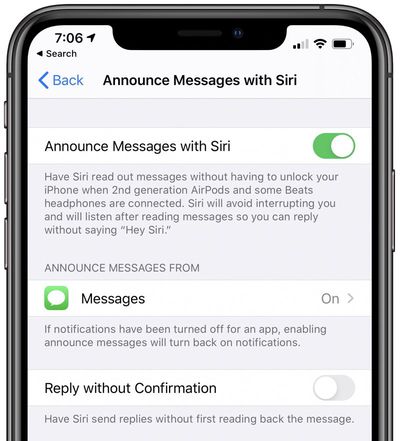
In iOS 13.2, Apple introduced Announce Messages with Siri, a new iPhone feature that allows you to listen to and respond to incoming text messages when you're wearing connected AirPods or Powerbeats Pro headphones.

airpodsvspowerbeatscase
In short, if you receive a message when you're wearing a pair of Apple's wireless headphones, ‌Siri‌ will transcribe it to you so you don't have to look at your iPhone or Apple Watch, and if you wish, you can reply to it instantly without even having to say "Hey, ‌Siri‌."

announcemessageswithsiri
Announce Messages with ‌Siri‌ is disabled by default, but you can easily turn it on by following the steps below. Note that for the feature to work, you need a pair of second-generation AirPods or ‌Powerbeats Pro‌ with Apple's proprietary H1 chip -- it won't work with third-party Bluetooth headphones.

  1. Launch the Settings app on your iPhone.
  2. Tap Siri & Search.
  3. Toggle on the switch next to Announce Messages.
  4. To reply to a message without it being read back to you, toggle on the switch next to Reply Without Confirmation.

The Announce Messages feature also supports third-party messaging apps like WhatsApp. You can choose which apps you want it to work with by selecting them from the same settings screen, below where it says Announce Messages From. Just note that if notifications have been turned off for the app you choose, they'll be turned back on again.


Popular Stories

macOS iOS 27 Siri App Feature

Apple's Siri AI Can Be Swapped Out for Claude, ChatGPT, Code Shows

Monday September 14, 2026 4:37 am PDT by
Code sleuth "pdfu" has uncovered iOS 27 and macOS Golden Gate private frameworks that show Apple has designed its new Siri architecture to work with third-party AI models at what appears to be a surprisingly deep level. One mechanism called Model Delegation allows Claude to appear as a Siri extension in the same way as the existing built-in ChatGPT extension. In pdfu's video, shared on X,...
iOS 27 Out Now Thumb

Apple Releases iOS 27 and iPadOS 27 With Siri AI and Liquid Glass Update

Monday September 14, 2026 10:04 am PDT by
Apple today released iOS 27 and iPadOS 27, the newest operating system updates for the iPhone and iPad. The software is available for free on all compatible devices, and can be downloaded over the air by going to Settings > General > Software Update. Subscribe to the MacRumors YouTube channel for more videos. It can take several minutes for the updates to propagate to all users due to high...
apple watch series 12 siri recap

Apple Explains What Happens to Conversations Siri Recap Hears

Thursday September 10, 2026 4:38 pm PDT by
The Apple Watch Series 12 and Ultra 4 have new Audio Intelligence features that include Sound Recognition, Music Recognition, Live Rewind, and Siri Recap. When these features are activated, the new Apple Watches are always listening to what's going on around the wearer. With Siri Recap, the Apple Watch listens to your conversations throughout the day and takes notes. It uses Apple...