Since December 2022, Apple has included a Karaoke feature with all Apple Music subscriptions. It's called Apple Music Sing, and it lets users sing along to their favorite songs by adjusting the volume of the vocals in tracks.
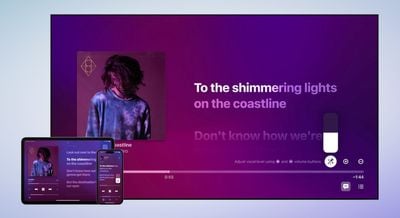
Available on iPhone, iPad, and Apple TV 4K (2022), Apple Music Sing works with Apple Music's real-time lyrics feature, and gives you control over a song's vocal levels. This means you can sing along with the original artist vocals or turn the vocals down and take the lead.
When there's background vocals in a song, the vocal lines sung simultaneously can animate independently from the main vocals to make it easier for you to follow. And if there's a duet or more singers, multiple vocals show on opposite sides of the screen to make them easier to sing along to. Apple says that "tens of millions of songs" support the feature.
Devices That Support Apple Music Sing
To use Apple Music's Sing feature, you'll need one of the following devices running iOS 16.2 and later, iPadOS 16.2 and later, or tvOS 16.2 and later.
- iPhone 11 series models
- iPhone 12 series models
- iPhone 13 series models
- iPhone 14 series models
- iPhone 15 series models
- iPhone SE (Third-generation)
- iPad Pro 12.9-inch (Fifth-generation and later)
- iPad Pro 11-inch (Third-generation and later)
- iPad Air (Fourth-generation and later)
- iPad (Ninth-generation and later)
- iPad mini (Sixth-generation)
- 2022 Apple TV 4K
How to Use Apple Music Sing on Apple Devices
- Open the Music app on your Apple device and start playing a track.
- With the fullscreen playback controls open, select the Lyrics button (the quotation mark speech bubble) if it's available for the song.
- Select the Sing button (the mic and stars icon) just above the track progress bar. If you don't see it, the Sing feature isn't available for this song.
- With the track playing, press and hold the Sing button, then move the slider up or down to adjust the volume of the vocals.
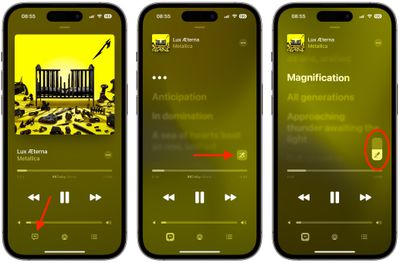
When you no longer want to sing along to the music, simply select the Sing button again to turn off the feature.
To help you get the most out of the feature, Apple Music includes dozens of playlists focused on "all of the epic songs, duets, choruses, and anthems that have been compelling people all around the world to sing."