How to Locate a Lost iPhone or Other Apple Device With Find My - MacRumorsOpen MenuShow RoundupsShow Forums menuVisit ForumsOpen Sidebar
Skip to Content

How to Locate a Lost iPhone or Other Apple Device With Find My

by

find my app iconIn iOS 13 and iPadOS, Apple combined the Find My Friends and ‌Find My‌ iPhone apps into a single app, called "‌Find My‌."

‌Find My‌ works similarly to the two apps it replaces. In this article, we'll show you how to set up ‌Find My‌ iPhone on your iOS device so that you can use the ‌Find My‌ app to locate stolen, lost or misplaced Apple devices, including iPads, AirPods, Apple Watches, Macs, and of course, iPhones.

Before you do anything in the ‌Find My‌ app, you need to set up the iCloud-based service on all of your devices. The following steps show you how to set up ‌Find My‌ iPhone on iOS devices and Macs.

How to set up Find My iPhone on iOS

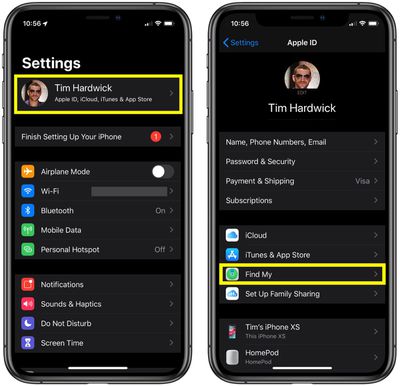
  1. Launch the Settings app on your iPhone or iPad.
  2. Tap the banner with your name in it at the top of the screen.
    how to use find my 2

  3. Tap Find My.
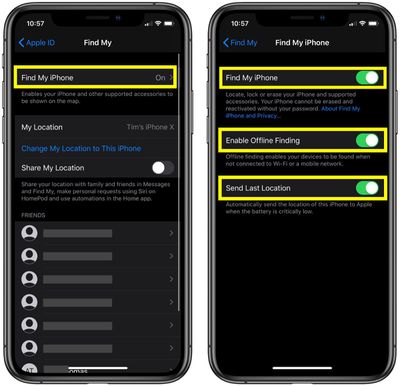
  4. Tap Find My iPhone.
  5. Tap the toggle switches to the ON position next to Find My iPhone, Enable Offline Finding, and Send Last Location.how to use find my 1

How to set up Find My on Mac

  1. Click the Apple () symbol in the menu bar at the top-left corner of the screen and select System Preferences....
  2. Click the iCloud icon in the preference panel.
  3. Check the box next to Find My Mac.

If you see a Details button next to ‌Find My‌ Mac, select Details -> Open Security & Privacy -> Enable Location Services. If Enable Location Services is dimmed in Security & Privacy preferences, click and enter your administrator name and password.

Using Find My to Locate a Lost Device

When Apple replaced the old ‌Find My‌ iPhone app with ‌Find My‌, it added a feature under the hood that allows you to locate lost devices that aren't connected to Wi-Fi or LTE by using the Bluetooth signal of your other nearby Apple devices.

When your lost device is offline but close to another device, it can connect to that device over Bluetooth and relay its location. The feature makes your devices more trackable than ever, and gives you a better chance of finding a device that's been lost.

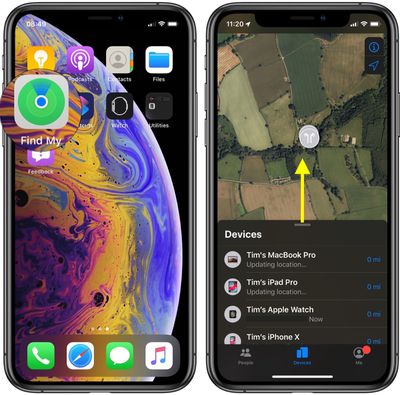
The ‌Find My‌ app is available by default on all new iOS devices, but if you've deleted it, you need to download the free app from the App Store. Once it's installed, launch the ‌Find My‌ app and then sign in with the Apple ID you use for iCloud. (If the iOS device that you've lost or misplaced is the only one you own, you can log in to Find My on a Mac or PC instead.)
find my
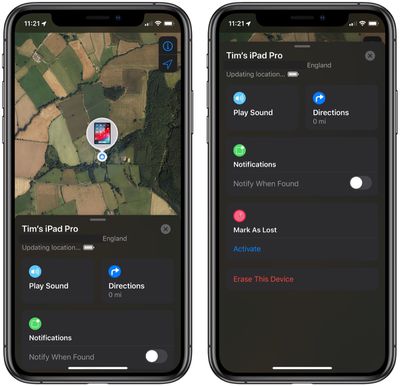
Once you've logged into the iOS app, you'll be presented with a map and a list of all the devices that are signed into your ‌iCloud‌ account. On the map, tapping the info icon (the circled 'i') in the top-right corner of the screen lets you change the map view to Satellite, Standard, or Hybrid, and set the distance to show as Miles or Kilometers. You can also tap the arrow icon in the top-right corner of the screen to center the map on the currently selected device.

Swipe up on the devices card to reveal the full list. Note that the line below each device tells you its last known location, while a padlock on a device's icon indicates that it's lost and has been manually locked. If you tap a device in the list, you'll gain access to additional device options.
how to use find my to locate a lost iphone
When you swipe up on the device actions card, the options available to you will depend on the type of device you're trying to locate, but you should always have the option to play a sound to locate a nearby device as long as it's powered on and within range.

If it's a Mac, iOS device or Apple Watch you're trying to locate, you can put it into Lost Mode (this ensures your passcode is required on the device before anyone can turn off ‌Find My‌ iPhone or erase it) or remotely erase it. If the ‌Find My‌ app knows where the device is located, you can also tap Directions, which will take you to navigation directions in the Apple Maps app.

If the selected device is out of range of network coverage or powered off, you can tap Notify When Found, and Apple will email you when the device is located. Any other options you choose in the device actions menu (Erase iPad, for example) will be performed the next time the device comes back online. Lastly, if the selected device has been irretrievably lost, you can choose to unlink it from your ‌iCloud‌ account by tapping Remove This Device at the bottom of the screen.
Popular Stories

ios 27 2 apple tv remote

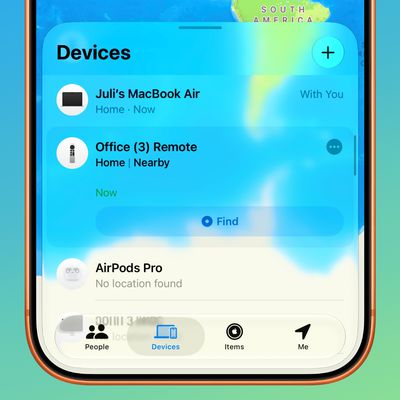
Older Siri Remotes Now Show Up in Find My With iOS 27.2

Monday October 26, 2026 5:13 pm PDT by
With iOS 27.2 and tvOS 27.2, second- and third-generation Siri Remotes can be tracked using the Find My app. There has been an option to locate a lost Siri Remote with an iPhone since iOS 17, but remotes did not previously show up in the Find My app. Locating a remote had to be done with the Apple TV Remote widget in the Control Center, which made the option hard to find. Supported Siri...

apple pro tell logo

Apple Launching Five New Products Today

Thursday November 5, 2026 12:59 am PST by
Apple is launching five new products on Friday, November 6, following pre-orders that opened last week, including its first touchscreen MacBook Pro models. The following new products will be available from today: iPad mini with OLED display and A20 Pro chip iMac with M6 chip 14-inch MacBook Pro with M6 chip 14-inch MacBook Pro with OLED touchscreen 16-inch MacBook Pro with OLED...
duo aquarium

More Fun iPhone Duo Apps: 30 New Picks to Try

Friday November 6, 2026 3:27 pm PST by
When the iPhone Duo launched, we shared a list of some of the fun apps developers created for the new form factor. Two weeks out, developers are continuing to come up with fresh ideas, so we thought we'd share some of our favorites. Games Marbles Unhinged ($2.99) - Marbles Unhinged is a marble maze designed for the Duo. When you fold it, the floor turns into a ramp. If you stand the top...
Latest Stories
Apple Taking New Approach to Developing iOS 28 and macOS 28
1 hour ago
Early Apple Black Friday Deals on Apple Watch, MacBook Air, and More
20 hours ago
'Backglow' Lets You Customize New MacBook Pro's Glowing Apple Logo
20 hours ago
Top Stories: Apple Product Launches, iOS 27.3 Beta, and More
1 day ago
More Fun iPhone Duo Apps: 30 New Picks to Try
2 days ago
Hands-On With Apple's New OLED Touchscreen MacBook Pro
2 days ago
Apple Store With All-New Design Opening Soon in Southern California
2 days ago
Control the Glowing Apple Logo on Your New MacBook Pro
2 days ago
Apple Shares New 'Apple Card: Apply and Use in Minutes' Ad
2 days ago
Apple Says More Than 100,000 Apps Optimized for iPhone Duo, Here's What's Still Missing
2 days ago
Early Black Friday Deals Kickoff With Steep Discounts on Apple Watch Ultras and More
2 days ago
The MacRumors Show: iOS 27.3 Looks Like a Huge Update
2 days ago
Best Buy's Black Friday Event Begins With Sitewide Savings on Apple, TVs, More
2 days ago
Apple Releasing Yet Another Two New Products Next Week
2 days ago
MacBook Air Drops to Lowest Price in Months With Amazon's $250 Discount
2 days ago
Apple Rumored to Drop the iPhone's Action Button Next Year
2 days ago
Apple's Extended Return Policy Now in Effect for 2026 Holiday Season
2 days ago
Apple Music Classical Updated With New Icon and Refreshed Design
2 days ago
OLED iPad Mini, M6 iMac, and New MacBook Pros Available From Today
2 days ago
Apple Surveys iPhone Duo Buyers About Crease and Camera
3 days ago
Apple's First Touchscreen Mac is Now Arriving to Customers
3 days ago
Claude Gets Personal Finance Feature With Bank Account Linking
3 days ago
Apple Arcade Adds Crossy Road Rush and NBA 2K27
3 days ago
Apple's New HomeView Smart Home Hub: Here's How Much RAM It Has
3 days ago
iPad Mini vs. iPad Air Buyer's Guide: Now Just $50 Apart
3 days ago
First iOS 27.3 and macOS Golden Gate 27.3 Public Betas Now Available
3 days ago
Apple Announces a New Mac Sales Record
3 days ago
Paid $200 for Logic Pro? Apple Says You Won't Get This New Feature
3 days ago
Instagram's Edits Video Editor is Now Available on Mac
3 days ago
Prevent Siri and Search From Accessing Specific iPhone Apps
3 days ago