

Apple in iOS 15 introduced Focus mode, an expansion of Do Not Disturb that allows you to set up different permissions for apps, contacts, and more depending on what you're doing. In iOS 16, Apple has expanded what Focus modes can do with new features, including the ability to add Focus Filters. This article explains what Focus Filters are and how to set them up.
Focus Filters are a completely new feature in iOS 16. With this option, you can filter out content within apps, displaying a specific Mail account or Calendar that pertains to your Focus. When you use a Focus with a filter set, the app with the filter will only show what you've selected and will hide everything else. If you have a work Focus, for instance, you might filter out events from your family calendar.
Here's what you can filter out with Focus Filters:
- Calendar - If you have different calendars set up for work and family, you can associate just one calendar with a Focus so you see only relevant events when that Focus is activated.
- Mail - You can choose any of your Mail accounts to associate with a Focus, and with this activated, when you're in that Focus, the Mail app will only show the accounts you've selected. It's useful if you want to filter out personal emails while working, and vice versa.
- Messages - The Messages app can be set to hide all messages except for the messages from the People list that you created for the particular Focus mode. So if you have a "Personal" Focus that filters out all contacts from work, you won't see their messages in the Messages app with the Personal Focus turned on.
- Safari - Safari can be set to only show a specific Tab Group when a Focus is turned on. You'll need to set up the Tab Group ahead of time in the Safari app.
- Dark Mode - You can choose Dark mode or Light mode for a Focus.
- Low Power Mode - You can opt to have Low Power mode activated or deactivated with a Focus.
How to Add a Focus Filter to Your Focus
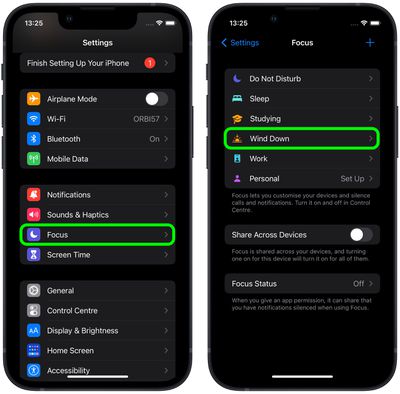
- Launch the Settings app on your iPhone, then tap Focus.
- Select the Focus mode that you want to add Focus Filters to.

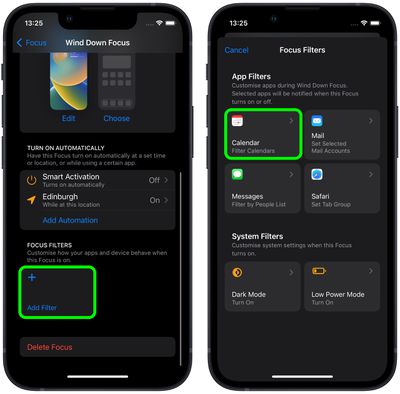
- Scroll down, and under "Focus Filters," tap Add Filter.
- Choose an App Filter that you'd like to set up: Calendar, Mail, Messages, or Safari. In this example, we're adding a calendar filter.
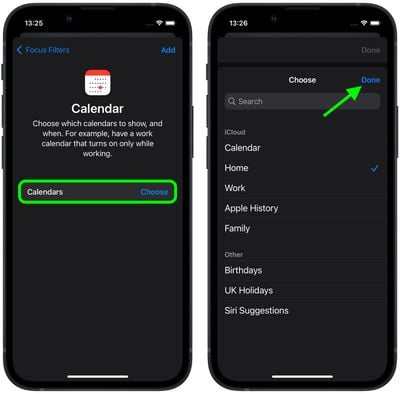
- Tap Choose to select which calendars to show, and when.
- Tap the iCloud and/or other calendars that you want to include, then tap Done.
- Tap Add to include the filter in your Focus mode.
Your chosen filter will now be active the next time you enable the Focus mode.
Apple has made a Focus Filter API for developers so that third-party apps can allow the same specific filtering options within a Focus as Apple's own app. If you use a third-party email app, for example, you'll be able to select a mailbox to show within that app provided the developer adds the Focus Filter API. For more on everything new in Focus with iOS 16, check out our comprehensive guide.















