

How to Use Secure Code AutoFill in iOS 12 and macOS Mojave - MacRumorsOpen MenuShow RoundupsShow Forums menuVisit ForumsOpen Sidebar
Skip to Content

How to Use Secure Code AutoFill in iOS 12 and macOS Mojave

by

Most readers will have at some point received a two-factor authentication code delivered to them by SMS text message. Many apps and websites send the one-time codes to confirm that the person attempting to log in to an account is the legitimate account holder, and not just someone using a stolen password.

Depending on how notifications are set up on your iPhone, receiving a code via text message may mean that you have to switch out from the app or website to read the message and memorize or copy the code, and then switch back to paste it or type it into the login screen manually.
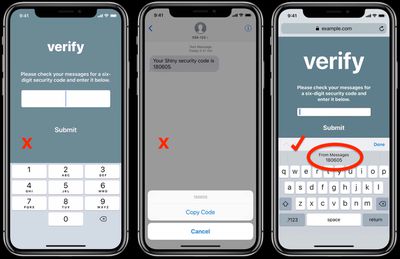
ios 12 secure code autofill 1
To make this process less of a hassle, Apple is introducing Security Code AutoFill for iOS 12. The new feature ensures that SMS one-time passcodes that you receive instantly appear as AutoFill suggestions in the QuickType bar above the virtual keyboard, letting you input them in the passcode field with a simple tap.

If you've enabled Text Message Forwarding on your iPhone, you can use the Secure Code AutoFill feature in macOS Mojave, too. The code should appear in Safari as an AutoFill option in the relevant field as soon as the SMS is delivered to Messages on your Mac.
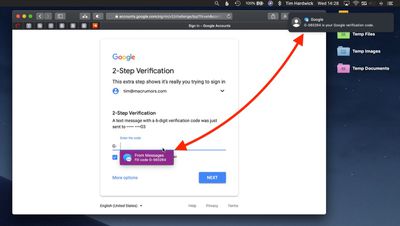
secure code autofil mojave 2
iOS and macOS use local data detector heuristics to work out whether an incoming message carries a security code, and Apple says the Security Code AutoFill feature does not alter the security of this two-factor authentication method.

So as long as developers craft their secure code text messages correctly, Security Code AutoFill should work in all third-party apps updated for iOS 12 and macOS Mojave, which are due for official public release this fall.


Related Forums: iOS 12, macOS Mojave

Top Rated Comments

103 months ago
Cool idea, but 2FA via SMS is inherently insecure and shouldn't be encouraged. However if Apple were to allow third-parties to deliver them over iMessage it would be secure and very convenient.
Score: 5 Votes (Like | Disagree)
103 months ago
I’m keen as for this feature!
Score: 2 Votes (Like | Disagree)
adrianlondon Avatar
103 months ago
Not working for me. I'm not currently testing on my phone, although when I did try it a few weeks ago it didn't work there either. Running 10.14 dev beta 7.

This is the SMS I got:
mTAN for your new login:123456

And attached is a pic showing the field that expects it. No auto-fill available. It's a shame, as it would be a great feature. Hopefully they'll enhance it over time as Apple learns the format of various SMS authentication texts.

Attachment Image
Score: 1 Votes (Like | Disagree)

Popular Stories

iCloud iPhone 17 Pro

iPhone Users Who Pay for iCloud Storage Get Two New Perks on iOS 27

Thursday July 2, 2026 6:10 am PDT by
If you pay for certain iCloud+ storage plans beyond the 5GB that Apple offers for free, you will receive two more perks on iOS 27 at no additional cost. A summary of the two new iCloud+ perks on iOS 27:Increased daily usage limits for some new Apple Intelligence features, including image generation in the revamped Image Playground app. HomeKit Secure Video cameras receive generated video...
iPhone 4 on Black Feature

Apple Facing One of Its Worst Leaks Since the iPhone 4

Thursday July 2, 2026 9:53 am PDT by
Apple supplier Tata Electronics recently suffered a cyberattack that resulted in thousands of confidential files being published on the dark web, and this reportedly included some photos and documents related to the upcoming iPhone 18 Pro. We have elected not to share any of the leaked photos in this story due to the illegal nature in which they were obtained, but they can easily be found...
American Express Gold Apple Pay Feature

American Express Announces New Apple Pay Feature

Tuesday June 30, 2026 10:27 am PDT by
American Express today announced that you can now redeem Membership Rewards points when checking out with Apple Pay on the web and in apps on the iPhone and iPad. When checking out with Apple Pay on iOS 18 or iPadOS 18 or later, tap on your eligible American Express card (Platinum, Gold, Green, and others) and select the Membership Rewards points option. You can use points to cover all or...















