How to Use the Podcasts App in watchOS 5 - MacRumorsOpen MenuShow RoundupsShow Forums menuVisit ForumsOpen Sidebar
Skip to Content

How to Use the Podcasts App in watchOS 5

by

watchOS 5 introduces a new Podcasts app for Apple Watch, which is designed to let you listen to your favorite podcasts on the watch without the need for the iPhone.

Streaming podcasts works over Wi-Fi or a cellular connection, and you can also use the Podcasts app to play podcasts from a connected iPhone if desired.

Using the Podcasts App on Apple Watch

As with Apple Music, when using Podcasts on the Apple Watch, you will need to have a pair of AirPods or other Bluetooth headphones paired to your Apple Watch.

Once Bluetooth headphones are paired, you will need to tap on the Podcasts icon, which looks like a radio antenna on a field of purple, much like the Podcasts app icon on the iPhone. You can also ask Siri to open it.

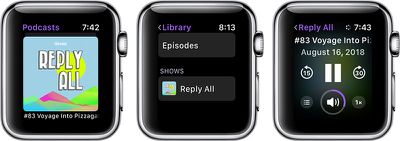
The Podcasts app will open up to the most recent podcast among the podcasts you're subscribed to, and you can play it by tapping on it.
applewatchpodcasts
Music controls are available by scrolling with the Digital Crown or swiping and tapping on "Now Playing."

Viewing Your Library

To view your library of subscribed podcasts, follow these steps:

podcastlibraryapplewatch

  1. Open the Podcasts app.
  2. Scroll down with the Digital Crown or Swipe to get to the list of app options.
  3. Choose "Library."

The Library section of the Podcasts app will let you see all of the different podcasts that you subscribe to in the "Shows" section, and individual episodes in the "Episodes" section.

Scroll through each section using a swipe on the Apple Watch's face or the Digital Crown.

Adding New Podcast Subscriptions

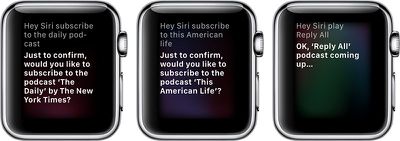
To add new podcast subscriptions on the Apple Watch, you'll need to know the name of the podcast you want to add. You can subscribe using Siri, with a command like "Hey Siri, subscribe to Reply All" or Hey Siri, subscribe to The Daily podcast."

If you would rather listen to a podcast or a specific podcast without subscribing to it, you can ask Siri to play it with commands like "Hey Siri, Play Reply All," or "Hey Siri, Play episode 21 of The Daily."
applewatchsiripodcasts
Outside of subscribing to new podcasts using Siri, there is no way to browse through podcast content on the Apple Watch. If you want to find new podcasts to listen to, you'll need to use the Podcasts app on iPhone.

Offline Usage

Podcasts that are listed in the episodes section of the Podcasts app are downloaded to the Apple Watch and can be listened to even without a cellular or WiFi connection. According to Apple, podcasts are downloaded when the Apple Watch is connected to power and placed near the iPhone.

After an episode has been played, it will be removed from the Apple Watch to make room for new episodes.

Controlling Podcasts on iPhone From Apple Watch

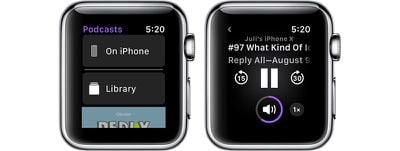
If your phone is connected to your Apple Watch and there's a podcast playing, you'll see an "On Phone" section in the Apple Watch Podcasts app and there will be a little red icon on the Apple Watch's face.
podcastsiphonecontrols
If you tap on the "On iPhone" section in the Podcasts app, you'll see options for "Now Playing" with controls for the current content, a "Listen Now" section that shows recent podcasts, a "Shows" section that displays all of the shows you subscribe to, an "Episodes" section that displays all of the available episodes, and a "Stations" section that displays Podcasts stations created on iPhone.


Related Roundup: Apple Watch 12
Buyer's Guide: Apple Watch (Buy Now)
Related Forum: Apple Watch

Top Rated Comments

107 months ago
Can you download podcasts to the watch to play without an iPhone or cellular connection? This post does not seem to say so.
Score: 4 Votes (Like | Disagree)
jclo Avatar
107 months ago
Can you download podcasts to the watch to play without an iPhone or cellular connection? This post does not seem to say so.
Sorry, I'll add a section. It does appear to download podcasts onto the Apple Watch so that they can be listened to without a connection. I was able to listen to saved podcasts in my episodes list with airplane mode turned on. I don't see a way to force a download, but it downloads new episodes when connected to power.
Score: 2 Votes (Like | Disagree)
107 months ago
Am I reading this right? It’s only streaming? So if I don’t have a cellular Apple Watch I still need my bloody phone!
Apple appear to have in mind that they will "automatically" sync audio with the watch so it's cached on the watch; but they seem to make it impossible (or very clumsy) to force a sync of the phone to the watch.
(There is already something similar with Music where you can, in principle, sync a playlist from your Phone to be cached on your Watch; but everything about this feature is so moronically designed that it's practically unusable.)

The thinking behind it seems astonishingly stupid, like they simply cannot imagine that users might be pissed off if they cannot be SURE that their content is on the watch, and then run out of content while away from their phone.

To me it looks like one of these crazy Apple ideas where some idiot designer loses all contact with reality. Usually they fix them (eventually) but we may have a year or two of this idiocy before sanity prevails.
Score: 2 Votes (Like | Disagree)
northernbaldy Avatar
107 months ago
It seems Apple balanced what is easy in a tiny screen versus battery life. So many false things in the comments... I don’t even want to start. Yes, you can create your own audio files and sync them. Yes, you can save podcasts to the watch without “streaming”. You all need help


You need help!
Score: 1 Votes (Like | Disagree)

Popular Stories

apple watch series 3 design

Apple Offers Steps to Fix Daylight Saving Time Bug on Apple Watch

Sunday November 1, 2026 3:34 am PST by
Apple has published a support document describing what to do if your Apple Watch continues to show time that's off by one hour after daylight savings time changes. "This incorrect time appears only on the Always On display when your wrist is down," says Apple. "When you activate the display by tapping it or raising your wrist, the time changes to the correct hour." To fix the issue, Apple says ...
siri recap live rewind

watchOS 27.3 Brings Live Rewind and Siri Recap to Apple Watch

Tuesday November 3, 2026 10:35 am PST by
With the first beta of watchOS 27.3, Apple is introducing new Audio Intelligence features it previewed for the Apple Watch Series 12 and Ultra 4 earlier this year. Powered by the S11 chip, Audio Intelligence includes Live Rewind, Siri Recap, Sound Recognition, and Shazam Music Recognition. Sound Recognition and Shazam are already on the watch, but Live Rewind and Siri Recap are now available ...
apple watch series 3 design

Apple Watch Users in Europe Report Daylight Saving Glitch

Monday October 26, 2026 5:26 am PDT by
Some Apple Watch users running watchOS 27 are reporting a daylight saving glitch after clocks went back in the UK and Europe on Sunday. In a MacRumors forums thread, five users – several in the UK and central Europe – say their watch shows the correct time when activated, but the Always-On display keeps showing summer time, leaving it an hour fast. The problem has also been reported in...
Latest Stories
Apple Music's 2026 Artist of the Year is Olivia Dean
2 minutes ago
This Could Be Your Last Chance to Pre-Order the HomeView at a Discount
20 minutes ago
Some HomePod Mini 2 Buyers Returning Units Over Mac Speaker Issues
34 minutes ago
MacBook Pro With PROLED XDR Display: Details You Might Have Missed
46 minutes ago
Satechi Offers MacRumors Readers 30% Off Select Accessories in Early Black Friday Sale
1 hour ago
Leaker Envisions a Shorter iPhone With a New iOS Layout
2 hours ago
Apple to Give You More Control Over When Your Mac Passwords Lock
2 hours ago
Siri Is Getting a Better Memory
3 hours ago
iPhone 18e Could Feature Bigger Display and Battery
3 hours ago
Apple's Siri Boss May Leave - Here's Who Could Take Over
4 hours ago
Apple Launching Two More New Products This Friday
4 hours ago
Apple Store Subscription Sign-Up Controversy Exposed
13 hours ago
Siri AI Rumored to Become 'More Like an Agent' as Early as Next Year
23 hours ago
Apple Taking New Approach to Developing iOS 28 and macOS 28
1 day ago
Early Apple Black Friday Deals on Apple Watch, MacBook Air, and More
2 days ago
'Backglow' Lets You Customize New MacBook Pro's Glowing Apple Logo
2 days ago
Top Stories: Apple Product Launches, iOS 27.3 Beta, and More
2 days ago
More Fun iPhone Duo Apps: 30 New Picks to Try
3 days ago
Hands-On With Apple's New OLED Touchscreen MacBook Pro
3 days ago
Apple Store With All-New Design Opening Soon in Southern California
3 days ago
Control the Glowing Apple Logo on Your New MacBook Pro
3 days ago
Apple Shares New 'Apple Card: Apply and Use in Minutes' Ad
3 days ago
Apple Says More Than 100,000 Apps Optimized for iPhone Duo, Here's What's Still Missing
3 days ago
Early Black Friday Deals Kickoff With Steep Discounts on Apple Watch Ultras and More
3 days ago
The MacRumors Show: iOS 27.3 Looks Like a Huge Update
3 days ago
Best Buy's Black Friday Event Begins With Sitewide Savings on Apple, TVs, More
3 days ago
Apple Releasing Yet Another Two New Products Next Week
3 days ago
MacBook Air Drops to Lowest Price in Months With Amazon's $250 Discount
3 days ago
Apple Rumored to Drop the iPhone's Action Button Next Year
3 days ago
Apple's Extended Return Policy Now in Effect for 2026 Holiday Season
3 days ago







































