iOS 15: How to Use Visual Lookup in Photos to Identify Landmarks, Plants, and Pets - MacRumorsOpen MenuShow RoundupsShow Forums menuVisit ForumsOpen Sidebar
Skip to Content

iOS 15: How to Use Visual Lookup in Photos to Identify Landmarks, Plants, and Pets

by

In iOS 15, Apple made further advancements in on-device machine learning and integrated them into the Photos app to make your iPhone more intelligent at recognizing the contents of pictures.

ios 15 visual lookup
In other words, the ‌Photos‌ app can now identify various objects, landmarks, animals, books, plants, works of art, and more in your image library, and then offer information about them that it draws from the web.

This new intelligent feature is called Visual Lookup, and the following steps show you how you can use it to get more clued up on the things you've taken pictures of with your iPhone through the years.

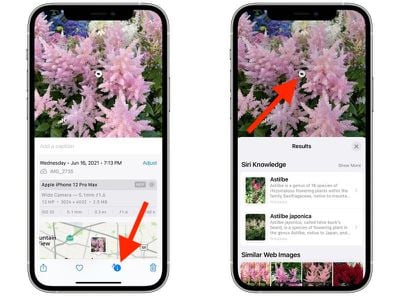
  1. Open the Photos app on your iPhone and select a picture with a clearly defined subject, such as a flower or animal.
  2. Check the info ("i") icon at the bottom of the screen. If it has a little star over it, tap it – this indicates there's a Visual Lookup you can examine.
  3. Tap the little icon in the center of the photo to bring up the Lookup search results.
photos
In Visual Lookup, search results consist of Siri Knowledge, similar images found on the web, and other online sources of information. For all the details on the other new ‌Photos‌ features in iOS 15, be sure to check our dedicated roundup.

Related Forum: iOS 15

Top Rated Comments

Mac Rules Avatar
70 months ago
Only available when region set to US
Score: 11 Votes (Like | Disagree)
HQuest Avatar
70 months ago
Still needs work 😂


Attachment Image
Score: 7 Votes (Like | Disagree)
The Barron Avatar
70 months ago

Must be only in IOS 15 - just tried this is 14.6 and can not find any "i" button.

The article does say iOS 15.
Score: 6 Votes (Like | Disagree)
70 months ago
I would like this to work the other way around. Would be nice to be able to search my almost 20,000 photos with words. For instance "Red Car" might help me quickly find that old mustang picture. I suppose it would mean that Apple would use AI to search all your photos and tag them with what it thinks the content is. Now that would be useful.
Score: 5 Votes (Like | Disagree)
andysw9 Avatar
70 months ago

Are y'all sure? Is there something called "tags" that are different than keywords? The only keywords I see in my photo library are ones that I added manually. I'm looking in Photos on my Mac. iOS 14 Photos doesn't appear to expose keywords. iOS 15 Photos seems like it will expose more of the EXIF data to the user.

Where do I go to see the tags that it adds automatically?

I know Photos has scanned for faces for years now and photos that are geotagged are searchable by location. But I don't think that's what we're talking about.
Best thing to do is likely just try using the search and see how it works. Not sure how else to convince you that the functionality is there. Photos have been searchable with keywords for some time now. The only thing I have done with any of my photos is shoot them on the phone, but they have been automatically categorised and it's mostly pretty accurate.


It doesn't add tags/keywords, it builds it's own internal 'categories' lists to which it adds all appropriate photos, and these are exposed to the user through the search function - so if in Photos you search for 'car' it will return any photos it has put in its 'cars' category, as well as anything you've tagged with 'car'. There's always a few it gets wrong, but it's sometimes very impressive (e.g. I thought it had falsely identified a photo as including a cat, but there was a very small reflection of our family cat in a window). It will also file a photo under multiple categories if appropriate so you can search 'car tree' to just get photos that include both.

The only slight downside is you can't correct it - if it doesn't recognise there's a car in your photo, you can add a keyword, but if it thinks there's a car in your photo but there isn't, you can't tell it so.

Photos has actually supported this general search function for several years now, though the number of categories it recognises has continued to grow.
Exactly this.


Attachment Image

Attachment Image

Attachment Image
Score: 4 Votes (Like | Disagree)
andysw9 Avatar
70 months ago

That is cool, but you have to add the keywords yourself, manually.
No you don't. I have never tagged a single photo and my entire library is searchable.
Score: 4 Votes (Like | Disagree)

Popular Stories

iphone duo facetime

iPhone Duo's Hidden FaceTime Camera Takes 'Trash' Photos

Wednesday October 21, 2026 11:36 am PDT by
The iPhone Duo's inner screen has an under-display front camera that's largely hidden from view. It's the first time we've seen an under-display camera on an iPhone, and it turns out there's a reason Apple hasn't used the technology before. Apple said the camera offers 1080p video recording, but didn't mention photo quality. Gizmodo said it's a 4-megapixel camera and described the photos as...
homeview faces

HomeView's Faces Include Snoopy, Photos, and Interactive Artwork

Wednesday October 14, 2026 4:00 am PDT by
Apple's HomeView includes customizable faces for photos, animations, and smart home controls. Faces Apple has named so far include: Photos Flow Snoopy Calendar Weather Home Modular Home Camera Other clock and widget layouts appear in Apple's promotional images, but have not yet been named. Apple says that selected faces change throughout the day, with different appearances...
apple pro tell logo

Apple Launching Five New Products Today

Thursday November 5, 2026 12:59 am PST by
Apple is launching five new products on Friday, November 6, following pre-orders that opened last week, including its first touchscreen MacBook Pro models. The following new products will be available from today: iPad mini with OLED display and A20 Pro chip iMac with M6 chip 14-inch MacBook Pro with M6 chip 14-inch MacBook Pro with OLED touchscreen 16-inch MacBook Pro with OLED...
Latest Stories
Siri AI Rumored to Become 'More Like an Agent' as Early as Next Year
3 hours ago
Apple Taking New Approach to Developing iOS 28 and macOS 28
4 hours ago
Early Apple Black Friday Deals on Apple Watch, MacBook Air, and More
23 hours ago
'Backglow' Lets You Customize New MacBook Pro's Glowing Apple Logo
23 hours ago
Top Stories: Apple Product Launches, iOS 27.3 Beta, and More
1 day ago
More Fun iPhone Duo Apps: 30 New Picks to Try
2 days ago
Hands-On With Apple's New OLED Touchscreen MacBook Pro
2 days ago
Apple Store With All-New Design Opening Soon in Southern California
2 days ago
Control the Glowing Apple Logo on Your New MacBook Pro
2 days ago
Apple Shares New 'Apple Card: Apply and Use in Minutes' Ad
2 days ago
Apple Says More Than 100,000 Apps Optimized for iPhone Duo, Here's What's Still Missing
2 days ago
Early Black Friday Deals Kickoff With Steep Discounts on Apple Watch Ultras and More
2 days ago
The MacRumors Show: iOS 27.3 Looks Like a Huge Update
2 days ago
Best Buy's Black Friday Event Begins With Sitewide Savings on Apple, TVs, More
2 days ago
Apple Releasing Yet Another Two New Products Next Week
2 days ago
MacBook Air Drops to Lowest Price in Months With Amazon's $250 Discount
2 days ago
Apple Rumored to Drop the iPhone's Action Button Next Year
2 days ago
Apple's Extended Return Policy Now in Effect for 2026 Holiday Season
2 days ago
Apple Music Classical Updated With New Icon and Refreshed Design
2 days ago
OLED iPad Mini, M6 iMac, and New MacBook Pros Available From Today
2 days ago
Apple Surveys iPhone Duo Buyers About Crease and Camera
3 days ago
Apple's First Touchscreen Mac is Now Arriving to Customers
3 days ago
Claude Gets Personal Finance Feature With Bank Account Linking
3 days ago
Apple Arcade Adds Crossy Road Rush and NBA 2K27
3 days ago
Apple's New HomeView Smart Home Hub: Here's How Much RAM It Has
3 days ago
iPad Mini vs. iPad Air Buyer's Guide: Now Just $50 Apart
3 days ago
First iOS 27.3 and macOS Golden Gate 27.3 Public Betas Now Available
3 days ago
Apple Announces a New Mac Sales Record
3 days ago
Paid $200 for Logic Pro? Apple Says You Won't Get This New Feature
3 days ago
Instagram's Edits Video Editor is Now Available on Mac
3 days ago