How to Use Your Mac to Help the Fight Against Coronavirus - MacRumorsOpen MenuShow RoundupsShow Forums menuVisit ForumsOpen Sidebar
Skip to Content

How to Use Your Mac to Help the Fight Against Coronavirus

by

folding%40homeFolding@home is a distributed computing project for disease research that simulates protein folding, computational drug design, and other types of molecular dynamics.

In addition to cancer, Alzheimer's, Huntington's, and Parkinson's, Folding@home has announced that it is tackling a disease that has been dominating the headlines: COVID-19.

The project is joining researchers around the world who are working to better understand the Coronavirus to accelerate the open science effort to develop new life-saving therapies.

By downloading Folding@Home on your Mac, you can donate your unused computational resources to the Folding@home Consortium, where researchers are working to advance our understanding of the structures of potential drug targets for COVID-19 that could aid in the design of new therapies.


The following steps show you how to get started with the Mac app. Before you install the Folding@home client, be aware that it can consume a lot of CPU cycles, so depending on what you use your Mac for, you may be better off running it only during times when your Mac is otherwise idle.

  1. Open a browser tab and visit https://foldingathome.org/start-folding/.
  2. Click on fah-installer_7.5.1_x86_64.mpkg.zip link to download the Folding@Home installer.
    fold@home

  3. Run the installer and enter your admin user name and password when prompted.
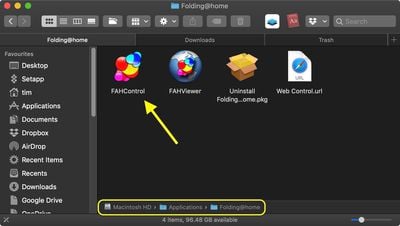
  4. When the installer has completed, ignore the webpage that it opens for now, and launch the FAHControl app from the Applications/Folding@home folder.
    finder

  5. You'll see a prompt warning you that the client hasn't been assigned an identity. Click Fold Anonymously or Configure Identity. The latter option ensures that the points you earn will be credited to you, but you'll need to enter a username. (You can also join a team – MacRumors' Team ID is 3446.)
    help fight covid 19 mac 2

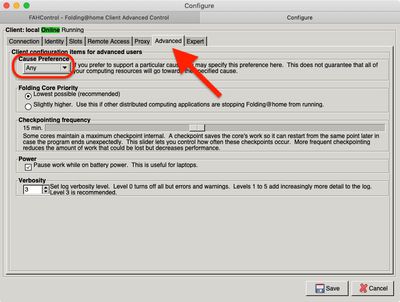
  6. To ensure your CPU cycles are contributing to COVID-19, click the Configure button, then select the Advanced tab and choose Any in the Cause Preference dropdown menu. (The project is prioritizing coronavirus among the Any category.)
    help fight covid 19 mac 3

  7. Click Save.

You can view a visual representation of the molecules your Mac is analyzing in real time by clicking the Viewer button. You can also access the web client at https://client.foldingathome.org for a better visual rendering.

how to fight covid 19 mac 3
Since this is a power-hungry endeavor, the Folding@home client will automatically pause whenever your Mac laptop switches to battery power. You can control this setting in Configure -> Advanced -> Power.


Top Rated Comments

Pangalactic Avatar
81 months ago
I wonder how useful this actually is (serious question)
Score: 14 Votes (Like | Disagree)
81 months ago

You can't set it.

When you sign up, you agree to be a part of the network. What they actually run on your device is not disclosed to you. It can be one of the many projects they have. The corona project is just there for marketing.

That's being said, how can you be sure that you are not just mining bitcoin?

You can't, that's the problem...
folding@home is run by a respected institution, has been around for a long time, and has done some good as I understand if. We get that you don’t trust them (or anybody?) but it’s not really necessary to post repeatedly like you’re trying to convince people they shouldn’t use it, like it, or feel good about it. The conspiratorial look is pretty ridiculous here, you’re actually suggesting Stanford could be tricking people into mining bitcoin? Come on, now.
Score: 9 Votes (Like | Disagree)
techno-Zen Avatar
81 months ago
I remember doing this on my PS3. lol
Score: 8 Votes (Like | Disagree)
Bustycat Avatar
81 months ago

I wonder how useful this actually is (serious question)
At least it’s more useful than mining.
Score: 7 Votes (Like | Disagree)
yaxomoxay Avatar
81 months ago
I wish they could do this for the AppleTV - with a nice "screensaver".


I wonder how useful this actually is (serious question)
My understanding is that these things are quite useful. Will they solve all of our problems? No. Will they help us find aliens as the good 'ol SETI@Home (man, I loved it!), probably not. However, they will certainly help in reducing computing expenses and they will also help in lowering calculation times.
Score: 6 Votes (Like | Disagree)
81 months ago
For the love of god, just wear mask to protect others,
Pointless advice. Most surgical masks are too loose fitting to make any difference. Medical grade N95 masks usually need a proper fit to be useful. any other sort of mask has zero medical benefits.

Masks are nothing more than a visual placebo.
Score: 5 Votes (Like | Disagree)

Popular Stories

macOS 27 on MacBook Pro

Apple Says macOS 27 Won't Be Compatible With These Macs

Wednesday June 3, 2026 8:29 am PDT by
During WWDC 2025, Apple revealed that macOS 26 Tahoe would be the final major macOS version for Intel-based Macs. macOS 27 will be compatible with Apple silicon Macs only, meaning that you will need a Mac with an M-series chip or a MacBook Neo with an A18 Pro chip in order to install the software update. Apple will unveil macOS 27 during its WWDC 2026 keynote this Monday, June 8, and the...
MacBook Neo on Yellow Feature

MacBook Neo is So Popular That Apple Reportedly Doubled Production

Wednesday June 3, 2026 9:24 am PDT by
On an earnings call in late April, Apple's CEO Tim Cook said that customer response to the MacBook Neo was "off the charts," and the popularity of the laptop has reportedly led the company to significantly boost production. Apple supply chain analyst Ming-Chi Kuo this week said he believes that MacBook Neo shipments to Apple were doubled from an initial target of 5 million units to 10...
iphone 18 pro blue%402x

iPhone 18 Pro: Dark Cherry, Light Blue, and Dark Gray Chassis Leaked [Update]

Thursday June 4, 2026 5:18 am PDT by
Update: Since publication, new information has come to light suggesting the images have been AI-manipulated and are not in fact iPhone 18 Pro chassis parts. The original article follows. The color options Apple is reportedly planning for the upcoming iPhone 18 Pro and ‌iPhone 18 Pro‌ Max have appeared online today in the form of images of chassis parts of unknown authenticity....