

How to View the Desktop Version of a Website on Your iPhone and iPad - MacRumorsOpen MenuShow RoundupsShow Forums menuVisit ForumsOpen Sidebar
Skip to Content

How to View the Desktop Version of a Website on Your iPhone and iPad

by

ios7 safari iconMost popular websites these days come in both desktop and mobile versions, with the latter rendering content in a more responsive fashion for a consistent browsing experience across a variety of tablet and smartphone screens.

Mobile-friendly websites are often stripped down and streamlined for easier navigation, with the result that some full-page content isn't displayed at all – and even when it is, finding that content can sometimes be a chore, especially if you're used to the desktop version of a site.

Recognizing this, Apple has had the foresight to let you bypass mobile versions of websites and view original desktop versions on its mobile devices instead. To request a desktop site on your iPhone and iPad, simply follow these steps.

  1. Launch Safari on your iOS device and navigate to the website in question.
  2. Long press the Reload button in the far right of the address bar.
  3. On iPhone, tap Request Desktop Site at the bottom of the screen. On iPad, the same option appears in the dropdown menu below the Reload button.
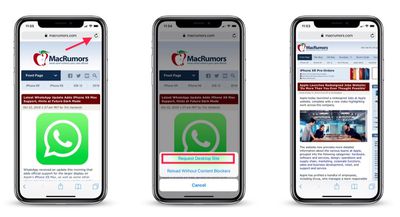
view desktop website on mobile safari
Note that you can also access this option by tapping the Share button (the square with an arrow pointing out) and selecting Request Desktop Site from the third row of the Share Sheet.

With that done, Safari should remember your preference for that particular website and load the desktop version the next time you visit it.


Tag: Safari
Related Forums: iOS 10, iOS 11, iOS 12

Top Rated Comments

99 months ago
The problem I found is that some websites still don’t provide the desktop version when requested.
Score: 24 Votes (Like | Disagree)
GabrielMoro Avatar
99 months ago
This was news a few years ago.
That’s why it’s useful to post about it today... A lot of people don’t know it exists. :)
Score: 15 Votes (Like | Disagree)
99 months ago
That’s a great feature... when it works. Which, these days, is less and less often.
Score: 10 Votes (Like | Disagree)
99 months ago
This was news a few years ago.
As a frequent tech user (See my above post), I actually had no idea about the long press with the refresh button requesting the desktop site. It’s much more convenient executing that versus strolling down to the bottom of the site to look for ‘view desktop site’.
Score: 6 Votes (Like | Disagree)
tromboneaholic Avatar
99 months ago
But why though? There's reason people design website as mobile first. There's this thing called progressive web apps.

All of these are to target mobile users. Why do you want to view website that is for desktop on mobile?

I am pretty sure the experience is kinda meh. You need to zoom in and out to actually do anything.
The old fashioned sites that have two different versions for mobile and desktop sometimes leave out functionality on the mobile version that is present on the desktop version. This is actually one of the advantages of responsive design – it's the same site with a different layout.
Score: 5 Votes (Like | Disagree)
99 months ago
I had know idea that you could ‘long press’ on the refresh button to request the desk-too site. I was always one that would scroll down to the bottom of the site, and look for ‘View Full site’ to click on.

Although, my preference is usually using the mobile site on my iPad or iPhone to be more streamlined and condensed.
Score: 4 Votes (Like | Disagree)

Popular Stories

MacBook Pro Low Angle Wide Lens

macOS 27: Two More Changes Leaked Ahead of WWDC Next Month

Sunday May 10, 2026 9:45 am PDT by
macOS 27 will have a "slight redesign" compared to macOS Tahoe, according to the latest word from Bloomberg's Mark Gurman. In his Power On newsletter today, Gurman said the design changes will help to improve the readability of macOS Tahoe's Liquid Glass interface:If you've used Tahoe, you're likely familiar with some of the quirks — particularly the transparency effects and shadows that...
Apple Card iPhone 16 Pro Feature

Apple Card Promo to Offer Free AirPods Pro 3

Friday May 15, 2026 8:59 am PDT by
Starting as early as next week, customers who sign up for an Apple Card at Apple's retail stores in the U.S. will receive $249 cash back when they purchase AirPods Pro 3, according to Bloomberg's Mark Gurman. The promotion has yet to be officially announced by Apple, so exact terms and conditions are not available at this time. AirPods Pro 3 are priced at $249 in the U.S., so customers who...
Apple WWDC25 iOS 26 CarPlay Light mode 250609

Six Popular iPhone Apps Now Available on CarPlay

Thursday May 14, 2026 9:10 am PDT by
Apple's CarPlay system for accessing iPhone apps on a vehicle's dashboard screen has received six popular apps in recent weeks: ChatGPT, Perplexity, Grok, Google Meet, WhatsApp, and the indie artist streaming platform Audiomack. Make sure you have the latest version of each app and they will automatically appear on CarPlay. ChatGPT Starting with iOS 26.4, CarPlay supports voice-based...















