How to Install Windows 10 on Your Mac Using Boot Camp Assistant - MacRumorsOpen MenuShow RoundupsShow Forums menuVisit ForumsOpen Sidebar
Skip to Content

How to Install Windows 10 on Your Mac Using Boot Camp Assistant

by

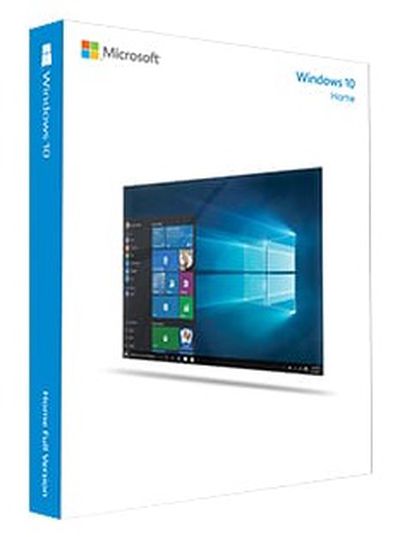
windows_10_boxFollowing the launch of Windows 10, Apple updated Boot Camp to support the latest Windows operating system on select Mac computers from 2012 and newer. If you've always wanted to try Windows on your Mac and think that now is the time to finally take the plunge, we can help you get through the basics with our how-to guide for installing Windows 10 on your Mac using Apple's Boot Camp Assistant.

This guide assumes you are installing Windows on your computer for the first time.

What You Need

You will, of course, need Windows 10, which can be purchased from Microsoft for $119. Older Mac computers support older versions of Windows, but won't work with Windows 10.

Make sure to check the system requirements for the version of Windows you want to install to ensure your Mac meets or exceeds them. You can find out the system specs for your Mac using System Information, accessible by typing "System Information" into a Spotlight search or using the Apple menu to go to About This Mac --> System Report.

To install Windows 10 (or Windows 7 or 8 for that matter) you will need at least 30 GB of free space on your startup drive and you'll need a keyboard and a mouse or trackpad to use with your computer.

If you're running OS X El Capitan and have an 11- or 13-inch MacBook Air, a 13- or 15-inch MacBook Pro or the Mac Pro, there's no need for a USB drive. If you're running a different version of OS X or have an older Mac, you'll need a 16 GB flash drive that doesn't have anything you don't want erased on it (Boot Camp Assistant automatically reformats the flash drive).

Creating a Disk Image File

On supported Macs running OS X El Capitan, Boot Camp comes with a modified interface that places the ISO image selector and partitioning on a single screen, allowing a user to easily select an ISO image and partition their hard drive before installing Windows. Once Boot Camp Assistant completes its tasks, the computer restarts with the normal Windows installation processes.

However, if you are not running El Capitan on a supported Mac, or are still running OS X Yosemite, Boot Camp Assistant requires a disk image file of Windows (not on DVD or a flash drive). The easiest method is to purchase the Windows ISO instead of the DVD version. However, if you don’t have a disk image file, create one by following the steps below.
yosemite-boot_camp_asst

  1. Insert the DVD or USB flash drive into your Mac.
  2. After the media appears in Finder, open Disk Utility and select the install file in the pop up window.
  3. Click the New Image icon at the top of the window.
  4. When the dropdown window appears, select DVD/CD master under Image Format and choose "none" from the Encryption option.
  5. Name the file and click Save. Wait for the program to create an image file.
  6. When the image file has been created, safely eject your DVD or USB flash drive.
  7. Find the newly created disk image file and select it. Then press Enter or Return on your keyboard to rename the file extension from .cdr to .iso. Select "Use .iso" to verify the change.

Set Up a Windows Partition

Before you install Windows on your Mac, you will need to create and format a partition. Use Boot Camp Assistant to create the partition and Windows installer to format it.
Windows Install

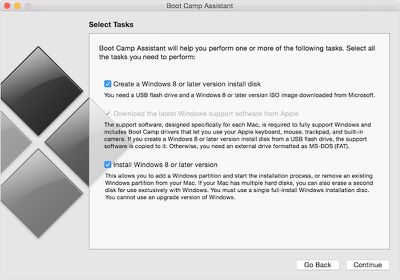
  1. Open Boot Camp Assistant to have the program automatically create the partition for you. It can be found in the Utilities folder of your Applications folder. Or, search for Boot Camp Assistant in Spotlight. Remember that the partition must have at least 30 GB of space.
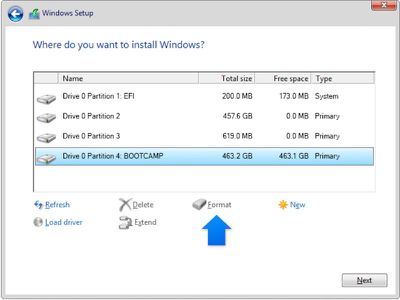
  2. Format the partition using Windows. After Boot Camp Assistant creates the partition on your Mac, when you are asked where you want to install Windows, select BOOTCAMP. Then, click Format. Windows will automatically format the partition.

Install and Restart

The final step is to install Windows on your computer following the on-screen prompts. Then, restart your computer. You can switch between OS X and Windows using the Startup Manager. While your computer is restarting, immediately press and hold the Option key. After a few seconds, you should be able to choose which operating system you wish to use (either Macintosh HD or Boot Camp).

If you are in Windows and want to switch back to OS X, use the Boot Camp system tray. Click the Boot Camp icon in the system tray and then select "Restart in OS X" from the dropdown menu.

Uninstall Windows 10

If you change your mind, or realize that the 30 GB of space can be better utilized for some other purpose, you can uninstall Windows 10 and restore your disk to a single partition.

  1. Start your Mac in OS X. Quit all apps and log out any other users.
  2. Open Boot Camp Assistant and click Continue
  3. Select "Remove Windows 7 or later version" and click Continue.
  4. Click restore.

Top Rated Comments

144 months ago
I tried to run bootcamp a while back but have never been able to as I always get an error when it's running the partitioning part.
I also get errors when trying to partition but I found I need to disconnect any thunderbolt drives prior to booting into the Windows install from Boot Camp. This may also be the same for USB drives etc.
Score: 3 Votes (Like | Disagree)
satcomer Avatar
144 months ago
Every Windows 10 user should read the blog post Guide: How to Disable Data Logging in Windows 10 (https://www.reddit.com/r/Windows10/comments/3f38ed/guide_how_to_disable_data_logging_in_w10) if you want to save your data and protect your privacy!
Score: 3 Votes (Like | Disagree)
desmond2046 Avatar
143 months ago
Windows 10 is pretty good for me! May be because I have suffered from windows 8 for too long...
Score: 1 Votes (Like | Disagree)
144 months ago
I keep hearing the accusation that the Bootcamp drivers suck. Any truth to this, or is this Windows propaganda?
Windows propaganda, as long as you've got a reasonably powered Mac, Windows 10 runs like a dream.
Score: 1 Votes (Like | Disagree)
John Mcgregor Avatar
144 months ago
And you know this how?
Because i wasted 4 hours finding out.
Score: 1 Votes (Like | Disagree)
CylonGlitch Avatar
144 months ago
Every Windows 10 user should read the blog post Guide: How to Disable Data Logging in Windows 10 ('https://www.reddit.com/r/Windows10/comments/3f38ed/guide_how_to_disable_data_logging_in_w10') if you want to save your data and protect your privacy!
Sadly though, they say that even these things doesn't stop them. They continue to collect the information and will continue to do so. Now Windows 10 isn't horrible; generally it is OK, but in some cases it is a mess. Don't bother with parental controls, those are gone. Non-administrator account; talk about painful. I still like it better than Windows 8, but I prefer to stick to Windows 7.


Score: 1 Votes (Like | Disagree)

Popular Stories

duo aquarium

More Fun iPhone Duo Apps: 30 New Picks to Try

Friday November 6, 2026 3:27 pm PST by
When the iPhone Duo launched, we shared a list of some of the fun apps developers created for the new form factor. Two weeks out, developers are continuing to come up with fresh ideas, so we thought we'd share some of our favorites. Games Marbles Unhinged ($2.99) - Marbles Unhinged is a marble maze designed for the Duo. When you fold it, the floor turns into a ramp. If you stand the top...
apple pro tell logo

Apple Launching Five New Products Today

Thursday November 5, 2026 12:59 am PST by
Apple is launching five new products on Friday, November 6, following pre-orders that opened last week, including its first touchscreen MacBook Pro models. The following new products will be available from today: iPad mini with OLED display and A20 Pro chip iMac with M6 chip 14-inch MacBook Pro with M6 chip 14-inch MacBook Pro with OLED touchscreen 16-inch MacBook Pro with OLED...
silver iphone 18 pro

Apple Rumored to Drop the iPhone's Action Button Next Year

Friday November 6, 2026 6:07 am PST by
Apple plans to merge the iPhone's Action button with the Camera Control starting next year, according to the leaker known as "Instant Digital." In a new post on Weibo, the leaker claimed that a single press of the combined button would open the camera, while a long press would trigger the function assigned to the Action button. They explicitly clarified that the dedicated Action button would ...
Latest Stories
Siri AI Rumored to Become 'More Like an Agent' as Early as Next Year
10 hours ago
Apple Taking New Approach to Developing iOS 28 and macOS 28
11 hours ago
Early Apple Black Friday Deals on Apple Watch, MacBook Air, and More
1 day ago
'Backglow' Lets You Customize New MacBook Pro's Glowing Apple Logo
1 day ago
Top Stories: Apple Product Launches, iOS 27.3 Beta, and More
2 days ago
More Fun iPhone Duo Apps: 30 New Picks to Try
2 days ago
Hands-On With Apple's New OLED Touchscreen MacBook Pro
2 days ago
Apple Store With All-New Design Opening Soon in Southern California
2 days ago
Control the Glowing Apple Logo on Your New MacBook Pro
2 days ago
Apple Shares New 'Apple Card: Apply and Use in Minutes' Ad
2 days ago
Apple Says More Than 100,000 Apps Optimized for iPhone Duo, Here's What's Still Missing
2 days ago
Early Black Friday Deals Kickoff With Steep Discounts on Apple Watch Ultras and More
2 days ago
The MacRumors Show: iOS 27.3 Looks Like a Huge Update
2 days ago
Best Buy's Black Friday Event Begins With Sitewide Savings on Apple, TVs, More
2 days ago
Apple Releasing Yet Another Two New Products Next Week
2 days ago
MacBook Air Drops to Lowest Price in Months With Amazon's $250 Discount
3 days ago
Apple Rumored to Drop the iPhone's Action Button Next Year
3 days ago
Apple's Extended Return Policy Now in Effect for 2026 Holiday Season
3 days ago
Apple Music Classical Updated With New Icon and Refreshed Design
3 days ago
OLED iPad Mini, M6 iMac, and New MacBook Pros Available From Today
3 days ago
Apple Surveys iPhone Duo Buyers About Crease and Camera
3 days ago
Apple's First Touchscreen Mac is Now Arriving to Customers
3 days ago
Claude Gets Personal Finance Feature With Bank Account Linking
3 days ago
Apple Arcade Adds Crossy Road Rush and NBA 2K27
3 days ago
Apple's New HomeView Smart Home Hub: Here's How Much RAM It Has
3 days ago
iPad Mini vs. iPad Air Buyer's Guide: Now Just $50 Apart
3 days ago
First iOS 27.3 and macOS Golden Gate 27.3 Public Betas Now Available
3 days ago
Apple Announces a New Mac Sales Record
3 days ago
Paid $200 for Logic Pro? Apple Says You Won't Get This New Feature
3 days ago
Instagram's Edits Video Editor is Now Available on Mac
3 days ago









































