

A couple of months ago, Boss Audio debuted its latest aftermarket CarPlay receiver, the BVCP9685A, offering a relatively low-cost way to add wired CarPlay (and Android Auto) to your existing vehicle.
The BVCP9685A is a double DIN unit with a 6.75-inch capacitive screen and a vertical strip of capacitive touch controls along the left side. With an external microphone and support for steering wheel controls and backup camera input when paired with proper auxiliary wiring, the BVCP9685A can integrate with much of the existing technology in your vehicle.


Boss Audio sent me a demo unit of the BVCP9685A to test out, and I've come away pretty impressed with its ability to deliver CarPlay functionality at a budget price point, which is currently even lower with an exclusive 5 percent discount code for MacRumors readers.
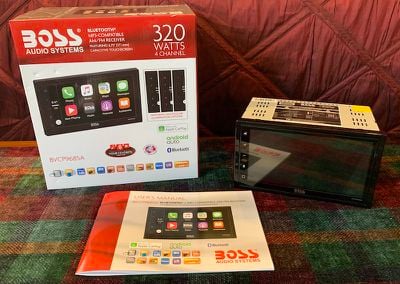
The BVCP9685A demo unit I received is a relatively self-contained package, hooked up to a standard AC power plug and a small external speaker. That makes it easy to test out the unit without needing to install it in a vehicle, which can be a bit tricky depending on your level of experience and the types of connections you need to make.
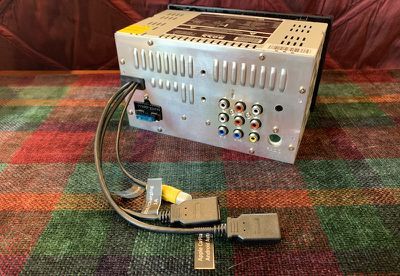
On the flip side, the demo unit doesn't give you the full experience, so this is more of a hands-on look than a complete review as I haven't been able to test its sound quality with a full car speaker setup, integration with steering wheel controls and rear camera, and some other features.
Overview
Boss's BVCP9685A offers a relatively clean look dominated by the large screen, although it does have a bit of a bottom bezel where there is some Boss branding and the model number. A strip to the left of the screen offers persistent access to capacitive mute, volume, Siri, and home buttons. The buttons are a little on the small side in a tradeoff with maximizing the size of the main screen.
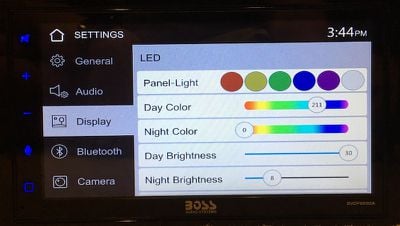
The 6.75-inch, 800x480 screen is bright and fairly crisp, although it doesn't quite match the higher resolutions seen on some other more expensive systems. The touch buttons along the left side can be set to just about any color of the rainbow or allowed to cycle through a range of colors automatically, and separate color and brightness options can be set for day and night modes.
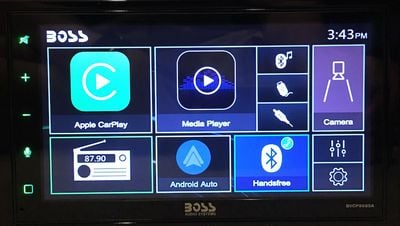
The main interface of the BVCP9685A consists of a set of tiles that offer access to the system's functions like radio, CarPlay, Android Auto, Bluetooth hands-free calling, rear camera, and media player functions over Bluetooth, USB or an RCA AV connection on the rear of the unit. Small tiles also offer access to settings and an equalizer.
The overall look certainly isn't as polished as some infotainment systems, but if you're a CarPlay user you'll likely be spending much of your time in there anyway.
The radio app offers a large display of the current station and a couple of sets of forward and backward buttons to help navigate between stations on the dial and via presets. Other options let you switch between AM and FM, stereo and mono, local and distant station optimization, and more.
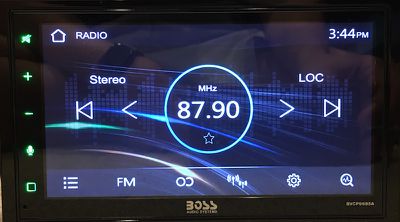
It's fairly easy to operate, although some of the options aren't necessarily intuitive such as the way tapping the option icons toggles indicators elsewhere on the display rather than simply changing a label on the icon itself. Tuning buttons also aren't explicitly labeled, although you'll quickly learn how they work once you start using them.
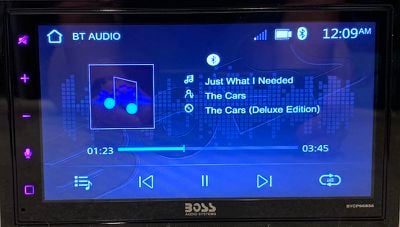
Playing media from an external device such as via Bluetooth is a similar affair, although I think the look of the media player screen is a bit better than the radio screen, with full track, artist, and album information as well as clear play/pause, track skip, and shuffle buttons along the bottom.
CarPlay
CarPlay and Android Auto require a wired connection on the BVCP9685A, which many users prefer considering they want to charge their phones while in the car, but for those who prefer wireless CarPlay that's starting to become more widely available in aftermarket units, you'll need to look elsewhere.
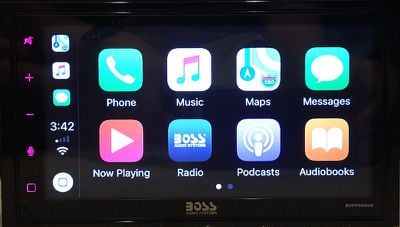
The BVCP9685A includes a pair of USB ports on short cables, one for CarPlay/Android Auto and one limited to charging and media playback, so you'll need to make sure you connect your Lightning cable to the right one. Once you're up and running with CarPlay, you'll find the usual experience with access to the default Apple apps, compatible third-party apps, and a dedicated Boss icon to take you out of CarPlay and back to the Boss system.
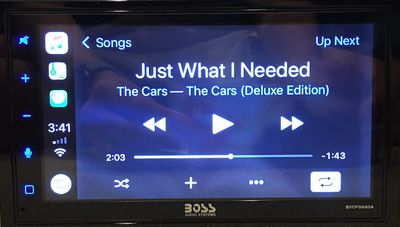
The screen is definitely smaller than some built-in infotainment systems that can go up to 8 inches or more, but within the limitations of the double DIN size standard, Boss has done a pretty good job of maximizing screen space. A few competitors have pushed their screen sizes to 7 inches by using skinny hardware buttons along the bottom of the unit, but Boss gets pretty close to that size while keeping buttons along the left where they're closest to the driver.
Overall, the CarPlay interface looks good on the BVCP9685A, with Maps being where you would most likely notice the difference compared to systems with larger screens, due to the mapping field of view and the various informational overlays. CarPlay is relatively responsive on the BVCP9685A, accurately registering taps and swipes.
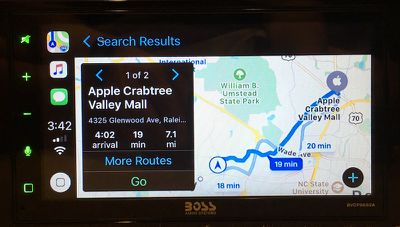
In addition to the Boss icon on the CarPlay home screen, you can also use the main capacitive home/back button in the lower left corner of the BVCP9685A to jump out of CarPlay and over to the Boss system. That button can take you back into CarPlay, but only if it's the immediately previous screen you were on. If you switch over to the Boss system and then fiddle with radio settings, for example, you'll need to get back to the Boss home screen and then tap the CarPlay tile there to return to CarPlay.
Wrap-up
As an entry-level CarPlay receiver, the Boss BVCP9685A looks like a solid way to bring your iPhone to the dashboard in your existing vehicle. It doesn't include features seen on more (in some cases much more) expensive models like SiriusXM tuner support, a wireless microphone, a DVD/CD drive, or built-in navigation, but if what you primarily need is CarPlay you may not be interested in many of those missing features.
The BVCP9685A is currently priced at $239.99 on Amazon, but the exclusive MacRumors discount available through this link knocks $12.00 off of that through May 22. Boss is also currently offering a $35.00 on-page or in-cart coupon that is stackable with the MacRumors discount, bringing the final price down to just $192.99.
That's a fantastic price for a CarPlay aftermarket head unit, but do keep in mind when budgeting that depending on your install situation, you may need to pick up some extra equipment like wiring harnesses and perhaps pay for professional installation if you're not comfortable with cracking open your dashboard yourself.
Note: Boss provided MacRumors with a loaner demo unit of the BVCP9685A for the purpose of this review. No other compensation was received. MacRumors is an affiliate partner with Amazon. When you click a link and make a purchase, we may receive a small payment, which helps us keep the site running.















































Top Rated Comments
[doublepost=1558188173][/doublepost]More like $1200 for a proper one.
6 years ago, I was trying to find a decent shallow subwoofer to fit a custom 10" sub enclosure that I made to fit behind the passenger side seat of my MR2, but there was hardly any that were shallow enough, or they were really expensive.
The Boss Audio sub was really cheap, and had next-day shipping at the time, so I decided to give it a try, and go with something else if it didn't perform well enough.
It end up exceeding my expectations, so much so that it is still in my MR2 6 years later. It punches pretty well, so much that it could make a passenger's back feel like it is getting a very violent massage. I usually the subs down when there is a passenger with me.
I should mention that I am not an audiophile, and the MR2 cab is kind of small with two firewalls in the front and rear, so it doesn't take much to fill the space with sound.
I understand this, but I wouldn't mind having wireless CP. You can still charge your phone if you need to even with wireless CP, but having it wireless, give the user the option of whether to plug in or not.
This is probably not an issue with the many different adapters out there.
You can use Crutchfield.com to see what you need for your car. I have purchased from them a few times, and while they are not always the cheapest, they are very helpful with planning the job. Sometimes I find some decent deals on there though.