

The Ionic is Fitbit's first real effort at a "true" smartwatch, and there's plenty riding on the $300 device. Not only is the activity tracker company late to the smartwatch game, its market share in wearables has shrunk because of increasingly sophisticated rival devices from the likes Apple and Xiaomi.
To have a hope of reviving its fortunes, Fitbit sought out a new creative direction and subsequently bought Pebble late last year. The wearable technology that Fitbit inherited as part of the acquisition now powers the new Ionic operating system, called Fitbit OS.
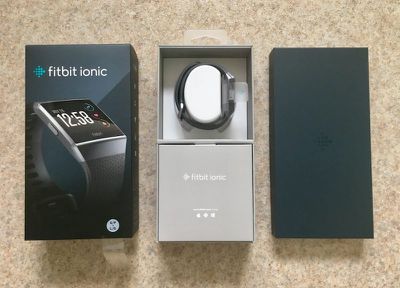
Last month, app makers were supplied with an SDK to see what third-party apps they can come up with for the Ionic. In the meantime, I was interested to look at what Fitbit's smartwatch has to offer out of the box, and in particular, how it compares to its closest kin, the Fitbit Blaze.
Design
As a previous owner of the Fitbit Charge and Blaze, I was never quite sure which strap size to go for at the initial ordering stage, but the Ionic comes supplied with a large rubber band as well as a second smaller strap for those with thinner wrists, so thankfully that's no longer a concern. I found the bands' elastomer material relatively comfy for all-day wear, but they're nowhere near as gentle on the skin as an Apple Watch Sport Loop.
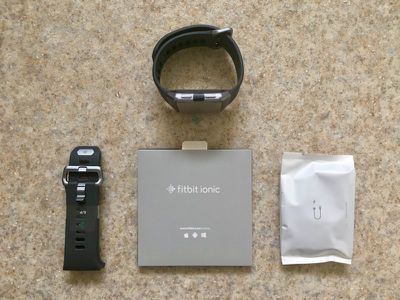
Fortunately, it's easy to detach and re-attach using the clips on the back of the watch module. That bodes well for anyone wishing to swap out the standard strap for any of the accessory bands that Fitbit sells separately, such as the perforated leather option or any of the third-party bands already available.
At a glance, the face of the watch looks quite angular and unforgiving on the wrist. Obviously the aesthetics are subjective here, but while it definitely lacks the rounded finesse of an Apple Watch, I didn't find it ugly by any means. In fact to me it looks reassuring, like it could stand up to a knock or a fall during a workout.
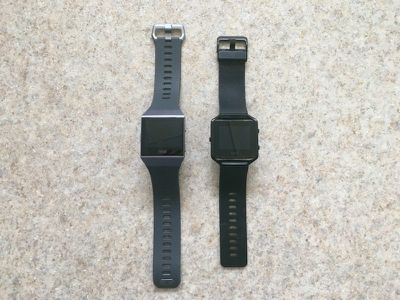
The tracker's smooth Gorilla Glass display, including the black bezels, is the same size as the Blaze module when out of its removable metal frame, but the gray "aerograde" aluminum where the strap connects hints at the new "nanomolding" process that Fitbit has used on the Ionic's unibody module to fuse the metal and plastic elements together.
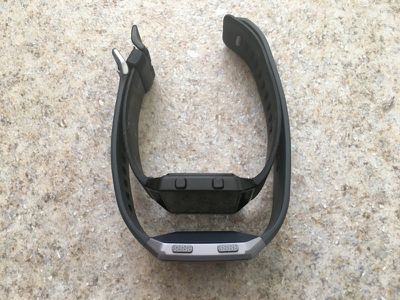
Nanomolding is a technique often used in smartphones and is said to improve GPS accuracy, but it's something you rarely see in wearables. The result is a smoother, more space-age look and feel than previous Fitbit trackers.
Weighing in at 30 grams and 12.2mm thickness, the unibody design is slightly chunkier than the Blaze, but I didn't really notice it during wear. That seems to be down to its slightly concave shape, which offers a better ergonomic fit and ensures the sensors achieve closer overall contact with your skin, ideally for more accurate readings.
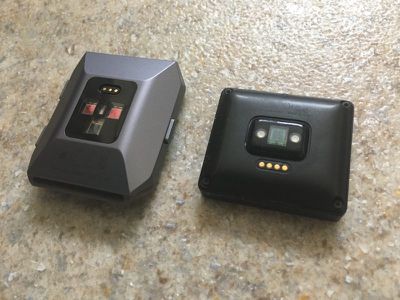
Elsewhere, the buttons have a tactile texture and are plenty responsive. The device also has a waterproofing oleophobic coating, so you can wear it in the shower and use it to track swimming, something that wasn't possible with the Blaze.
Touchscreen Interface and Smartwatch Features
The 1.42-inch LCD touchscreen display automatically adapts to ambient light, and is generally brighter and more colorful than previous Fitbits. The screen pumps out 1,000 nits, which is the same as the Apple Watch, and offers a higher resolution than the Blaze and better viewing in sunny conditions. The Ionic also comes with 17 bold clock faces with more surely on the way, now that the development kit has been released.
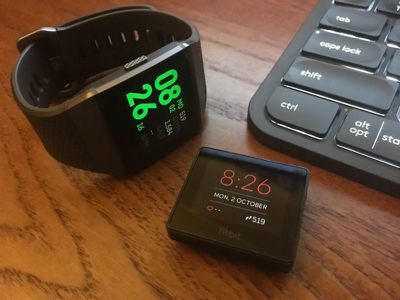
When viewing the clock face, the upper-right button provides a quick shortcut to your daily activity stats, which can be rearranged with a long press, while the lower right button takes you straight to the various training options. Both buttons adopt contextual functions in several other watch screen modes. Like the Blaze, a sideways swipe left on the clock face takes you to additional menu screens, and pressing the left button returns you to the last-viewed screen.
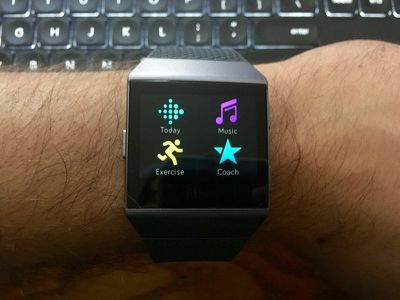
Beyond that, the Ionic's touch interface builds on the Blaze's simple horizontal swipe menu by packing in four icons per screen instead of just one. It's also possible to hold these individual icons – or apps, as Fitbit now calls them – and rearrange them however you like, so you can place your most-used apps fewer swipes away from the main clock face for quicker access.
Elsewhere, swiping down on the clock brings up music controls, while a swipe up reveals any smart notifications pushed from your phone over Bluetooth. Lastly, a new swipe-right menu from the clock allows you to turn off auto-screen wake and notifications.
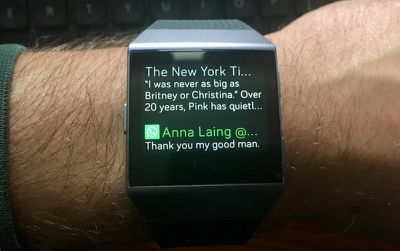
A word on those notifications. The Ionic can buzz you when someone texts or calls, but you can't reply to messages like you can on an Apple Watch, and you can't take calls from your wrist, since the Ionic has no microphone or speaker (although you can accept a call from the watch screen if you've paired Bluetooth headphones that have a built-in mic). It can push app alerts from your phone, and notify you of calendar events or when it's time for bed, but that's as good as it gets.
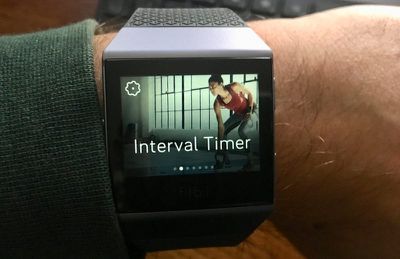
As far as other "smartwatch" functions go, aside from the stock tracking, breathing, and alarm/timer functions we've come to expect from most Fitbit wearables, the Ionic also ships with a small selection of additional apps. The Coaching app for example replaces the Fitstar features of previous models, and includes three guided bodyweight workouts with onscreen examples. They're pretty basic. More workouts are on the way, according to Fitbit, but those will be paid-for additions.
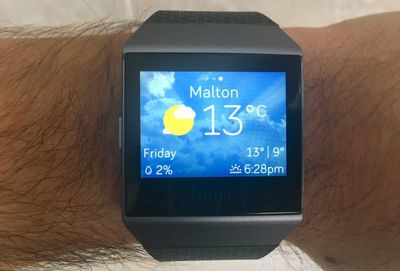
There's also a Strava app that requires you to link a Strava account via your phone for logging runs and cycle sessions, a Pandora music app for U.S. subscribers, a Starbucks app (U.S. and Canada only) and a weather app for checking the current forecast in up to three locations.
Then there's the Wallet app, which is supposed to store up to six credit or debit cards for use on Fitbit's new NFC digital payment platform, Fitbit Pay. After a card is added, the Ionic requires a four-digit pin to be unlocked once it's removed from your wrist.
Being in the U.K, I wasn't able to test out the contactless payments system, as it's currently only available in the U.S., Canada, and Australia, where it's supposed to work with "the world's most common banks and credit unions", according to the press release. Fitbit told me Fitbit Pay is coming to Europe sometime next year, but wasn't able to provide a specific date.
Fitness and Tracking
The Exercise categories in the Ionic interface include Run, Interval Timer, Weights, Bike, Swim, Treadmill, and Workout. Additional sports can be synced using the Fitbit phone app. The Ionic also continuously records steps, distance, calories burned, floors climbed, active minutes, and nightly sleep patterns and stages. These workouts and stats automatically sync to your personal Fitbit web profile and the Fitbit iOS/Android app, which is still one of the best-designed dashboards for gaining more insight into your health and activity data points.
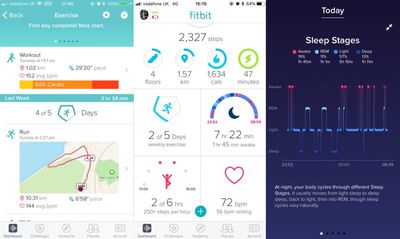
Like the Blaze, the Ionic also measures continuous HR (except when you're swimming) as well as resting HR, which is seen as a better indicator of overall health. In addition, there's a new SPO2 sensor built into the smartwatch for measuring blood-oxygen saturation, which Fitbit hopes will ultimately help identify sufferers of sleep apnea, but it's yet to be implemented.
Fitbit claims the Ionic features its most advanced HR sensor to date, and I found that to be generally true in my experience. During interval running and weight training exercises, it managed to keep up with my Moov HR Burn chest strap better than the Blaze could, tracking my heart rate at one second intervals with a good degree of accuracy.
Still, the Ionic's HR measurements were often wildly inaccurate when performing high-intensity circuit training workouts, just like its predecessor. That remains a general failing of wrist-based HR tracking technology, which is more suited to activity involving consistency of movement, so it's unfair to single out Fitbit on this point. The Apple Watch suffers the same issue, as do the Polar and Garmin range of smartwatches.
The Ionic's real-time onscreen stats are clear and well-designed, and can be set either to remain visible throughout your workout or to only show when you raise your arm. Tapping the screen reveals further available stats, while a new option lets you customize the three ranges to display (eg. splits, pace, time, swim lengths, HR, calories, and so on). The top and bottom ranges are static, but tapping on the screen cycles through multiple stats on the middle range.
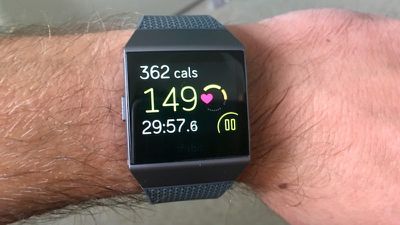
Apart from when you're swimming, the selection of ranges available to you doesn't really change across sports (there's no rep counting for weights, for example) but they're still useful for most exercises. You also get a nice workout summary at the end of your exercise, while syncing to the mobile app gets you plenty of detailed stats to pour over later.
In my opinion, the current lack of audio cues is perhaps the Ionic's biggest failing in this department. I prefer spoken progress updates during a workout, rather than having to raise my wrist every time my watch buzzes with a visual cue. Your mileage may very.
Otherwise, the Ionic's built-in GPS (with GLONASS support) was a godsend, allowing me to leave my phone at home during outdoor runs and rides without sacrificing real-time pace information and post-workout route mapping. Getting a GPS connection was generally quick and easy. Also, the Ionic's SmartTrack feature automatically tracked my runs and activated GPS without my input, which was a neat touch.
Music storage and playback
The Ionic comes with 2.5 gigabytes of internal storage for music tracks, which is enough for approximately 300 songs. Unlike the Apple Watch, it's currently impossible to upload music to the Ionic from your phone's music library over a Bluetooth connection. You have to use the Mac/Windows Fitbit Connect app, which limits you to syncing iTunes playlists to the watch, as long as the computer and the Ionic are on the same WiFi network.
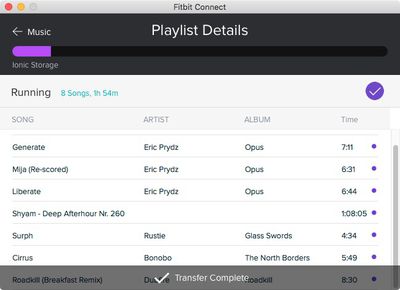
Trying to sync music from my Mac was an excruciating experience. The client app regularly crapped out and failed to upload all of the tracks in the list. A friend using Windows couldn't even get their Surface Pro to find the watch on the same network.
Several Ionic owners can be found in the support forums and on Twitter complaining of similar issues. Given the vagaries of home wireless networks, I can see this being a persistent problem for a good proportion of Ionic owners until Fitbit offers music upload directly from your smartphone. As it is, Fitbit seems to be inviting problems by forcing the Ionic to connect over WiFi to sync tracks from your computer.
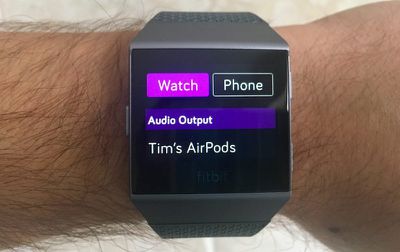
Eventually I managed to get a whole playlist to upload to the Ionic, but my problems didn't end there. Using the standard Bluetooth pairing button on my AirPods case, I was able to connect Apple's wireless earbuds to the watch pretty quickly, but the onscreen volume controls wouldn't respond to my touches. What's more, resuming playback after pausing essentially cut off the audio, and I had to re-pair the AirPods to get the sound back.
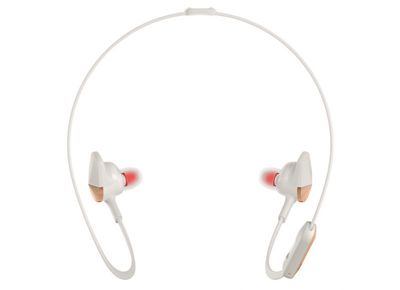
I couldn't replicate these issues using other earbuds. The Ionic also occasionally dropped the connection to my AirPods while I was running, and that's never happened when they've been paired with my iPhone. Fitbit's advertising says "Ionic seamlessly connects to wireless Bluetooth headphones like Fitbit Flyer so you can hear music and audio coaching on the go". But if the Ionic isn't compatible with Apple's market-leading earbuds, that assurance rings hollow.
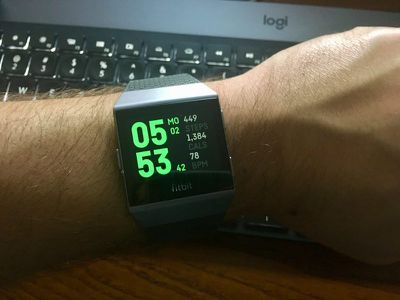
As for battery life, this is one of Fitbit's strengths. The Ionic easily lived up to its stated claim of 4 days or more. I managed to get around four days on a single charge, and that included two half-hour GPS runs, not to mention plenty of notification buzzes and onscreen interactions. The supplied USB charger, which attaches magnetically to the back of the watch, brought the Ionic from totally empty to a full charge in two and a half hours.
Bottom Line
There's no doubting the Ionic is Fitbit's most advanced wearable to date, marrying the best bits of the Blaze's software and the Surge's hardware while improving on both in the process. It's also solidly built and offers comprehensive fitness tracking features to rival the Apple Watch as well as mid-range Garmin devices, and battery life is of course excellent. But given the current lack of apps and the inability to respond to calls or notifications, I'm hesitant to call the Ionic a "true" smartwatch. There's certainly plenty of smartwatch potential if development continues, but aside from GPS, in its current state the Ionic doesn't seem all that much of an upgrade over the Blaze.
There are also issues to be fixed before Fitbit can possibly justify that $300 price tag. The initial setup and sync process is glacially slow, while the whole music interfacing system leaves a lot to be desired – especially if you're an Apple AirPods user. Add to that tentpole features like Fitbit Pay still awaiting proper rollout, and it all starts to feel as though the Ionic was rushed to market.
If the company can sort out these problems and get third-party developers to populate its app store with apps worth the download, then the Ionic might well turn out to be the shot in the arm that Fitbit is looking for, but as it stands, my advice is to hold off on that purchase, and wait and see how this product pans out.
Pros
- Robust, swim-proof design
- Intuitive iOS app and watch menus
- 4+ day battery life
- Integrated GPS
Cons
- Buggy sync process
- Lack of apps
- No workout audio cues
- Music interfacing is flaky
How to Buy
The Fitbit Ionic costs $300 and can be ordered on the Fitbit website and from Amazon in three variations: Blue Gray/Silver Gray, Slate Blue/Burnt Orange, and Charcoal/Smoke Gray. Accessory bands available in various colors include the Perforated Leather Band ($60), Sport Band ($30), and Classic Band ($30). There's also an Adidas edition of the Ionic coming in early 2018.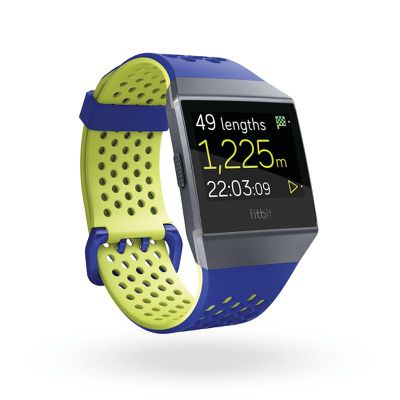
Note: Fitbit supplied the Ionic to MacRumors for the purposes of this review. No other compensation was received.















































Top Rated Comments
But I'm not sure why you're even commenting that you dropped your Apple Watch, when that's your own fault. That's Not something to complain about or even related to the Apple Watch experience. That would be self-inflicted on your behalf.
But I find the Apple Watch more aesthetically pleasing, and at least it doesn't have the Fitbit logo plastered on the front of the display With those large bezels.
Goodbye Fitbit. Your arrogance, in not supporting Apple Health, was the final nail in your coffin. I, like many others, abandoned your feeble offerings when the Apple Watch became of age.
You reap what you sow! Please remember to switch off the lights on your way out...
The problem with Fitbit is they produce throwaway, unreliable devices. I'm on my third (Charge HR 2) and whilst I love the software and accuracy, the build quality is poor. The strap has just started falling apart on this one too.
That battery life goes way FAST. My Alta had 6 days first 6 months and now a year later it's barely a day or 2 before I get a low battery warning. I'm not sure if they use low quality batteries or what but that 6 day battery life will NOT last. I charged Saturday Night into Sunday Morning and wore it Sunday and today and I'm down to less than 1/2 of the battery bar. You'll be lucky to see 2 days on the Ionic after a year... and forget about support for it when the Ionic 2 comes out.
I would rather see a Fitbit Apple Watch App. I'd even pay for it because the Fitbit Ecosystem is the only thing that is better than Apple's.