

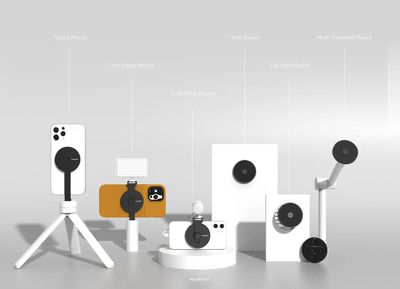
Moment is best known for its line of lenses designed for iPhones, but the company also makes all kinds of other accessories that are designed to improve the iPhone experience. With the launch of MagSafe, Moment designed MagSafe friendly cases and accessories that are useful for those who want to use Moment lenses or photography equipment like tripods with their iPhones.
Moment's MagSafe-Compatible iPhone 13 Cases
Moment makes a range of MagSafe-compatible iPhone 13 cases that are both MagSafe-compatible and are able to work with Moment's lineup of lenses. Cases are priced at $50, and are made from a soft touch polycarbonate material.
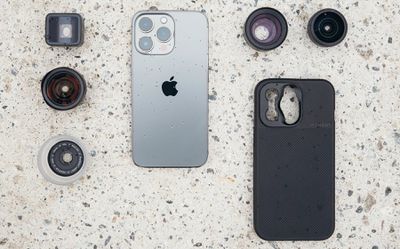
As a standard MagSafe case, Moment's cases are not my favorite. There is a texture to the case, but it is not as grippy and easy to hold as Apple's own silicone cases and I'm continually worried that it might slip out of my hand.
There is a nice microfiber lining inside, along with protection for the camera area, bottom ports, and a lip for keeping the display safe. Moment says the cases offer six-foot drop protection, and while I'm not going to toss my iPhone on the ground to test it out, that seems about right given the protective features and the case thickness.
Volume and power buttons are covered but are still easy to press, and the mute button and all ports remain accessible. I didn't have a problem using this case with wireless chargers, both Qi and MagSafe. There are wrist strap attachment points at the bottom if you want to add a wrist strap for an extra grip when taking photos.
While this isn't my favorite standalone case, it is one of the only cases that's compatible with Moment's lineup of lenses, so if you have Moment lenses, you'll need a Moment case to use them. You will have to pair the Moment case with a Drop-in Lens Mount, which is an extra $4.99. I'm not sure why Moment isn't selling this as an all-in-one bundle or with an option to have the mount already attached in the case, but for now it's standalone.
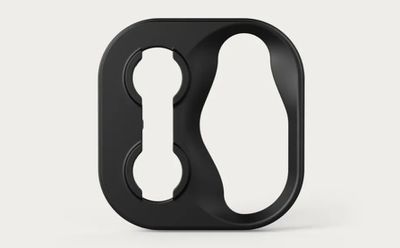
If you have the case and the lens mount, you basically just need to pop out the standard lens bracket that comes with the case and the pop in the lens mount version. All of the built-in cameras work fine with the lens mount in place, and you can screw in Moment's lenses.
Moment makes a fisheye lens, a wide-angle lens, a telephoto lens, a macro lens, and an anamorphic lens, and all of the M-series lenses work with the case and the mount. It's worth noting that Moment lenses are designed to be used with the wide-angle camera and will block the telephoto lens and the ultra wide lens. This is my first choice case if you have Moment lenses, but I still prefer other MagSafe cases like Apple's if you don't.
Car Vent Mount
The $40 Moment Car Vent Mount is more general use than some of the other Moment accessories. It's simple and straightforward, designed to attach to the vent of a car and stay firmly in place.
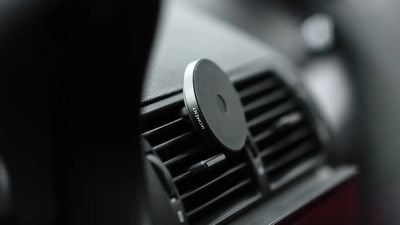
In my experience, it worked fine, and the mount stayed attached to my iPhone during multiple car rides, even going over bumps and with sudden stops. I've tried a few other magnetic mounts, and I think that Moment's version has one of the strongest magnets that I've encountered to date. There is no charging, though, so this is strictly for mounting for maps usage and other in-car purposes.
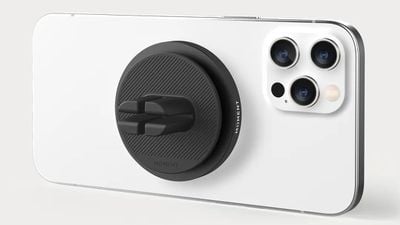
There's a soft grip texture where the mount attaches to an iPhone so you can use it naked or without a case, and the mount itself is made of aluminum. The same is true for all of Moment's mounting options - they feature the same aluminum design with a rubber barrier between the mount and the iPhone.
Wall Mount
Like the vent mount, the $15 Moment Wall Mount is multi-purpose. It has the same circular shape featured with many of Moment's accessories, with a magnet on one side and adhesive on the other.
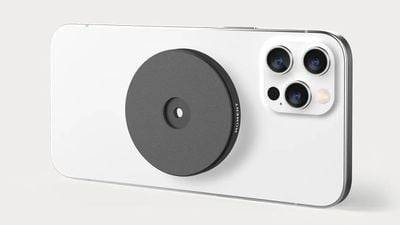
It's designed to allow you to attach your iPhone to any surface where the mount is stuck, so you can attach it to a wall in the kitchen for viewing recipes, or in an office for FaceTime and other purposes. Using the mount is as simple as peeling off the 3M adhesive and sticking it against a flat surface and then attaching your iPhone to the magnet, which is super strong.
I didn't have an issue with the adhesive in the month that I tested these accessories, but I am concerned about its long term viability. Adhesive can sometimes fail and this mount is relatively heavy, so I am concerned that it could just slip off the wall at some point.
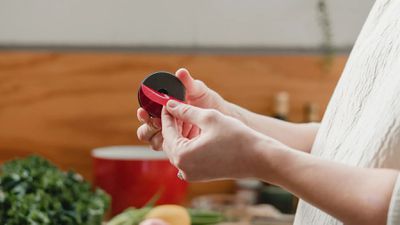
To be clear, that hasn't happened to me, but I'd definitely recommend using the wall mount with a case so should it come unattached from the wall, your iPhone won't suffer damage from a high fall. If you need to reposition the mount, you can do so with the extra adhesive pad that's included. I didn't have wall damage removing it, but it's going to vary based on wall material.
Multi-Threaded Mount
Moment's $40 Multi-Threaded Mount can be affixed to all manner of accessories because it comes with five different female threads in 3/8" and 1/4"-20 sizes. It can be threaded onto tripods, rig mounts, ball heads, and other accessories that you might have.
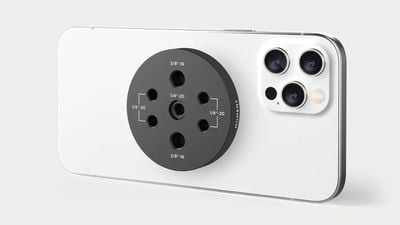
I tested it with a tripod, and it screwed right in. On the side opposite the threads, there's a magnetic plate that attaches to a MagSafe iPhone. As with MagSafe's other mounts, the magnet is surprisingly strong and I feel confident that my iPhone 13 Pro Max is going to stay secured in place even with a decent amount of movement.
All of the attachment points for this accessory are at the back, and I would have preferred to have one or two connection points on the side, which would make this Multi-Threaded Mount even more versatile.
This is definitely one of Moment's most versatile MagSafe accessories and it's a solid choice if you have a tripod you want to use your iPhone with or another similar accessory that uses one of the standard mount sizes.
Tripod Mount
The $40 Tripod Mount works with any standard 1/4"-20 tripod that you might already have on hand. The mount is made from aluminum (as are all of these Moment mounting options) and it's lightweight but offers a super strong magnetic grip on the iPhone.
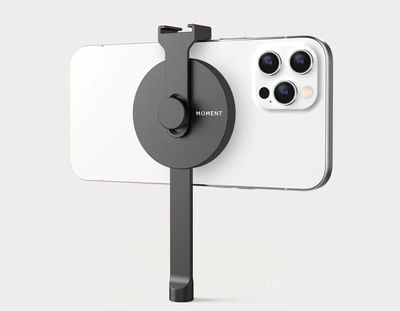
There's basically a round magnetic pad that attaches to the iPhone and an arm that can be screwed on to any tripod or handle that you already have, making it a useful way to add MagSafe compatibility to your photography accessories. You can use the Tripod Mount in either portrait or landscape mode, and make subtle adjustments to the angle by just rotating the iPhone on the magnetic attachment. It's simple and effective.
I didn't have the "pro" version with an included cold shoe mount, but that's an option for those who want to add a light or a microphone for filming purposes. The Pro version is $60, so $20 extra.
Prior to MagSafe I used a clamp mount accessory to attach my iPhone to a tripod, but Moment's MagSafe tripod mount is much quicker and easier to use in comparison for portrait shots, long exposure shots, and other situations where a tripod is useful.
Cold Shoe Mount
The $30 Cold Shoe Mount is useful for attaching a light or a microphone to the iPhone. I didn't have a compatible accessory on hand to try, but the design is close to identical to the tripod mount without the arm.
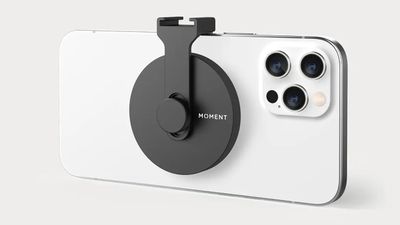
The magnetic pad attaches to the iPhone and then there's an adjustable cold shoe mount at the back. A thumbscrew can be used to lock the cold shoe arm in the position that you want for attaching accessories. This is a great option if you want to add a light or microphone while using your iPhone in handheld mode.
This may be one of the more niche accessories and I'm not sure that most people are going to want a standalone cold shoe mount. The Pro version of the Tripod Mount that comes with a cold shoe mount is more expensive at $60, but it also has the option to attach the iPhone to a tripod.
Bottom Line
Having tested quite a few MagSafe accessories, I was impressed with the magnet strength that Moment has achieved. For all of these mounts, my iPhone 13 Pro Max felt well-secured and I was not worried about it detaching or coming loose when mounted in the car, on a tripod, or on the wall.
I think most people looking for MagSafe-compatible accessories are going to be satisfied with Moment's lineup given the magnetic strength and the affordable price points. As for the cases, I'd recommend them if you need something to use with the Moment lenses that you own.
All of these accessories work with Moment lenses when used with Moment's cases and case mounts, but I do want to point out that you won't want to pick up these accessories if you have Moment lenses and intend to use them with an iPhone 12 mini or iPhone 13 mini. You can't use these accessories and a Moment Lens at the same time on one of Apple's smallest iPhones because of space constraints.
How to Buy
All of the Moment MagSafe accessories can be purchased directly from the Moment website.
Note: Moment provided MacRumors with its MagSafe accessories for the purpose of this review. No other compensation was received.
















































Top Rated Comments