Apple Community Envisions Better Ways to Activate Control Center on iPhone X - MacRumorsOpen MenuShow RoundupsShow Forums menuVisit ForumsOpen Sidebar
Skip to Content

Apple Community Envisions Better Ways to Activate Control Center on iPhone X

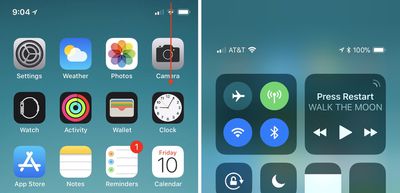
One of the biggest software changes on Apple's new iPhone X is the location of Control Center, the useful user interface that provides you with quick access to music playback controls, Bluetooth and Wi-Fi toggles, the flashlight, calculator, and much more thanks to iOS 11's customizable layout. On pre-iPhone X devices, the Control Center is awoken by swiping up from the bottom edge of the device. Because that action is now the default "go home" gesture on iPhone X, Apple has moved Control Center to the top right edge of the smartphone.

This location change has removed the simplicity and ease-of-access to Control Center for many iPhone X users -- particularly those who are left handed -- who have been posting about the iPhone X-specific issue in the MacRumors forums, Twitter, and on Reddit. Some of these users have also provided interesting alternative locations and invoking gestures that Apple could potentially implement in future iOS updates, but it should be reiterated that these are simply community ideas and not in any way an indication that we'll see them added to the iPhone X.
iphone x control center

How to activate Control Center on iPhone X

Reddit has been the source of multiple ideas for new Control Center gestures on the iPhone X, with a few that replace existing gestures (so you'd have to choose between two options in Settings) and some that are new. One user theorized that the iPhone X's new Reachability gesture (swiping down on the Home indicator, which must be activated in Settings) could have an alternate option for invoking Control Center.

Further threads provided variations on this idea: 3D Touch on the Home indicator for Reachability and pulling down on the indicator for Control Center, or keeping Reachability as it is and using 3D Touch on the Home indicator for Control Center. The 3D Touch solution has been put forward by multiple people over the last few days and appears to be a favorite, particularly because Reachability's new swipe-down gesture on the Home indicator can be difficult to execute and could potentially be an even more frustrating location for Control Center.

Other ideas have been shared on the MacRumors forums, including one that could be an additional option for the swipe-down gesture that enacts Search anywhere on the Home Screen, but that would make Control Center impossible to call up within apps. iOS developer Guilherme Rambo posted his own idea on Twitter this week, suggesting that a 3D Touch edge swipe could house Control Center. Currently, this is used as an app switching gesture, which Apple at first removed from iOS 11 and then brought back in a later update, so it's another idea where you'd have to pick one setting over another.

While Rambo's idea appears to be focused on Control Center replacing an app switcher gesture, a few users have also had ideas where Control Center is added into the app switcher. In these, you'd swipe up and hold to access other apps as normal, and Control Center would potentially be the first app you see instead of the last-used app. Or, Apple could place it on the right side of the app switcher, as one Redditor posited. Another mockup by Twitter user @jwangARK placed buttons under the app switcher for easy access to both Notifications and Control Center.

Another iOS developer, Riley Testut, theorized a simple solution that would place Control Center at the bottom right edge of the iPhone X display instead of the top right edge, while swiping up from the center would still go Home. A few iPhone X users have also pointed towards Assistive Touch in Accessibility as a workaround for easier Control Center activation, but that comes with a permanent, virtual Home Button on your iPhone screen, which will be a hard trade-off for some iPhone X owners.

With the iPhone X out in the wild for one full week as of today, November 10, the location of Control Center is one of a few gripes that early adopters have had with Apple's newest smartphone. Another notable point of contention focused on the iPhone X keyboard's "wasted space", with users presenting a few potential solutions to that as well, including placing recently used emoji or punctuation in the empty field below the space bar.

Make sure to check out our iPhone X Roundup for more details on the smartphone's new features.

Related Forums: iOS 11, iPhone

Popular Stories

apple pro tell logo

Apple Launching Five New Products Today

Thursday November 5, 2026 12:59 am PST by
Apple is launching five new products on Friday, November 6, following pre-orders that opened last week, including its first touchscreen MacBook Pro models. The following new products will be available from today: iPad mini with OLED display and A20 Pro chip iMac with M6 chip 14-inch MacBook Pro with M6 chip 14-inch MacBook Pro with OLED touchscreen 16-inch MacBook Pro with OLED...
duo aquarium

More Fun iPhone Duo Apps: 30 New Picks to Try

Friday November 6, 2026 3:27 pm PST by
When the iPhone Duo launched, we shared a list of some of the fun apps developers created for the new form factor. Two weeks out, developers are continuing to come up with fresh ideas, so we thought we'd share some of our favorites. Games Marbles Unhinged ($2.99) - Marbles Unhinged is a marble maze designed for the Duo. When you fold it, the floor turns into a ramp. If you stand the top...

silver iphone 18 pro

Apple Rumored to Drop the iPhone's Action Button Next Year

Friday November 6, 2026 6:07 am PST by
Apple plans to merge the iPhone's Action button with the Camera Control starting next year, according to the leaker known as "Instant Digital." In a new post on Weibo, the leaker claimed that a single press of the combined button would open the camera, while a long press would trigger the function assigned to the Action button. They explicitly clarified that the dedicated Action button would ...

Top Rated Comments

Patriks7 Avatar
117 months ago
Am I the only one slightly ticked off with the way apps are closed on the X? Feels like a completely unnecessary step to press and hold the app instead of just swiping up.
Score: 75 Votes (Like | Disagree)
117 months ago
No. A 3D Touch swipe from the edge would be a horrid idea for invoking control center.
Score: 46 Votes (Like | Disagree)
117 months ago
They are not gonna change this soon, that would be admitting it was a wrong first choice. Apple doesn't make mistakes.

[doublepost=1510329398][/doublepost]
Am I the only one slightly ticked off with the way apps are closed on the X? Feels like a completely unnecessary step to press and hold the app instead of just swiping up.

Yes, more people dislike this just like all of this:
[LIST=1]
* Bring up the status bar information so it fits better next to the notch, if needed make the font of it smaller.
* Add an option to unlock the phone without swiping up.
* Add control center to the multitasking screen instead of stretching your thumb every time.
* Force close apps by swiping up instead of holding one down first. One can simply swipe from bottom to get back.
* Get back battery percentage in the status bar.
* Make safari landscape mode wider on the iPhone X.
* Customize lock screen force touch buttons.
* Hide the "home" bar.
* Dark mode is even more important for the X due to OLED burn-ins.
* Lower the keyboard or add useful function to the wasted space below the keyboard.
Score: 41 Votes (Like | Disagree)
117 months ago
Why not add it to the multi taking page like iPads???
Score: 18 Votes (Like | Disagree)
117 months ago
Am I the only one slightly ticked off with the way apps are closed on the X? Feels like a completely unnecessary step to press and hold the app instead of just swiping up.
It's probably because other then an app that has gotten stuck/crashed there really is no reason to close an app because it doesn't really make a difference.
Score: 15 Votes (Like | Disagree)
117 months ago
Personally I like where it is. Then again I don't mind the notch either...
Score: 11 Votes (Like | Disagree)
Latest Stories
Siri AI Rumored to Become 'More Like an Agent' as Early as Next Year
4 hours ago
Apple Taking New Approach to Developing iOS 28 and macOS 28
5 hours ago
Early Apple Black Friday Deals on Apple Watch, MacBook Air, and More
1 day ago
'Backglow' Lets You Customize New MacBook Pro's Glowing Apple Logo
1 day ago
Top Stories: Apple Product Launches, iOS 27.3 Beta, and More
1 day ago
More Fun iPhone Duo Apps: 30 New Picks to Try
2 days ago
Hands-On With Apple's New OLED Touchscreen MacBook Pro
2 days ago
Apple Store With All-New Design Opening Soon in Southern California
2 days ago
Control the Glowing Apple Logo on Your New MacBook Pro
2 days ago
Apple Shares New 'Apple Card: Apply and Use in Minutes' Ad
2 days ago
Apple Says More Than 100,000 Apps Optimized for iPhone Duo, Here's What's Still Missing
2 days ago
Early Black Friday Deals Kickoff With Steep Discounts on Apple Watch Ultras and More
2 days ago
The MacRumors Show: iOS 27.3 Looks Like a Huge Update
2 days ago
Best Buy's Black Friday Event Begins With Sitewide Savings on Apple, TVs, More
2 days ago
Apple Releasing Yet Another Two New Products Next Week
2 days ago
MacBook Air Drops to Lowest Price in Months With Amazon's $250 Discount
2 days ago
Apple Rumored to Drop the iPhone's Action Button Next Year
2 days ago
Apple's Extended Return Policy Now in Effect for 2026 Holiday Season
2 days ago
Apple Music Classical Updated With New Icon and Refreshed Design
2 days ago
OLED iPad Mini, M6 iMac, and New MacBook Pros Available From Today
2 days ago
Apple Surveys iPhone Duo Buyers About Crease and Camera
3 days ago
Apple's First Touchscreen Mac is Now Arriving to Customers
3 days ago
Claude Gets Personal Finance Feature With Bank Account Linking
3 days ago
Apple Arcade Adds Crossy Road Rush and NBA 2K27
3 days ago
Apple's New HomeView Smart Home Hub: Here's How Much RAM It Has
3 days ago
iPad Mini vs. iPad Air Buyer's Guide: Now Just $50 Apart
3 days ago
First iOS 27.3 and macOS Golden Gate 27.3 Public Betas Now Available
3 days ago
Apple Announces a New Mac Sales Record
3 days ago
Paid $200 for Logic Pro? Apple Says You Won't Get This New Feature
3 days ago
Instagram's Edits Video Editor is Now Available on Mac
3 days ago








































