8 New Photo Features Coming to iPhone in iOS 17 - MacRumorsOpen MenuShow RoundupsShow Forums menuVisit ForumsOpen Sidebar
Skip to Content

8 New Photo Features Coming to iPhone in iOS 17

Photography has become a staple use of the modern iPhone, and Apple isn't resting on its laurels in its efforts to advance what you can do with a photo in iOS 17.

8 New Photo Features Feature 1
Below we've listed eight new photo-related features and improvements coming with Apple's latest mobile operating system, which is expected to get its official release in the fall. Can't wait until then? The iOS 17 beta is available now.

1. Pet Recognition

In iOS 17, Apple has improved the image recognition capabilities of the Photos app, which can now recognize not only your family and friends, but also your beloved pets.

ios 17 pets photos
The ‌‌Photos‌‌ app's ability to detect animals isn't new, but now it can identify animals that are important to you by taking into account the number of photos that you have of them. That's why the "People" album has become the "People and Pets" album, where you can add the names of your pets and confirm additional photos.

2. One-Tap Crop

In iOS 16, cropping images in the ‌Photos‌ app involves tapping into the Edit interface, choosing the crop tool, and adjusting the crop from there with either pinch zoom gestures or by dragging the corners of the cropping tool.

ios 17 crop photos app
In iOS 17, Apple has made the process quicker and easier. Now when you zoom into an image, there's a new "Crop" button that appears in the upper right. Tapping it brings up the crop interface with the zoom level that you've selected, so you can crop into the part of the image that you prefer with just a couple of taps.

3. Turn Photos into Animated Stickers

In iOS 16, Apple added a neat "remove subject from background" tool for plucking things out of images. In iOS 17, Apple has supercharged the feature, and now you can use it to make your own custom animated stickers for use in Messages.

ios 17 stickers create
When long-pressing a subject in a photo, the pop-up menu includes a new "Add Sticker" option that exports the selected subject into Messages' sticker interface. From there, you can add effects like a white sticker outline, a "puffy" sticker effect, a glittery effect, and more. Subjects pulled from Live Photos even have the option of animating.

4. Get Recipes for Food

When viewing your photos, Apple has enhanced Visual Look Up in iOS 17 in a few ways, one being the ability to find recipes for similar dishes when meals are recognized in the picture.

visual lookup recipes
When an image of food is identified in the ‌Photos‌ app, a knife and fork icon appears at the bottom of the interface. The Look Up Food option gives you direct links to recipe websites, so now you can get inspiration about what to cook, without having to trawl the web yourself in Safari.

5. Straighten Your Shooting Angle

For the last few years, the Camera app's Grid mode has included a somewhat-hidden leveling feature for top-down photos, popping up a floating crosshair to help make sure you're lined up properly above your subject.

ios 17 camera level
In iOS 17, Apple has enhanced the camera leveling functionality, separating it out from the Grid mode to its own option and expanding it to include a horizontal level for more traditional straight-on photos.

The Level option displays a broken horizontal line on the screen when your iPhone senses you're lining up for a straight-on shot and you tilt your device slightly out of horizontal. The line appears white while your phone is out of level and then turns yellow once you achieve a level orientation to indicate success.

6. Look Up What You Just Lifted

In iOS 17, when you use the "remove subject from background" tool, you can now look up information about the subject in question, thanks to a new option in the popup menu.

lookup lifted subject
Not only that, the ‌Photos‌ app now also offers the ability to pause video on any frame and look up information on a subject.

7. Visual Look Up for Auto Symbols

Apple hasn't publicly promoted this feature, but Reddit users digging into the iOS 17 beta have discovered that Visual Look Up can now detect car symbols on vehicle dashboards.
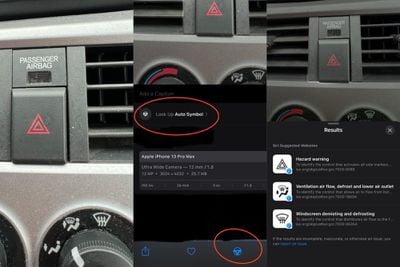
lookup auto symbols

Image credit: yahlover

When the ‌Photos‌ app identifies one or more symbols in an image, iOS 17 presents the name of the icon and a short description of its meaning, and offers up links to learn more about each symbol in Safari.

8. Tweaked Editing Tools Interface

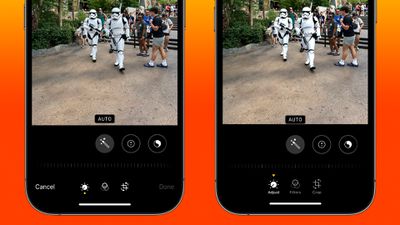
Lastly, Apple in iOS 17 has made some quality of life improvements to the ‌Photos‌ app editing interface to make it a little more intuitive. The Cancel and Done buttons have been moved from the bottom of the screen to the top, and the tool icons have been given text descriptions to make their function clearer.
photos ui comparison

‌Photos‌ app editing UI in iOS 16 (left) vs iOS 17

In order to make it more obvious whether Adjust, Filters, or Crop is currently selected, Apple has also changed the indicator from a yellow circle beneath the active icon, to a triangle pointing down at it from above.

Related Forums: iOS 17, iPadOS 17

Popular Stories

iphone duo facetime

iPhone Duo's Hidden FaceTime Camera Takes 'Trash' Photos

Wednesday October 21, 2026 11:36 am PDT by
The iPhone Duo's inner screen has an under-display front camera that's largely hidden from view. It's the first time we've seen an under-display camera on an iPhone, and it turns out there's a reason Apple hasn't used the technology before. Apple said the camera offers 1080p video recording, but didn't mention photo quality. Gizmodo said it's a 4-megapixel camera and described the photos as...


homeview faces

HomeView's Faces Include Snoopy, Photos, and Interactive Artwork

Wednesday October 14, 2026 4:00 am PDT by
Apple's HomeView includes customizable faces for photos, animations, and smart home controls. Faces Apple has named so far include: Photos Flow Snoopy Calendar Weather Home Modular Home Camera Other clock and widget layouts appear in Apple's promotional images, but have not yet been named. Apple says that selected faces change throughout the day, with different appearances...
duo aquarium

More Fun iPhone Duo Apps: 30 New Picks to Try

Friday November 6, 2026 3:27 pm PST by
When the iPhone Duo launched, we shared a list of some of the fun apps developers created for the new form factor. Two weeks out, developers are continuing to come up with fresh ideas, so we thought we'd share some of our favorites. Games Marbles Unhinged ($2.99) - Marbles Unhinged is a marble maze designed for the Duo. When you fold it, the floor turns into a ramp. If you stand the top...

Top Rated Comments

contacos Avatar
44 months ago
How about finally showing us which photos have already been sorted into Albums and also show WHICH Album in the photo details? It’s a mess if you do not sort them right away (I am trying to do it monthly for this reason). Often I am like „hmmm where did I leave off?!?“ hmmm did I sort those already?

On android I have a little indicator on the thumbnail in my „all photos“ feed to show me that those photos are already sorted
Score: 13 Votes (Like | Disagree)
johnmarki Avatar
44 months ago
Keep the updates to Photos coming Apple! No complaints here.
Score: 8 Votes (Like | Disagree)
StellarVixen Avatar
44 months ago
Where’s the retouch brush? Mac Photos has had it for years now
Score: 5 Votes (Like | Disagree)
Ch3ckM4te Avatar
44 months ago
Hope it recognizes all my Pet Rocks…
Score: 5 Votes (Like | Disagree)
44 months ago

How about finally showing us which photos have already been sorted into Albums and also show WHICH Album in the photo details? It’s a mess if you do not sort them right away (I am trying to do it monthly for this reason). Often I am like „hmmm where did I leave off?!?“ hmmm did I sort those already?

On android I have a little indicator on the thumbnail in my „all photos“ feed to show me that those photos are already sorted
You can create a smart album that filters those images for you that are not part of any album yet. Please see attached!

Attachment Image
Score: 4 Votes (Like | Disagree)
matrix07 Avatar
44 months ago
No 4 will be huge.
Score: 4 Votes (Like | Disagree)
Latest Stories
Apple Store Subscription Sign-Up Controversy Exposed
2 hours ago
Siri AI Rumored to Become 'More Like an Agent' as Early as Next Year
12 hours ago
Apple Taking New Approach to Developing iOS 28 and macOS 28
14 hours ago
Early Apple Black Friday Deals on Apple Watch, MacBook Air, and More
1 day ago
'Backglow' Lets You Customize New MacBook Pro's Glowing Apple Logo
1 day ago
Top Stories: Apple Product Launches, iOS 27.3 Beta, and More
2 days ago
More Fun iPhone Duo Apps: 30 New Picks to Try
2 days ago
Hands-On With Apple's New OLED Touchscreen MacBook Pro
2 days ago
Apple Store With All-New Design Opening Soon in Southern California
2 days ago
Control the Glowing Apple Logo on Your New MacBook Pro
2 days ago
Apple Shares New 'Apple Card: Apply and Use in Minutes' Ad
3 days ago
Apple Says More Than 100,000 Apps Optimized for iPhone Duo, Here's What's Still Missing
3 days ago
Early Black Friday Deals Kickoff With Steep Discounts on Apple Watch Ultras and More
3 days ago
The MacRumors Show: iOS 27.3 Looks Like a Huge Update
3 days ago
Best Buy's Black Friday Event Begins With Sitewide Savings on Apple, TVs, More
3 days ago
Apple Releasing Yet Another Two New Products Next Week
3 days ago
MacBook Air Drops to Lowest Price in Months With Amazon's $250 Discount
3 days ago
Apple Rumored to Drop the iPhone's Action Button Next Year
3 days ago
Apple's Extended Return Policy Now in Effect for 2026 Holiday Season
3 days ago
Apple Music Classical Updated With New Icon and Refreshed Design
3 days ago
OLED iPad Mini, M6 iMac, and New MacBook Pros Available From Today
3 days ago
Apple Surveys iPhone Duo Buyers About Crease and Camera
3 days ago
Apple's First Touchscreen Mac is Now Arriving to Customers
3 days ago
Claude Gets Personal Finance Feature With Bank Account Linking
3 days ago
Apple Arcade Adds Crossy Road Rush and NBA 2K27
3 days ago
Apple's New HomeView Smart Home Hub: Here's How Much RAM It Has
3 days ago
iPad Mini vs. iPad Air Buyer's Guide: Now Just $50 Apart
3 days ago
First iOS 27.3 and macOS Golden Gate 27.3 Public Betas Now Available
3 days ago
Apple Announces a New Mac Sales Record
3 days ago
Paid $200 for Logic Pro? Apple Says You Won't Get This New Feature
3 days ago