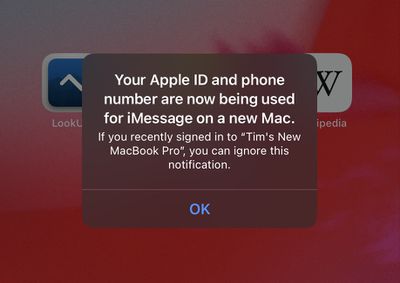
Have you received an unexpected notification on your Apple device saying that your Apple ID and phone number are now being used for iMessage and FaceTime on a new Mac, iPhone or iPad?
If the answer is yes, there's no need to panic. The message doesn't necessarily mean anything malicious has happened to your Apple account. In fact, in the vast majority cases, there's a simple explanation for it. Keep reading to learn more.
Why Have I Received This Message?
Whenever you set up a new Apple device, you will be asked to sign into it using your Apple ID. Your Apple ID is the account you use to sign in to all Apple services like iCloud, the iTunes Store, and the App Store. You can have multiple devices signed into the same Apple ID. This ensures that your iCloud user data, app downloads, and media purchases can sync between them.
If you set up a new Apple device, erase and re-install the operating system on a device you already own and then sign back into your Apple ID, or simply sign out of iMessage or FaceTime on a device, any other devices signed in to the same Apple ID should throw up the following popup notification on the screen: "Your Apple ID and phone number are now being used for iMessage/FaceTime on a new [iPhone/iPad/Mac]. If you recently signed into [device name] you can ignore this notification."
But I Didn't Do Any of Those Things Recently!
Even if you haven't done anything recently to warrant the pop-up message and you don't recognize the default name of the device ("iPhone," for example), it doesn't necessarily mean anything untoward has occurred. Sometimes it takes a while for Apple to update your Apple ID device list in its Activation Servers.
On other occasions, the message will pop up if you turn on a device that hasn't been connected to the internet for a while, especially if you logged in to iMessage or FaceTime during the period that it was disconnected. The message can also occur if the device has been relying on a poor Wi-Fi connection.
In these cases, the message is simply a delayed notification and not a sign of a compromised Apple ID. However, if you're suspicious because the name of the device that signed into your Apple ID is not a default name and you don't recognize it, you can investigate the cause by checking your Apple ID device list with Apple. The following steps show you how.
How to Check Your Apple ID Device List
- On your iPhone or iPad, open the Settings app.
- Tap your Apple ID banner at the top of the menu.
- Scroll down, then tap any device name to view that device's information, such as the device model, serial number, OS version, and whether the device is trusted and can be used to receive Apple ID verification codes.

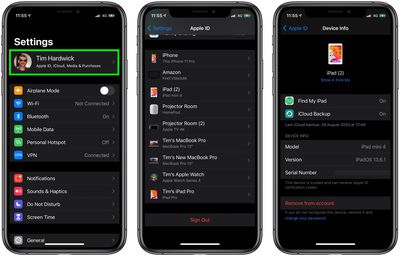
You can also view this list on a Mac by clicking the Apple menu () in the menu bar, selecting System Preferences..., and clicking Apple ID.
If you see anything untoward or suspicious – a device linked to your Apple ID that you don't recognize, for example – then your account may be compromised. You should remove the device from your account using the red option at the bottom of the screen for that device. After you've done that, follow the steps below to secure your account.
How to Gain Control of Your Apple ID
- Sign in to your Apple ID account page using Apple's Apple ID website. If you can't sign in or you receive a message that the account is locked when you try to sign in, try to reset or change your password.
- Review all the personal and security information in your account. Update any information that isn't correct or that you don't recognize, including your name, your primary Apple ID email address and alternate/rescue email address, your phone numbers. Also check your security questions and answers, and make sure your answers aren't easy to guess.
- If you haven't already, set up two-factor authentication for your Apple ID. This additional security feature is designed to prevent anyone from accessing your account, even if they know your password.
If you don't have 2FA enabled, click these corresponding links to take you to the sections explaining how to reset your Apple ID password if you're using SMS-based two-factor verification, or if you have email, password and security questions set up for your account.