How to Secure Your Apple ID Using Two-Factor Authentication - MacRumorsOpen MenuShow RoundupsShow Forums menuVisit ForumsOpen Sidebar
Skip to Content

How to Secure Your Apple ID Using Two-Factor Authentication

by

Apple introduced two-factor authentication (2FA) in 2015 to provide an enhanced level of security when accessing Apple ID accounts. With 2FA enabled, you'll be the only person who can access your account, regardless of whether someone learns your password – as the result of a hack or a phishing scam, for example – so it's well worth taking the time to enable the feature. In this article, we'll show you how.

How Two-Factor Authentication Works

2FA offers hardened security during login attempts by requesting that the user provides an extra piece of information only they would know.
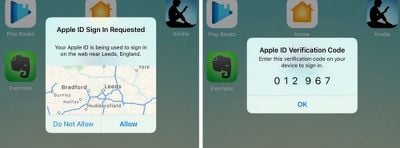
2fa verification on ios
With 2FA enabled on your Apple ID account, the next time you try to log in you will be automatically sent a six-digit verification code to all the Apple devices you have registered to that Apple ID. If you try to access the account from an unknown device or on the web, 2FA also displays a map on all registered devices with an approximate location of where the Apple ID login attempt occurred.

In basic terms, this is an improved version of Apple's older two-step verification method, which prompted users to send a four-digit code to a registered SMS-capable device. Apple automatically upgraded most two-step verification users to 2FA as of iOS 11 and macOS High Sierra, but if you're still on two-step verification for some reason, follow the steps below to manually upgrade to 2FA.

How to Turn Off Two-Step Verification

  1. Open a browser and go to appleid.apple.com
  2. Enter your Apple ID and password in the login fields.
  3. In the Security section of your account page, click the Edit button on the right.
  4. Check to make sure two-step verification is enabled rather than two-factor authentication, and click Turn off two-step verification.

How to Turn On Two-Factor Authentication in iOS

To turn on 2FA using an iPhone or iPad, it needs to be running iOS 9 or later. Note that if you're running iOS 10 or later and you have any other, older devices tied to your Apple ID that aren't compatible with 2FA, you'll receive a compatibility warning during the setup process.

On top of that, you'll also be asked to append a six-digit code to the end of your password whenever you authenticate a login on your older devices in future. You can potentially avoid this hassle by updating those devices to the latest version of iOS or macOS where possible.

With that in mind, perform the following steps on your iOS device:

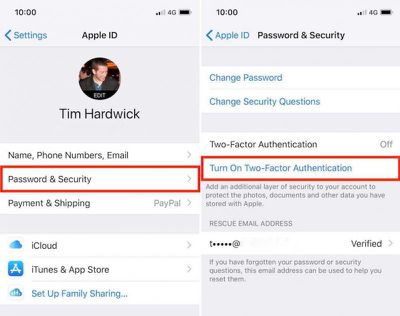
  1. Open the Settings app and tap your Apple ID banner at the top of screen.
  2. Tap Password & Security.
  3. Tap Turn On Two-Factor Authentication, and then tap Continue on the next screen.
  4. Tap Turn On Anyway if you see a compatibility warning about older devices.
  5. Check your phone number is correct. (If it isn't, tap Use a Different Number at the bottom of the screen and input a new number.)
  6. Select Text message or Phone call for verification, and then tap Next.
  7. Enter your Passcode.

2fa ios e1517490695102

How to Turn On Two-Factor Authentication on a Mac

If it's a Mac you're using to enable two-factor authentication then make sure it's running OS X El Capitan or later. To turn on 2FA on Mac, follow these steps:

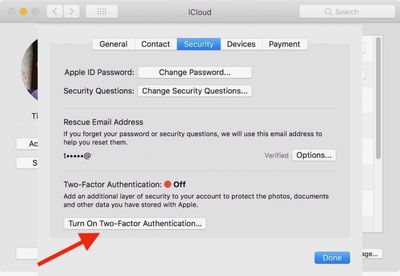
  1. Click the Apple () symbol in the menu bar at the top left of the desktop, and select System Preferences.
  2. Click the iCloud preferences pane.
  3. Click the Account Details button and select the Security tab.
  4. Click Turn on Two-Factor Authentication, and then click Continue in the drop-down pane.
  5. Check your phone number is correct and click Continue.
2fa mac 2

Verification Codes

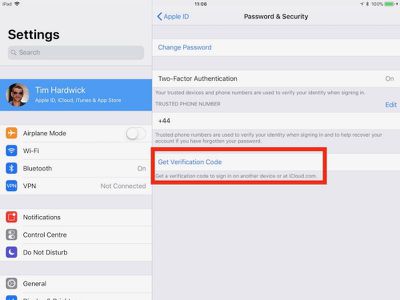
With 2FA enabled, you'll be prompted to enter a new verification code every time you log in to your Apple ID account using iCloud.com or another Mac or iOS device. These codes will automatically appear on devices that are already logged into your Apple ID, but you can also request them manually using an iPhone or iPad, like so:

  1. Open the Settings app and tap on your Apple ID banner at the top of the screen.
  2. Tap Password & Security.
  3. Tap Get Verification Code.

2fa codes

Top Rated Comments

114 months ago
User BEWARE!!
There's currently no way to recover your account using two factor authentication if you lose or forget your password and or the recovery key.
Without the recovery key the account and all its contents will be lost completely (all purchases)
The recovery key must be store in a "safe deposit box" outside the residence in case your house burns down i.e. Cal Wild Fires, floods, etc. and your recovery key was stored at home in a "safe" place.
DO NOT USE TWO FACTOR AUTHENTICATION if you do not store your password and recovery key outside the residence or in another cloud account where it can be readily accessed.
Yes there is. With the old way (2 step verification) you needed a recovery key. This way they are doing now, you don’t. I’m actually helped a person recover their data and they got a phone call in 12 days and got their account unlocked.

Personally, I rather have it so I need a recovery key.
Score: 4 Votes (Like | Disagree)
Weaselboy Avatar
114 months ago
You can set up more than 1 trusted phone number.
Yep... you can even add your home phone and Apple will robo call you with the six digit code.

Score: 3 Votes (Like | Disagree)
Apple_Robert Avatar
114 months ago
No way to recover if you lose your phone while travelling. Apple should allow two factor with a secondary email rather than phone number.
You can set up more than 1 trusted phone number.
Score: 3 Votes (Like | Disagree)
114 months ago
User BEWARE!!
There's currently no way to recover your account using two factor authentication if you lose or forget your password and or the recovery key.
Without the recovery key the account and all its contents will be lost completely (all purchases)
The recovery key must be store in a "safe deposit box" outside the residence in case your house burns down i.e. Cal Wild Fires, floods, etc. and your recovery key was stored at home in a "safe" place.
DO NOT USE TWO FACTOR AUTHENTICATION if you do not store your password and recovery key outside the residence or in another cloud account where it can be readily accessed.
This is obviously by design for security reasons.
Score: 3 Votes (Like | Disagree)
Weaselboy Avatar
114 months ago
If you set someone up as a "trusted" number, do they get notified every single time you get an access code to get into an iCloud setting or whatever?

For whatever reason, every single time -- for example -- that I open iCloud.com in a browser I'm prompted for a code from a trusted device... even though I've checked "remember me" over and over.
No it defaults to the main iCloud account. You would need to manually tell it to use one of the other numbers for the other person to get the code.

Score: 2 Votes (Like | Disagree)
Apple_Robert Avatar
114 months ago
Glad to see MR posting a much needed tutorial for those who may not know all that is involved.

Score: 2 Votes (Like | Disagree)

Popular Stories

apple pro tell logo

Apple Launching Five New Products Today

Thursday November 5, 2026 12:59 am PST by
Apple is launching five new products on Friday, November 6, following pre-orders that opened last week, including its first touchscreen MacBook Pro models. The following new products will be available from today: iPad mini with OLED display and A20 Pro chip iMac with M6 chip 14-inch MacBook Pro with M6 chip 14-inch MacBook Pro with OLED touchscreen 16-inch MacBook Pro with OLED...
duo aquarium

More Fun iPhone Duo Apps: 30 New Picks to Try

Friday November 6, 2026 3:27 pm PST by
When the iPhone Duo launched, we shared a list of some of the fun apps developers created for the new form factor. Two weeks out, developers are continuing to come up with fresh ideas, so we thought we'd share some of our favorites. Games Marbles Unhinged ($2.99) - Marbles Unhinged is a marble maze designed for the Duo. When you fold it, the floor turns into a ramp. If you stand the top...
silver iphone 18 pro

Apple Rumored to Drop the iPhone's Action Button Next Year

Friday November 6, 2026 6:07 am PST by
Apple plans to merge the iPhone's Action button with the Camera Control starting next year, according to the leaker known as "Instant Digital." In a new post on Weibo, the leaker claimed that a single press of the combined button would open the camera, while a long press would trigger the function assigned to the Action button. They explicitly clarified that the dedicated Action button would ...
Latest Stories
Siri AI Rumored to Become 'More Like an Agent' as Early as Next Year
2 hours ago
Apple Taking New Approach to Developing iOS 28 and macOS 28
4 hours ago
Early Apple Black Friday Deals on Apple Watch, MacBook Air, and More
23 hours ago
'Backglow' Lets You Customize New MacBook Pro's Glowing Apple Logo
23 hours ago
Top Stories: Apple Product Launches, iOS 27.3 Beta, and More
1 day ago
More Fun iPhone Duo Apps: 30 New Picks to Try
2 days ago
Hands-On With Apple's New OLED Touchscreen MacBook Pro
2 days ago
Apple Store With All-New Design Opening Soon in Southern California
2 days ago
Control the Glowing Apple Logo on Your New MacBook Pro
2 days ago
Apple Shares New 'Apple Card: Apply and Use in Minutes' Ad
2 days ago
Apple Says More Than 100,000 Apps Optimized for iPhone Duo, Here's What's Still Missing
2 days ago
Early Black Friday Deals Kickoff With Steep Discounts on Apple Watch Ultras and More
2 days ago
The MacRumors Show: iOS 27.3 Looks Like a Huge Update
2 days ago
Best Buy's Black Friday Event Begins With Sitewide Savings on Apple, TVs, More
2 days ago
Apple Releasing Yet Another Two New Products Next Week
2 days ago
MacBook Air Drops to Lowest Price in Months With Amazon's $250 Discount
2 days ago
Apple Rumored to Drop the iPhone's Action Button Next Year
2 days ago
Apple's Extended Return Policy Now in Effect for 2026 Holiday Season
2 days ago
Apple Music Classical Updated With New Icon and Refreshed Design
2 days ago
OLED iPad Mini, M6 iMac, and New MacBook Pros Available From Today
2 days ago
Apple Surveys iPhone Duo Buyers About Crease and Camera
3 days ago
Apple's First Touchscreen Mac is Now Arriving to Customers
3 days ago
Claude Gets Personal Finance Feature With Bank Account Linking
3 days ago
Apple Arcade Adds Crossy Road Rush and NBA 2K27
3 days ago
Apple's New HomeView Smart Home Hub: Here's How Much RAM It Has
3 days ago
iPad Mini vs. iPad Air Buyer's Guide: Now Just $50 Apart
3 days ago
First iOS 27.3 and macOS Golden Gate 27.3 Public Betas Now Available
3 days ago
Apple Announces a New Mac Sales Record
3 days ago
Paid $200 for Logic Pro? Apple Says You Won't Get This New Feature
3 days ago
Instagram's Edits Video Editor is Now Available on Mac
3 days ago