How to Delete or Deactivate Your Apple ID Account and Data - MacRumorsOpen MenuShow RoundupsShow Forums menuVisit ForumsOpen Sidebar
Skip to Content

How to Delete or Deactivate Your Apple ID Account and Data

by

Apple has launched a new Data and Privacy website that enables users to request a copy of all of the data associated with their Apple ID accounts that the company maintains on its servers. The page also provides options to delete or deactivate an Apple ID by following the step-by-step instructions outlined below.
apple id account delete deactivate
While any customer anywhere can delete an Apple ID account, Apple says the ability to deactivate an Apple ID account is limited to accounts with locations set in the European Union, Iceland, Liechtenstein, Norway, and Switzerland. Apple intends to roll out the deactivation option around the world "in the coming months."

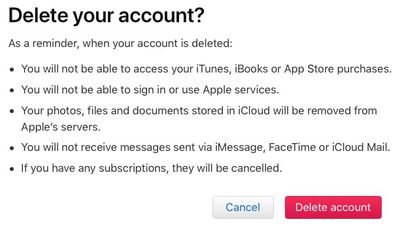
Keep in mind that deleting an Apple ID account and any associated data is a permanent, irreversible* action. After your account is deleted, Apple can't reopen or reactivate your account or restore any of your data, and you will no longer be able to access any of the content and services listed below.

  • Photos, videos, documents, and other content that you stored in iCloud are permanently deleted

  • You will no longer receive any messages or calls sent to your account via iMessage, FaceTime, or iCloud Mail

  • You will no longer be able to sign in to or use services such as iCloud, the App Store, iTunes Store, iBooks Store, Apple Pay, iMessage, FaceTime, and Find My iPhone

  • Your paid iCloud storage plans if any will be canceled

  • Any remaining Apple Store appointments and support cases are canceled, but any AppleCare plans you may have purchased remain valid

Content without Digital Rights Management, such as iTunes music purchases, continue working normally when your account is deleted or deactivated. However, any DRM-free content stored in iCloud Music Library isn't accessible or playable.

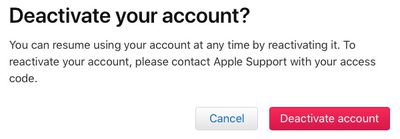
If you aren't planning to use your Apple ID for now, but may in the future, Apple recommends temporarily deactivating your account where possible instead of deleting it. Apple IDs can be reactivated by contacting Apple Support and providing the unique access code received during deactivation.

Apple also recommends that you take the following steps before you request deletion or deactivation of your account:

  • Back up the data that you store in iCloud, including content for any Apple or third-party apps that store data using iCloud

  • Download any DRM-free purchases, iTunes Match tracks that you don't have copies of, and any other music and media

  • Review any active subscriptions, as any remaining subscriptions are canceled at the end of their billing cycles, even during deactivation

  • Save copies of any Apple-related information that you currently need or expect to need

  • Sign out of all your devices to avoid issues with apps that use your Apple ID account or iCloud. If your account is deleted, you can't sign out of iCloud or turn off Find My iPhone Activation Lock on your devices. If you forget to sign out, you might not be able to use your device when your account is deleted.

How to Delete Your Apple ID Account

  1. Open a web browser on your Mac, PC, or iPad, and navigate to privacy.apple.com. The option is not available on iPhone.

  2. Enter your Apple ID email and password. Answer any security questions or authorize two-factor authentication on another device if prompted.
    get a copy of your apple data

  3. On the Apple ID & Privacy page, select Continue.
    get a copy of your apple data5

  4. Under Delete Your Account, select Get Started.
    delete get started

  5. Select a reason for deleting your account from the dropdown menu, such as "prefer not to say," and select Continue.
    account deletion reason

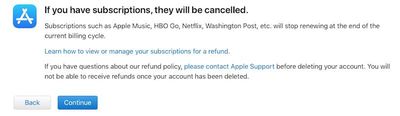
  6. Review the checklist of important things to know before deleting your account and select Continue.
    account deletion first checklist

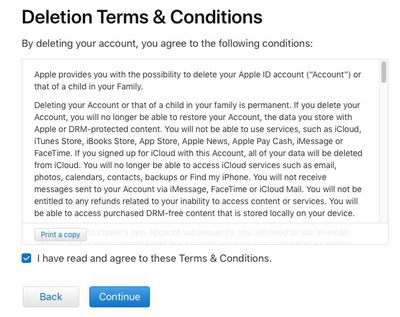
  7. Review the deletion terms and conditions, check off the read and agree box, and select Continue.
    account deletion terms

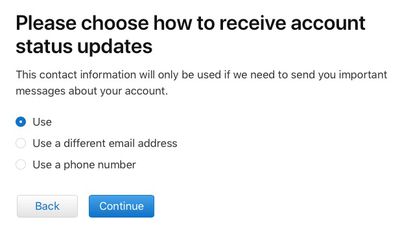
  8. Choose how to receive account status updates: the email used to create the Apple ID, a different email address, or by phone. Then select Continue.
    how to reach

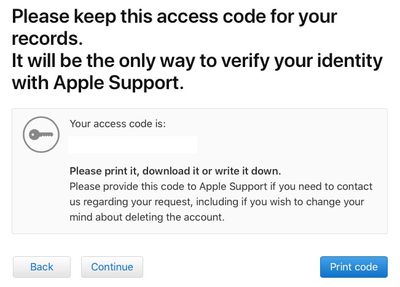
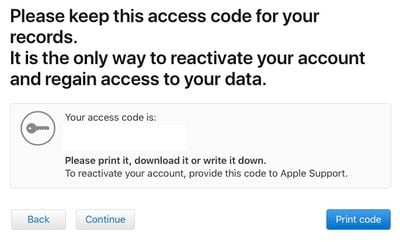
  9. Print, download, or write down the unique access code, which is needed to contact Apple Support regarding your request, including if you wish to change your mind about deleting the account for a short period after the request is submitted. Then select Continue.
    deletion write down code

  10. Enter the access code to confirm that you have received it. Then select Continue.
    enter code to continue

  11. Review the list of important details one more time and select Delete Account.
    delete account red button

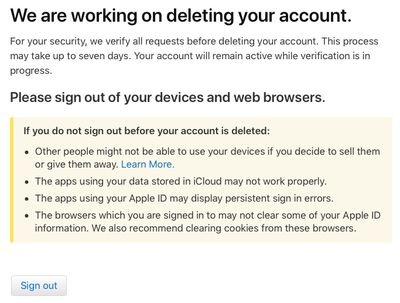
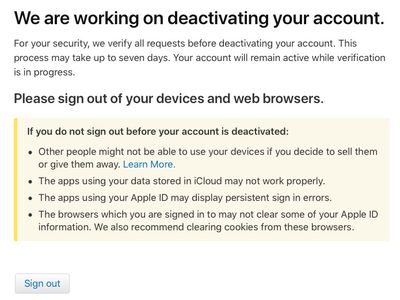
  12. Apple will confirm it is working on deleting your account on the website and in an email. Apple says the process may take up to seven days. Your account will remain active while verification is in progress.
    working on deleting

  13. Remember to sign out of the Apple ID on all devices and web browsers before the account is deleted.
How to Deactivate Your Apple ID Account

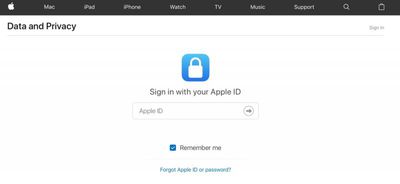
  1. Open a web browser on your Mac, PC, or iPad, and navigate to privacy.apple.com. The option is not available on iPhone.

  2. Enter your Apple ID email and password. Answer any security questions or authorize two-factor authentication on another device if prompted.
    get a copy of your apple data

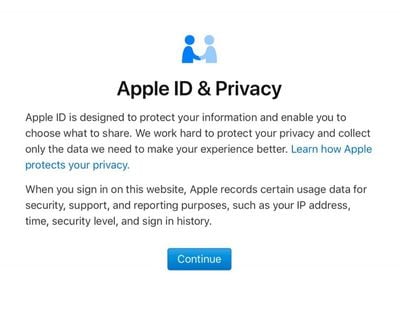
  3. On the Apple ID & Privacy page, click Continue.
    get a copy of your apple data5

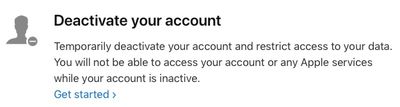
  4. Under Deactivate Your Account, select Get Started.
    deactivate get started

  5. Select a reason for deactivating your account from the dropdown menu, such as "prefer not to say," and select Continue.

  6. Review the checklist of important things to know before deactivating your account and select Continue.

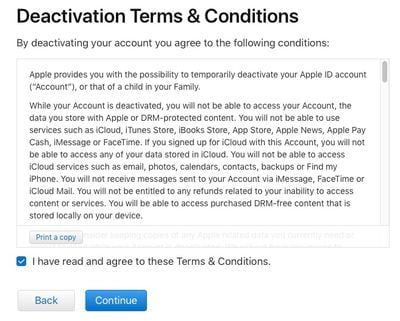
  7. Review the deactivation terms and conditions, check off the read and agree box, and select Continue.
    deactivation terms

  8. Choose how to receive account status updates: the email used to create the Apple ID, a different email address, or by phone. Then select Continue.
    how to reach

  9. Print, download, or write down the unique access code, which is needed to contact Apple Support regarding your request, including if you wish to reactivate your account at any time. Then select Continue.
    deactivate code

  10. Enter the access code to confirm that you have received it. Then select Continue.
    enter code to continue

  11. Review the important details one more time and select Deactivate Account.
    deactivate red button

  12. Apple will confirm it is working on deactivating your account on the website and in an email. Apple says the process may take up to seven days. Your account will remain active while verification is in progress.
    working on deactivation

  13. Remember to sign out of the Apple ID on all devices and web browsers before the account is deactivated.
These new options satisfy the requirements of the European Union's new General Data Protection Regulation (GDPR), enforceable starting May 25, but Apple plans to make them available around the world.

* For a short time, you can enter a unique access code provided by Apple during the deletion process should you change your mind about deleting your account. Apple will notify you when your account has been irreversibly deleted.


Top Rated Comments

Kabeyun Avatar
111 months ago
So what happens when hackers access your account and delete it?
The same thing that happens if a hacker deletes any other account: it’s deleted.

Won’t happen though. We’ve been able to delete our Apple accounts for years. How many reports of this have you heard?
Score: 4 Votes (Like | Disagree)
macduke Avatar
111 months ago
How far can this be taken? Can you import this downloaded data into another account? I've got two Apple IDs because I was an idiot when setting up my accounts. I setup my iTunes Apple ID that uses a non-Apple email address in the early 2000s and my .MAC account a few years later when I got my first Mac. So I've got all these purchases on the first account and all my iCloud data on the second account, along with an account name I'd like to keep because it's shorter and ends with @mac.com. Could I, in theory, download my data from my iTunes/App Store account, delete it, and merge that into my @mac.com account? Or download/delete my old @mac.com account, and create a new account and import the data from both of those accounts and it will maintain the iCloud/iTunes/App Store data from both but under a new user name? This has been a hassle for so many years! If they never sort this out, when I strike it rich I'm going to just rebuy all my content on my iCloud account.
Score: 2 Votes (Like | Disagree)
timeconsumer Avatar
111 months ago
How far can this be taken? Can you import this downloaded data into another account? I've got two Apple IDs because I was an idiot when setting up my accounts. I setup my iTunes Apple ID that uses a non-Apple email address in the early 2000s and my .MAC account a few years later when I got my first Mac. So I've got all these purchases on the first account and all my iCloud data on the second account, along with an account name I'd like to keep because it's shorter and ends with @mac.com. Could I, in theory, download my data from my iTunes/App Store account, delete it, and merge that into my @mac.com account? Or download/delete my old @mac.com account, and create a new account and import the data from both of those accounts and it will maintain the iCloud/iTunes/App Store data from both but under a new user name? This has been a hassle for so many years! If they never sort this out, when I strike it rich I'm going to just rebuy all my content on my iCloud account.
Same situation here. At first they didn’t allow .MAC accounts to be used. So I signed up for my iTunes account with another email. I’d love to be able to merge the accounts together.


Score: 1 Votes (Like | Disagree)
111 months ago
So has anyone downloaded their data to see what Apple retains, above and beyond the obvious things like purchases?

And does the data tool allowing you to selectively purge data like Google (sort of) allows? I really wish that they’d let you delete purchases. So annoying having to go through and “hide” apps that are now defunct.
I've currently got a case open with this after I wrote Phil Schiller an email on this exact question. He never replied but I got contacted by the "sub-manager" of the App Store. They are aware there are cases where this is needed/useful. I hate having all that trash and old apps cluttering my Apple ID.
Score: 1 Votes (Like | Disagree)
riverfreak Avatar
111 months ago
So has anyone downloaded their data to see what Apple retains, above and beyond the obvious things like purchases?

And does the data tool allowing you to selectively purge data like Google (sort of) allows? I really wish that they’d let you delete purchases. So annoying having to go through and “hide” apps that are now defunct.
Score: 1 Votes (Like | Disagree)

Popular Stories

apple pro tell logo

Apple Launching Five New Products Today

Thursday November 5, 2026 12:59 am PST by
Apple is launching five new products on Friday, November 6, following pre-orders that opened last week, including its first touchscreen MacBook Pro models. The following new products will be available from today: iPad mini with OLED display and A20 Pro chip iMac with M6 chip 14-inch MacBook Pro with M6 chip 14-inch MacBook Pro with OLED touchscreen 16-inch MacBook Pro with OLED...
duo aquarium

More Fun iPhone Duo Apps: 30 New Picks to Try

Friday November 6, 2026 3:27 pm PST by
When the iPhone Duo launched, we shared a list of some of the fun apps developers created for the new form factor. Two weeks out, developers are continuing to come up with fresh ideas, so we thought we'd share some of our favorites. Games Marbles Unhinged ($2.99) - Marbles Unhinged is a marble maze designed for the Duo. When you fold it, the floor turns into a ramp. If you stand the top...
silver iphone 18 pro

Apple Rumored to Drop the iPhone's Action Button Next Year

Friday November 6, 2026 6:07 am PST by
Apple plans to merge the iPhone's Action button with the Camera Control starting next year, according to the leaker known as "Instant Digital." In a new post on Weibo, the leaker claimed that a single press of the combined button would open the camera, while a long press would trigger the function assigned to the Action button. They explicitly clarified that the dedicated Action button would ...
Latest Stories
Siri AI Rumored to Become 'More Like an Agent' as Early as Next Year
6 hours ago
Apple Taking New Approach to Developing iOS 28 and macOS 28
8 hours ago
Early Apple Black Friday Deals on Apple Watch, MacBook Air, and More
1 day ago
'Backglow' Lets You Customize New MacBook Pro's Glowing Apple Logo
1 day ago
Top Stories: Apple Product Launches, iOS 27.3 Beta, and More
1 day ago
More Fun iPhone Duo Apps: 30 New Picks to Try
2 days ago
Hands-On With Apple's New OLED Touchscreen MacBook Pro
2 days ago
Apple Store With All-New Design Opening Soon in Southern California
2 days ago
Control the Glowing Apple Logo on Your New MacBook Pro
2 days ago
Apple Shares New 'Apple Card: Apply and Use in Minutes' Ad
2 days ago
Apple Says More Than 100,000 Apps Optimized for iPhone Duo, Here's What's Still Missing
2 days ago
Early Black Friday Deals Kickoff With Steep Discounts on Apple Watch Ultras and More
2 days ago
The MacRumors Show: iOS 27.3 Looks Like a Huge Update
2 days ago
Best Buy's Black Friday Event Begins With Sitewide Savings on Apple, TVs, More
2 days ago
Apple Releasing Yet Another Two New Products Next Week
2 days ago
MacBook Air Drops to Lowest Price in Months With Amazon's $250 Discount
2 days ago
Apple Rumored to Drop the iPhone's Action Button Next Year
2 days ago
Apple's Extended Return Policy Now in Effect for 2026 Holiday Season
2 days ago
Apple Music Classical Updated With New Icon and Refreshed Design
2 days ago
OLED iPad Mini, M6 iMac, and New MacBook Pros Available From Today
3 days ago
Apple Surveys iPhone Duo Buyers About Crease and Camera
3 days ago
Apple's First Touchscreen Mac is Now Arriving to Customers
3 days ago
Claude Gets Personal Finance Feature With Bank Account Linking
3 days ago
Apple Arcade Adds Crossy Road Rush and NBA 2K27
3 days ago
Apple's New HomeView Smart Home Hub: Here's How Much RAM It Has
3 days ago
iPad Mini vs. iPad Air Buyer's Guide: Now Just $50 Apart
3 days ago
First iOS 27.3 and macOS Golden Gate 27.3 Public Betas Now Available
3 days ago
Apple Announces a New Mac Sales Record
3 days ago
Paid $200 for Logic Pro? Apple Says You Won't Get This New Feature
3 days ago
Instagram's Edits Video Editor is Now Available on Mac
3 days ago