Apple Pencil Buyer's Guide: Which Model Should You Choose? - MacRumorsOpen MenuShow RoundupsShow Forums menuVisit ForumsOpen Sidebar
Skip to Content

Apple Pencil Buyer's Guide: Which Model Should You Choose?

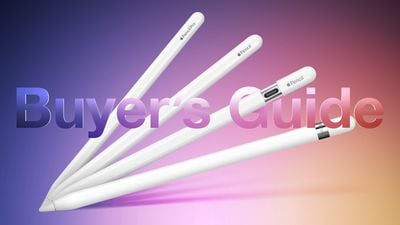
Apple now offers four different Apple Pencil models at $79, $99, and $129 price points, each with different feature sets and compatibility. Our guide helps you decide which ‌Apple Pencil‌ is best for you.

Apple Pencil Buyers Guide Graphic ft Pro
Which ‌Apple Pencil‌ you should buy is firstly determined by which iPad model you have. Some ‌iPad‌ models are only compatible with one kind of ‌Apple Pencil‌, while others are compatible with two. If your ‌iPad‌ model only supports one kind of ‌Apple Pencil‌, your buying decision is straightforward. Use the table below to find out which ‌Apple Pencil‌ models your ‌iPad‌ supports:

‌Apple Pencil‌ (first-generation, 2015) ‌Apple Pencil‌ (second-generation, 2018) ‌Apple Pencil‌ (USB-C, 2023) ‌Apple Pencil‌ Pro (2024)
iPad Pro 12.9-inch (first- and second-generation) ‌iPad Pro‌ 12.9-inch (third-, fourth-, fifth-, and sixth-generation) ‌iPad Pro‌ 12.9-inch (third-, fourth-, fifth-, sixth-, and seventh- generation) ‌iPad Pro‌ 13-inch (seventh-generation)
‌iPad Pro‌ 9.7-inch and 10.5-inch ‌iPad Pro‌ 11-inch (first-, second-, third-, and fourth-generation) ‌iPad Pro‌ 11-inch (first-, second-, third-, fourth-, and fifth-generation) ‌iPad Pro‌ 11-inch (fifth-generation)
iPad Air (third-generation) ‌iPad Air‌ (fourth- and fifth-generation) ‌iPad Air‌ (fourth-, fifth-, and sixth-generation) ‌iPad Air‌ (sixth-generation)
iPad mini (fifth-generation) ‌iPad mini‌ (sixth-generation) ‌iPad mini‌ (sixth-generation)
‌iPad‌ (sixth-, seventh-, eighth-, ninth-, and tenth-generation) ‌iPad‌ (tenth-generation)

Simply put, if your ‌iPad‌ features a Lightning connector, it is only compatible with the first-generation ‌Apple Pencil‌, providing it has ‌Apple Pencil‌ support at all. It will not work with the second-generation ‌Apple Pencil‌ or the ‌Apple Pencil‌ with USB-C. If your ‌iPad‌ features a USB-C port, it is compatible with the second-generation ‌Apple Pencil‌ and the ‌Apple Pencil‌ with USB-C, except the tenth-generation ‌iPad‌, which supports the first-generation ‌Apple Pencil‌ and ‌Apple Pencil‌ with USB-C, and the M2 ‌iPad Air‌ and M4 ‌iPad Pro‌, which support the ‌Apple Pencil‌ Pro and ‌Apple Pencil‌ with USB-C.

It is worth noting that the first-generation ‌Apple Pencil‌ is only compatible with the tenth-generation ‌iPad‌ using a USB-C cable and USB-C to ‌Apple Pencil‌ Adapter. It is not possible to use the first-generation ‌Apple Pencil‌ this way with any other ‌iPad‌ model that has a USB-C port.

All four ‌Apple Pencil‌ models feature "pixel-perfect" precision, low latency, and tilt sensitivity, but feature different designs, pairing and charging methods, pressure sensitivity capabilities, and more. The below table lists all hardware and feature differences between the different ‌Apple Pencil‌ models.

‌Apple Pencil‌ (first-generation, 2015) ‌Apple Pencil‌ (second-generation, 2018) ‌Apple Pencil‌ (USB-C, 2023) ‌Apple Pencil‌ Pro (2024)
Glossy finish Matte finish Matte finish Matte finish
Weighted to prevent rolling Flat edge to prevent rolling and snap to the side of an ‌iPad‌ Flat edge to prevent rolling and snap to the side of an ‌iPad‌ Flat edge to prevent rolling and snap to the side of an ‌iPad‌
Attaches magnetically for storage, pairing, and charging Attaches magnetically for storage Attaches magnetically for storage, pairing, and charging
6.92-inch length 6.53-inch length 6.1-inch length 6.53-inch length
Removable cap Non-removable sliding cap
Lightning connector USB-C port
Pair and charge via Lightning port or USB-C cable and USB-C to ‌Apple Pencil‌ Adapter Pair and charge wirelessly Pair and charge via USB-C cable Pair and charge wirelessly
Pressure sensitivity Pressure sensitivity Pressure sensitivity
Barrel roll
Supports ‌Apple Pencil‌ hover Supports ‌Apple Pencil‌ hover Supports ‌Apple Pencil‌ hover
Double-tap to change tools Double-tap to change tools
Squeeze control
Haptic feedback
Find My support
Free engraving option Free engraving option
$99 $129 $79 $129

First-Generation Apple Pencil vs. Apple Pencil With USB-C

Most users should choose the ‌Apple Pencil‌ with USB-C. For a price of just $79, the ‌Apple Pencil‌ with USB-C provides a good balance of features with a more modern design. It also has the added advantage of being compatible with a wide range of models and will likely work with all new ‌iPad‌ models for many years to come.

It is only worth opting for the first-generation ‌Apple Pencil‌ if you specifically want pressure-sensitivity for activities like illustration, since the ‌Apple Pencil‌ with USB-C does not have this feature. Buyers should be aware that this model comes at a $20 premium, requires a USB-C to ‌Apple Pencil‌ Adapter with the tenth-generation ‌iPad‌, and will not be compatible with any future ‌iPad‌ models. It also cannot be magnetically attached to an ‌iPad‌ for storage, features a larger and older design, and has a removable cap over the Lightning connector that's easy to lose.

Second-Generation Apple Pencil or Apple Pencil Pro vs. Apple Pencil With USB-C

If choosing between the second-generation ‌Apple Pencil‌ or ‌Apple Pencil‌ Pro and the ‌Apple Pencil‌ with USB-C, the second-generation and Pro models are a better choice on account of their superior feature set, but this requires spending an additional $50. Double-tap to change tools and pressure-sensitivity may be particularly useful additions for illustrators, while the easy pairing and charging on the side of an ‌iPad‌ provides a much better experience than a wired connection with a USB-C cable.

If you have only basic needs for activities like handwriting notes and marking up documents, the ‌Apple Pencil‌ with USB-C is still a great option at a much more affordable price point. It even supports ‌Apple Pencil‌ hover on the newer ‌iPad Air‌ and ‌iPad Pro‌ models.

Related Forum: iPad Accessories

Popular Stories

iPhone Duo Apple Pencil Useful Thumb

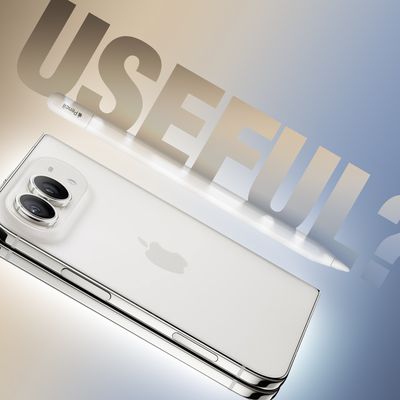
Using an Apple Pencil With the iPhone Duo: What to Know

Friday October 23, 2026 1:49 pm PDT by
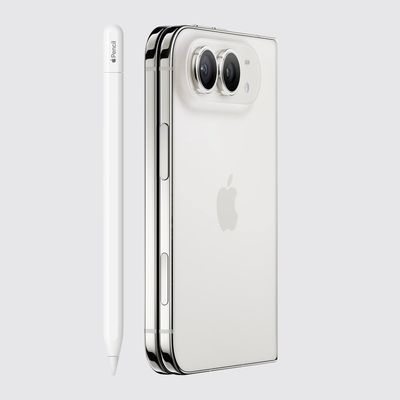
The iPhone Duo is compatible with the Apple Pencil, if you have the right one. MacRumors videographer Dan Barbera tested the Apple Pencil with the iPhone Duo to see if it's a useful tool to pick up. If you already have an Apple Pencil 1, Apple Pencil 2, or Apple Pencil Pro to use with an iPad, you're going to be disappointed to hear they won't work with the iPhone Duo. The iPhone Duo only...
iPhone Duo Apple Pencil

iPhone Duo Supports Apple Pencil Starting With iOS 27.2

Wednesday October 21, 2026 8:19 am PDT by
As noted by Creative Strategies analyst Max Weinbach, the iPhone Duo is gaining Apple Pencil support with iOS 27.2, which is expected to be released to the public next week. You can use the USB-C version of the Apple Pencil to draw, annotate, and scroll within supported apps on the iPhone Duo's inner and outer displays. In a post on X, Weinbach confirmed that Apple Pencil support was enabled...


duo aquarium

More Fun iPhone Duo Apps: 30 New Picks to Try

Friday November 6, 2026 3:27 pm PST by
When the iPhone Duo launched, we shared a list of some of the fun apps developers created for the new form factor. Two weeks out, developers are continuing to come up with fresh ideas, so we thought we'd share some of our favorites. Games Marbles Unhinged ($2.99) - Marbles Unhinged is a marble maze designed for the Duo. When you fold it, the floor turns into a ramp. If you stand the top...

Top Rated Comments

40 months ago
OMG, only an Ivy League MBA could dream up this product mess.
Score: 94 Votes (Like | Disagree)
TigerNike23 Avatar
40 months ago
Apologies to the writers and editors here, they’re just doing their job.

But the fact we’re having a debate about what the best stylus is instead of what the best new iPad is is to me a huge indictment on Tim Apple and his leadership of this company.

They’ve missed product deadlines, half-baked some products, poor software quality. But, if you don’t care about Apple’s customers and only care about shareholder $$$$, then I guess he’s a great CEO, right?

End rant.
Score: 55 Votes (Like | Disagree)
40 months ago
Its now a nightmare...

Apple... you only had to make one to rule them all... it's what you used to do!

Steve jobs famously dissed the stylus... and now the same company makes three of the damn things.. one is ancient, one is purposely restricted and the other is good/great, but not quite there.

Why?

Edit: And now there is four of the damn things... 😆
Score: 48 Votes (Like | Disagree)
karranz Avatar
40 months ago
this is the company that used to have one or two products for a whole category, they used to know the product and the customer so much that they were sure that the new version would hit in every spot, old models were retired on the spot. Now we have 3 different versions of a ***** pencil.

edit: 4 different **** pencils!
Score: 38 Votes (Like | Disagree)
klasma Avatar
40 months ago

Most users should choose the ‌Apple Pencil‌ with USB-C.
No, most users should, if they don’t need pressure sensitivity, choose a $20 clone which basically does the same, while still also working on older iPads, like for example https://www.amazon.com/dp/B0BW8LQKL4/. You even get different colors!
Score: 31 Votes (Like | Disagree)
Attirex Avatar
40 months ago
When a behind of the scenes book is written about this time period in Apple, the Pencil matrix/comparison chart will be featured prominently as a big ole red flag that Apple learned nothing, and promptly returned to 1990s product line bloat.
Score: 26 Votes (Like | Disagree)
Latest Stories
Siri AI Rumored to Become 'More Like an Agent' as Early as Next Year
9 hours ago
Apple Taking New Approach to Developing iOS 28 and macOS 28
11 hours ago
Early Apple Black Friday Deals on Apple Watch, MacBook Air, and More
1 day ago
'Backglow' Lets You Customize New MacBook Pro's Glowing Apple Logo
1 day ago
Top Stories: Apple Product Launches, iOS 27.3 Beta, and More
2 days ago
More Fun iPhone Duo Apps: 30 New Picks to Try
2 days ago
Hands-On With Apple's New OLED Touchscreen MacBook Pro
2 days ago
Apple Store With All-New Design Opening Soon in Southern California
2 days ago
Control the Glowing Apple Logo on Your New MacBook Pro
2 days ago
Apple Shares New 'Apple Card: Apply and Use in Minutes' Ad
2 days ago
Apple Says More Than 100,000 Apps Optimized for iPhone Duo, Here's What's Still Missing
2 days ago
Early Black Friday Deals Kickoff With Steep Discounts on Apple Watch Ultras and More
2 days ago
The MacRumors Show: iOS 27.3 Looks Like a Huge Update
2 days ago
Best Buy's Black Friday Event Begins With Sitewide Savings on Apple, TVs, More
2 days ago
Apple Releasing Yet Another Two New Products Next Week
2 days ago
MacBook Air Drops to Lowest Price in Months With Amazon's $250 Discount
3 days ago
Apple Rumored to Drop the iPhone's Action Button Next Year
3 days ago
Apple's Extended Return Policy Now in Effect for 2026 Holiday Season
3 days ago
Apple Music Classical Updated With New Icon and Refreshed Design
3 days ago
OLED iPad Mini, M6 iMac, and New MacBook Pros Available From Today
3 days ago
Apple Surveys iPhone Duo Buyers About Crease and Camera
3 days ago
Apple's First Touchscreen Mac is Now Arriving to Customers
3 days ago
Claude Gets Personal Finance Feature With Bank Account Linking
3 days ago
Apple Arcade Adds Crossy Road Rush and NBA 2K27
3 days ago
Apple's New HomeView Smart Home Hub: Here's How Much RAM It Has
3 days ago
iPad Mini vs. iPad Air Buyer's Guide: Now Just $50 Apart
3 days ago
First iOS 27.3 and macOS Golden Gate 27.3 Public Betas Now Available
3 days ago
Apple Announces a New Mac Sales Record
3 days ago
Paid $200 for Logic Pro? Apple Says You Won't Get This New Feature
3 days ago
Instagram's Edits Video Editor is Now Available on Mac
3 days ago